40
About MP3/WMA file playback (continued)
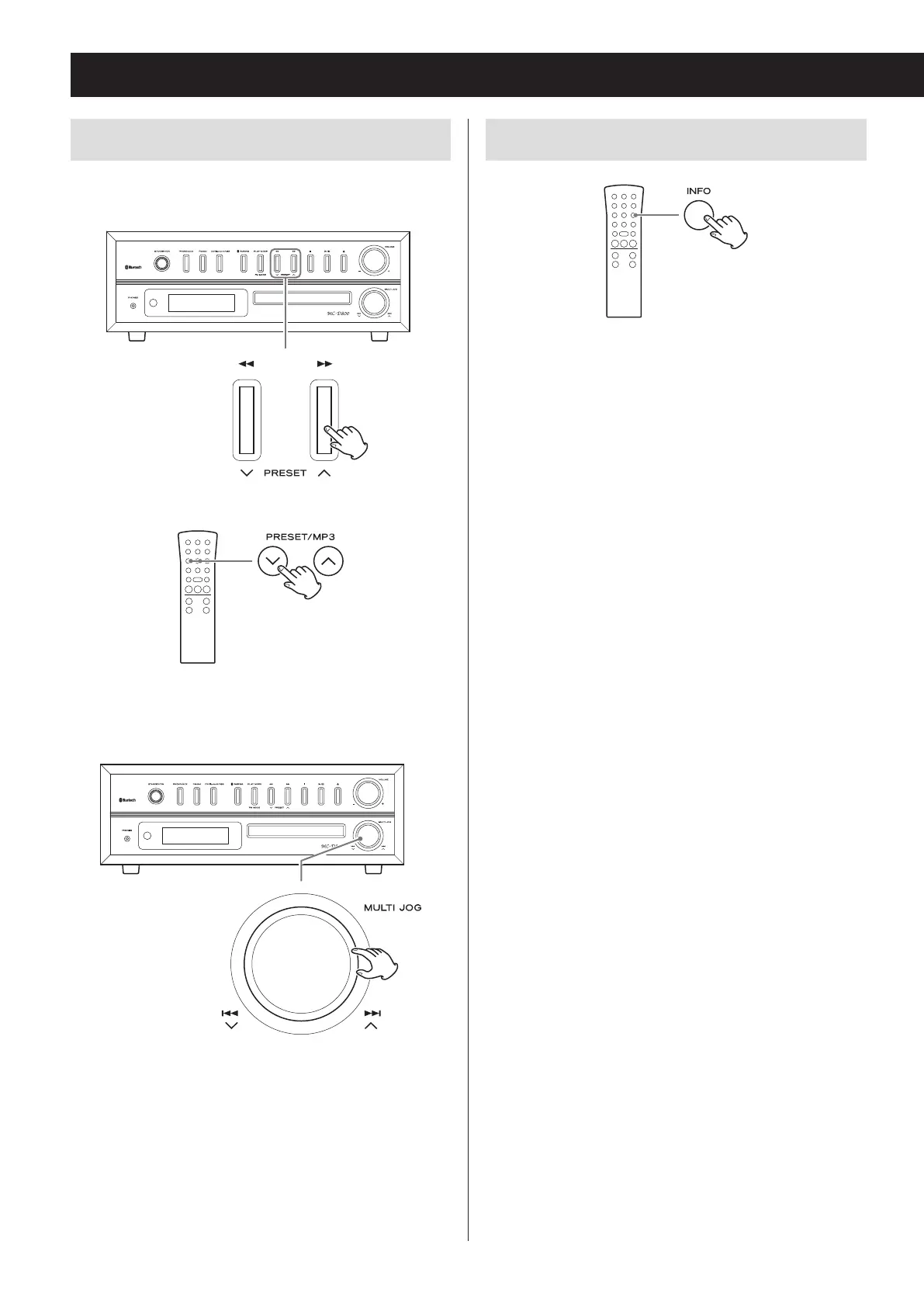
Selecting folders and files
To select a folder by number, use the main unit's search
(m/,) buttons.
Z
When using the remote, use the MP3 (j/k) buttons.
To select a file by number, use the main unit's scroll
(MULTI JOG) knob.
Z
When using the remote, use the skip/search
(.m/,/) buttons.
o After selecting the folder/file number, press the play/
pause (y/9) button to start playback.
If the play button is not pressed within five seconds,
the CD/USB information will appear on the display.
Changing the display
Each time you press the INFO button, the information
on the display changes.
o The first 32 characters of the song/artist/album
names are shown.
o The display of this unit can only show single-byte
alphanumeric characters. If the file information uses
Japanese, Chinese or other double-byte characters,
playback is possible but the name will not be shown
correctly on the display.
o After each item of information scrolls across three
times, the elapsed playback time will appear again.
o If the file is a WMA file, “WMA” will appear on the left
side of the display.


 To Next Page