4. PROGRAMMING OPERATIONS EO1-11155
4.8 Cashier Name and Status Programming
4-21
4.8 Cashier Name and Status Programming
Cashier Name and Cashier Status for each cashier can be programmed here.
Any time outside a sale
Mode Lock: SET
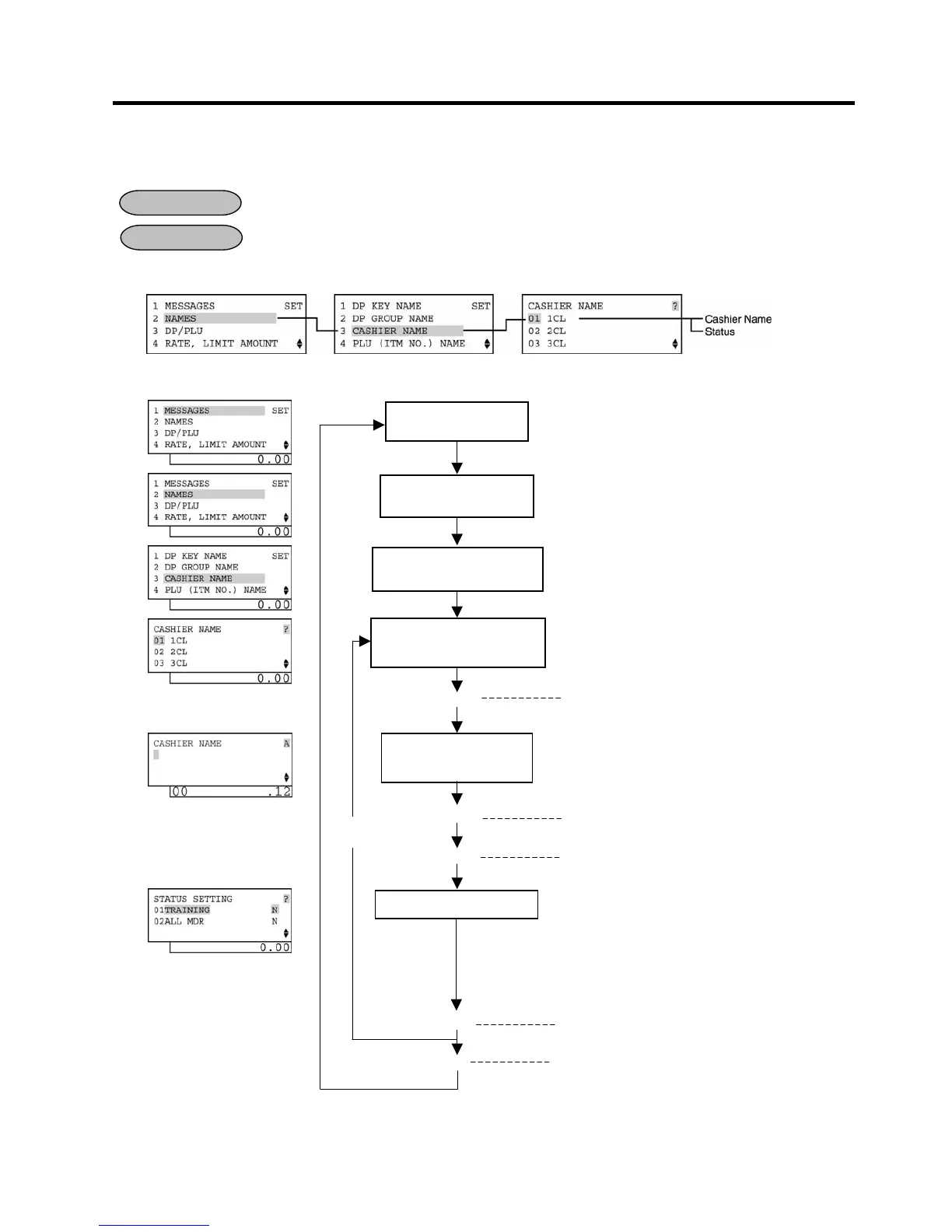
1) Menu Tree
2) Operation Flowchart
OPERATION
selected.
Select a Cashier to be
programmed.
Input a Cashier
Name.
[Enter]
ECR is being outside a sale and in
.
Or Depress [2].
The ECR enters character input mode.
Depress
The Cashier Name is entered and displayed.
This setting is ended. A long receipt is issued
and the display returns to Main Menu screen.
Select a Cashier to be programmed with the
or [↓] key, then depress [Enter].
[Enter]
The ECR enters the cashier status input mode.
Select cashier statuses.
Select a cashier status with the
depress the [→] key to set/reset the status.
The two statuses below are set/reset.
(N: Reset, Y: Set)
01 Training: If select Y (Set), the cashier will be a
training cashier.
02 All MDR: If select Y (Set), the cashier will be
permitted to perform a money
declaration.
[Enter]
The programmed data is printed.
[Rtn]


 To Next Page
 Loading...




