EasyManua.ls Logo

TEC MA-600-1 series - 4.17 %+ and %- Preset Rate Setting

TEC MA-600-1 series
188 pages
Print Icon
To Next Page IconTo Next Page
To Previous Page IconTo Previous Page
Loading...
4. PROGRAMMING OPERATIONS EO1-11155
4.17 %+ and %- Preset Rate Setting
4-58
4.17 %+ and %- Preset Rate Setting
A preset rate may be set on each of the [%+] and [%-] keys, one independent rate for each key. Once a rate is
preset, the % key will simply be depressed without a prior rate entry to activate the preset rate. If a rate is
entered prior to the depression of the key, the entered rate (manual rate) will be activated instead.
Any time outside a sale
Mode Lock: SET
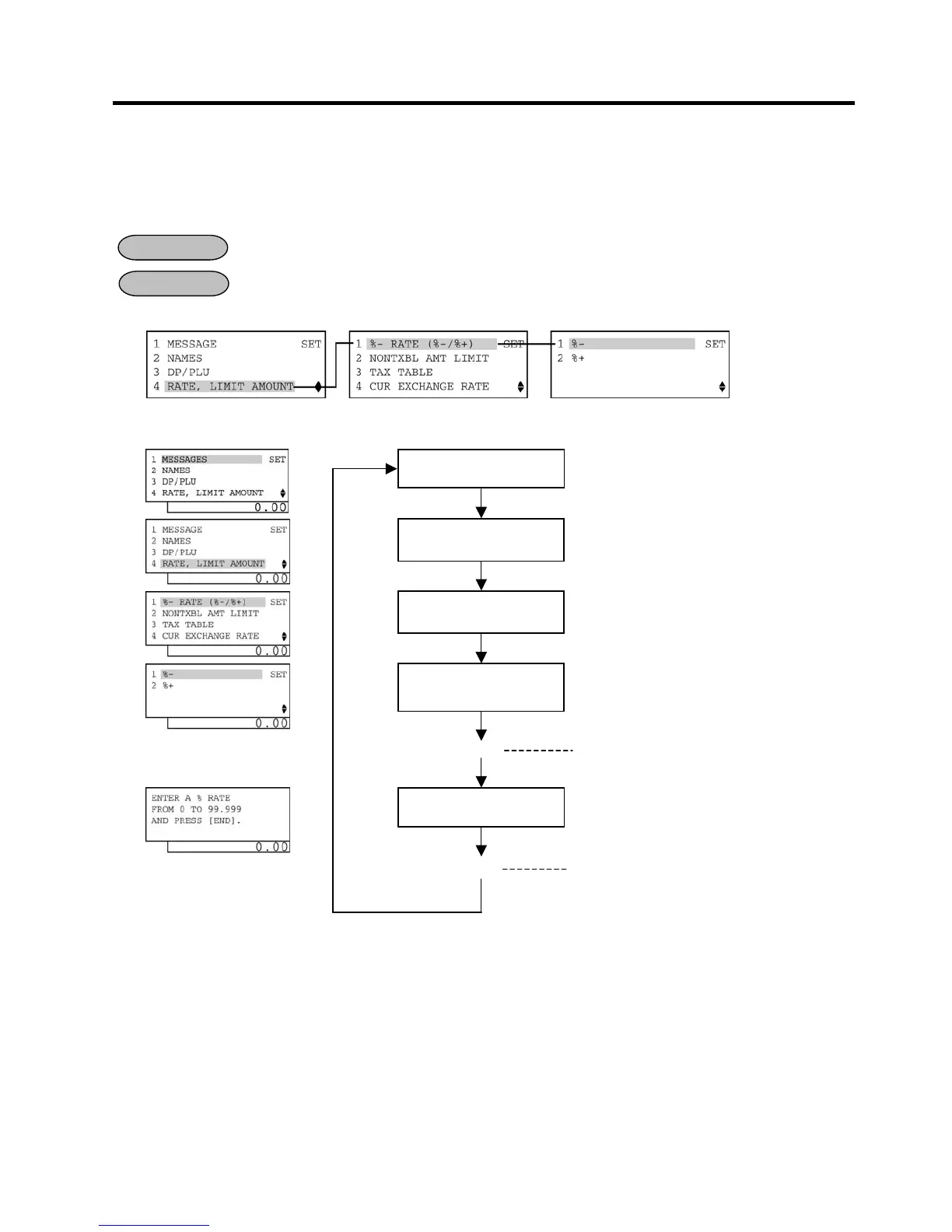
1) Menu Tree
2) Operation Flowchart
NOTE: When inputting 0, the % preset rate will be canceled. If doing so, the % preset rate should be set in the
registration operation.
OPERATION

CONDITION
4 RATE, LIMIT
AMOUNT
is selected.
Main Menu
1 %- RATE (%-/%+)
is
selected.
Input a preset rate.
ECR is being outside a sale and in
SET
mode.
Depress
[
]
three times then
[Enter]
.
Or Depress [4].
0.001 to 99.999 (%):
Use the [.] key if decimal portion is contained.
(See NOTE below.)
Depress
[1]
or
[Enter]
key.
Select a [%] key which
is to be programmed.
To select
[%
-
]
key, depress
[1]
or
[Enter]
.
To select [%+] key, depress [2] or depress []
then [Enter].
[End]
This setting is ended. A long receipt i
s issued
and the display returns to Main Menu screen.
The preset rate is entered and printed.
[Enter]

Table of Contents

Related product manuals