4. PROGRAMMING OPERATIONS EO1-11155
4.12 PLU Table Programming
4-35
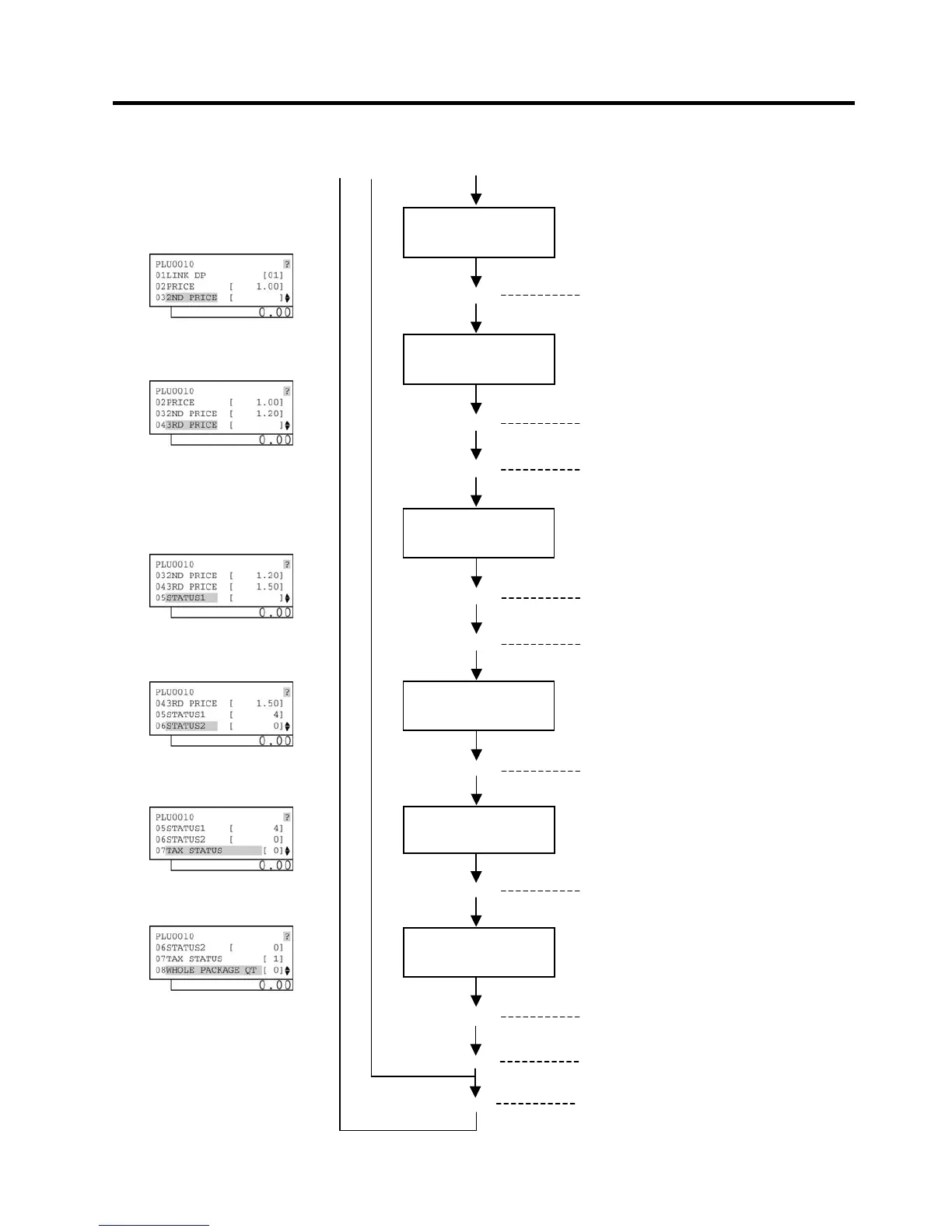
Input Tax Status(es)
The Tax Status is entered and displayed.
Input a Whole
Package Quantity.
Whole Package Quantity Setting (See *8.)
The Whole Package Quantity t
-- continued from the previous page --
(C)
Select desired PLU
statuses.
[Enter]
Select a PLU status with the
depress the [←] or [→] key to set/reset the
status.
The PLU statuses are entered and displayed.
This setting is ended. A long receipt is issued
and the display returns to Main Menu screen.
(A) (B)
Input a 2nd preset
price.
2nd Preset Price Setting (See *3.)
preset price is entered and displayed.
Input a 3rd preset
price.
3rd Preset Price Setting (See *4.)
preset price is entered and displayed.
The ECR enters the PLU Status 1 Setting
The next PLU code (i.e. the currently
programmed PLU code plus 1) is displayed.
([PLU])
Select desired PLU
statuses.
[Enter]
Select a PLU status with the
depress the [←] or [→] key to set/reset the
status.
The PLU statuses are entered and displayed.
The ECR enters the PLU Status 2 Setting
mode. (See *6.)


 To Next Page
 Loading...




