I Hardware Installation Manual 2. Safety Functions and Interface
21
For hazard configuration, user can define the locations with risk of robot contact with the human
body within the collaborative space. The robot’s operating speed in collaborative mode and other
data will be shown on the right side of the interface. The settings can be saved once they are
confirmed by the user. The data include the automatic pathing speed and automatic
point-to-point movement speed, when entering the collaborative zone and the surface area of
tools that may come into contact with the human body. User should tick the confirmation box in
the lower right corner before saving the settings to confirm the surface area of any potential
contact between tools mounted on the robot and the human body will be larger than or equal
to the surface area being confirmed.
In this function, the robot speed is calculated according to the durable force and pressure on
medical reports which conform to ISO/TS15066. In addition to the body parts showed in the
figure, other vulnerable body parts such as spine, hindbrain and etc., should be taking into
consideration for risk assessment to avoid any possible of collision with TM robot.
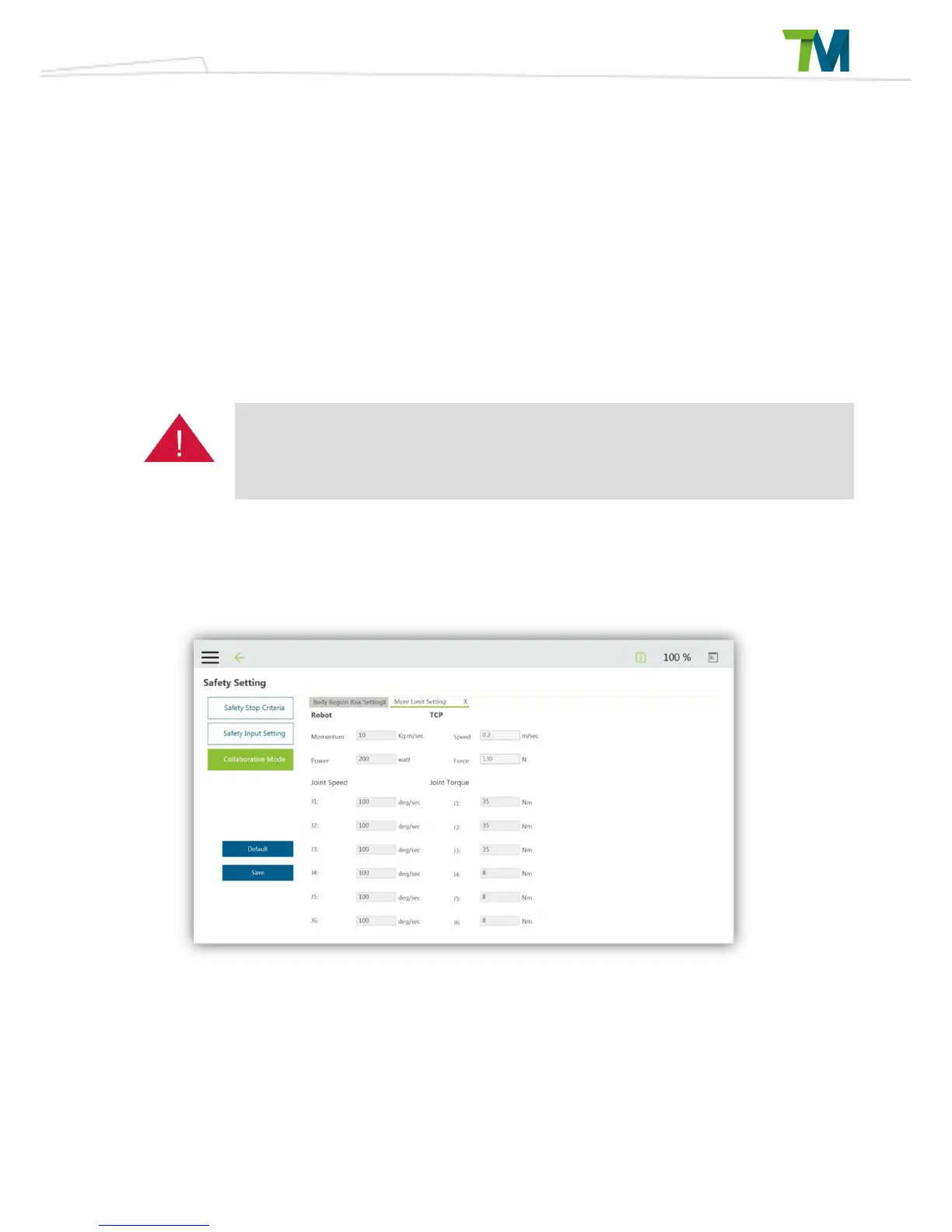
Please note that while the values for some calculated data can be modified by the user, only
smaller values can be used. If more detailed parameters must be configured by the user,
they can be modified from the “Additional Limit Configuration Page” as shown below.
In this configuration page for collaborative mode, the user can set servo speed, and servo torque.
Please note that these settings must be smaller than the settings of standard mode. Settings can
be saved once they have been confirmed by the user.



 To Next Page