RUN PERSONAL: Service & maintenance manual - rev. 3.1
Page 7.5
7.3. UPPER GUARD DISASSEMBLY: TGS, USB AND IPOD
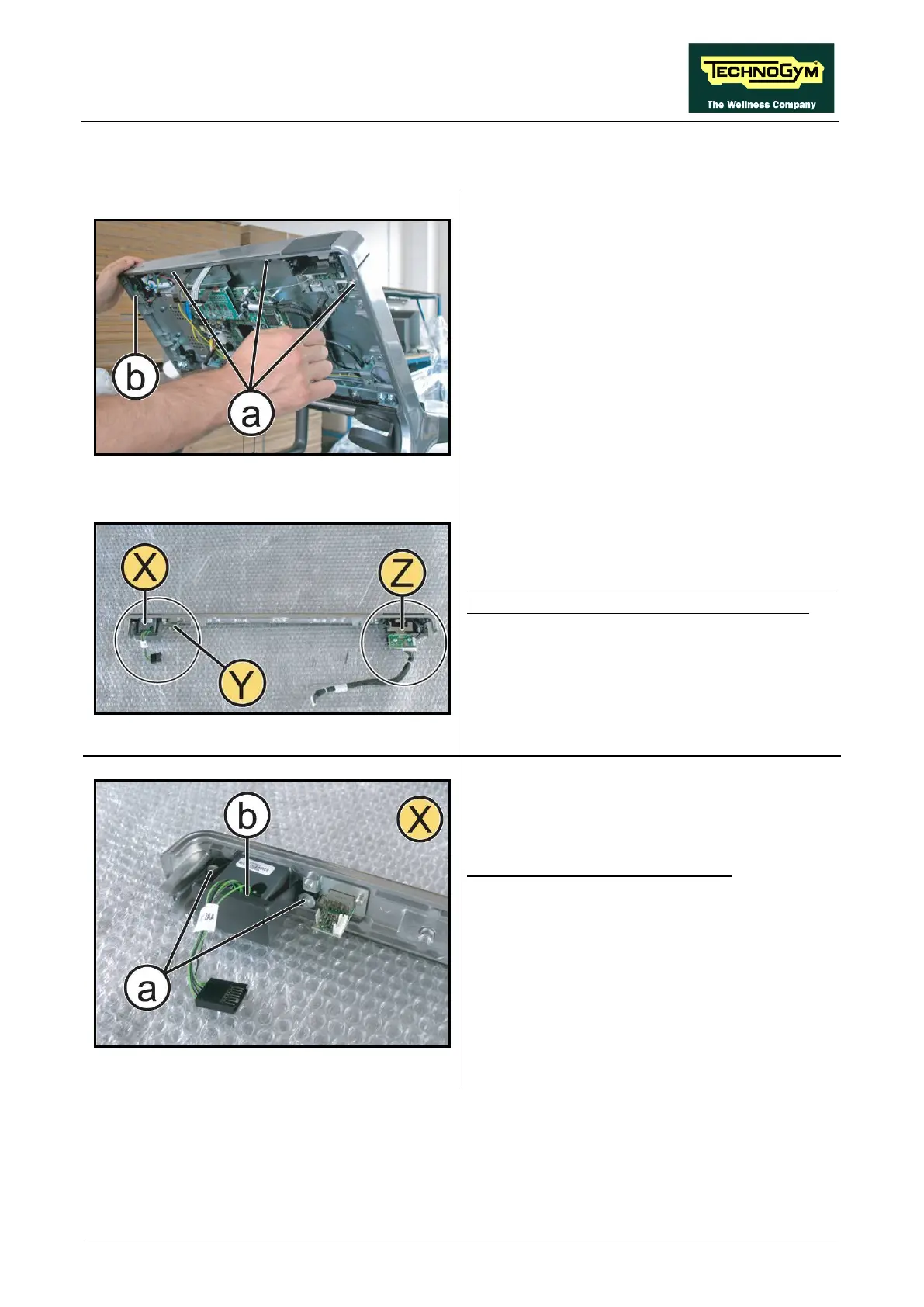
Figure 7.3-1
Remove the rear Display guard, following the
instructions up to step (4) of paragraph: 7.1.
“Disassembling the touch screen”.
1.
Disconnect the TGS, USB and iPod cables
from the CPU board.
2. Back off the 3 screws (a) using a 4mm hex
wrench.
3. Back off the screw (b) using a 10mm
wrench.
4. Remove the upper guard.
Figure 7.3-2
Pla
ce the upper guard on a bench; it is now
possible to remove the following components:
• Dual TGS reader (X)
• USB port (Y)
• iPod docking Station (Z)
Figure 7.3-3
Disassembling the TGS reader (X):
1. Back off the 2 screws (a)
screwdriver.
2. Remove the TGS reader (b).
Continued on following page…












 To Next Page