15 16
In the
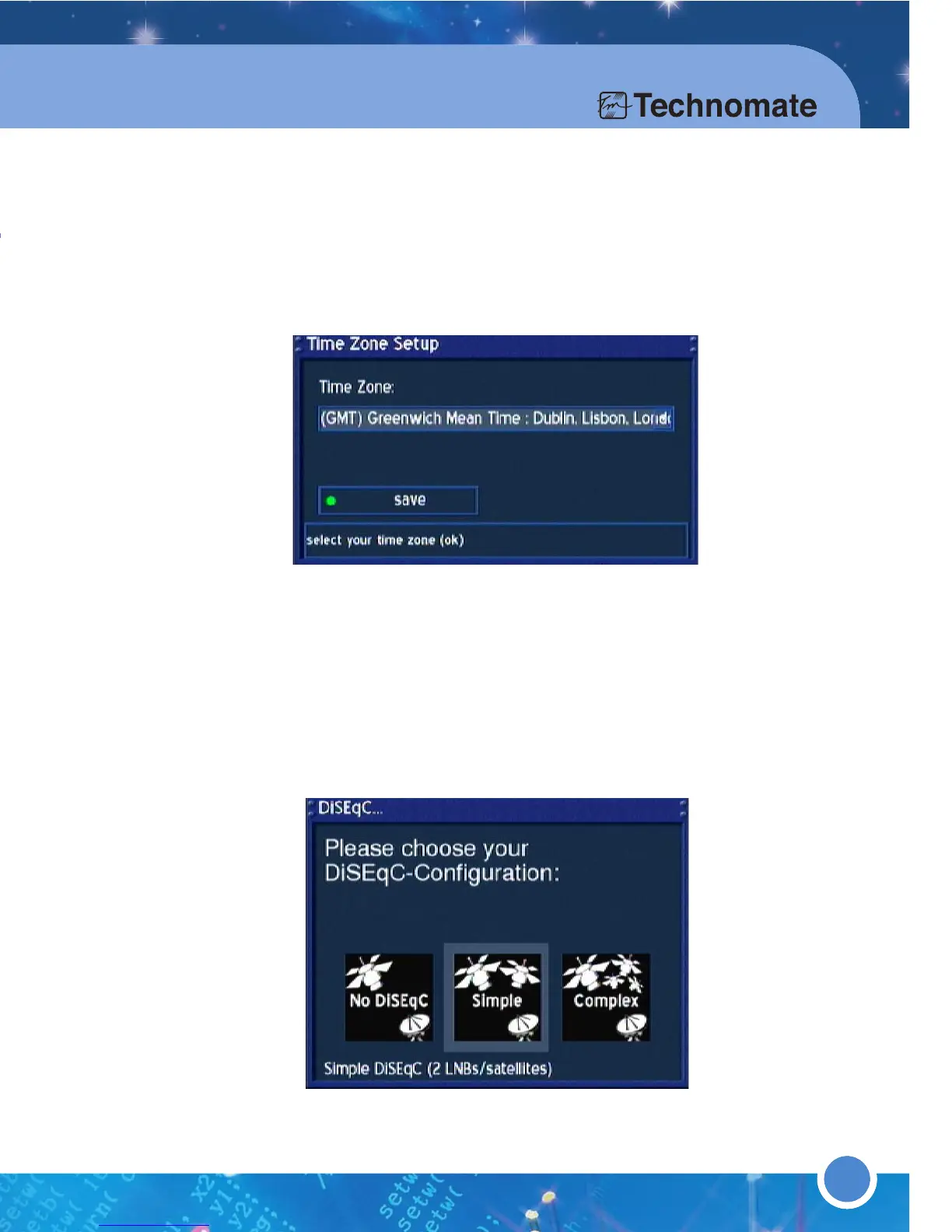
Time Zone Setup menu, press the [OK] button to open a dropdown list.
Use the [UP/DOWN] Navigation buttons to choose your Time Zone and press the
[OK] button to confirm. Press the [GREEN] button or press OK on save to save.
In the
DiSEqC...menu, choose your configuration.
a. No DiSEqC = Fixed dish/antenna on one satellite
b. Simple = When using a 2 / 4 Way DiSEqC switch for multiple satellites
c.i. Complex = For a USALS motorized dish/antenna
c.ii. Complex = For a DiSEqC 1.2 motorized dish/antenna
d. For a non-standard configuration, select any of the above and proceed to (6).
4
5
3. Operation & Setting
Mini-Glossary:
Services = channels
Service List = Channel List
In order to set up the receiver, follow the instructions below:
Turn on the TV and
TM-500/600
.
In the
TV System Wizard
menu, choose your TV system by [LEFT/RIGHT]
Navigation buttons. Press the [
GREEN
] button or press [OK]button on save to save.
3.1 GETTING STARTED
1
2
3
1615
In the OSD Language menu, use the [UP/DOWN] Navigation buttons
to choose a language. Press the OK button to confirm.
(The
OSD Language menu is in the Main Menu of (6)Setup (3)System
Settings
(6)OSD Language)



 To Next Page