© Technosoft 2007 44 IBL2403 Technical Reference
then close the Communication | Setup dialogue with OK. If the communication is established,
EasySetUp displays in the status bar (the bottom line) the text “Online” plus the axis ID of your
drive/motor and its firmware version. Otherwise the text displayed is “Offline” and a
communication error message tells you the error type. In this case, return to the Communication |
Setup dialogue, press the Help button and check troubleshoots
Remark: When first started, EasySetUp tries to communicate via RS-232 and COM1 with a drive
having axis ID=255 (default communication settings). If your drive is powered with all the DIP
switches OFF and it is connected to your PC port COM1 via an RS-232 cable, the communication
shall establish automatically. If the drive has a different axis ID and you don’t know it, select in the
Communication | Setup dialogue at “Axis ID of drive/motor connected to PC” the option
Autodetected.
4.2.2. Setup drive/motor
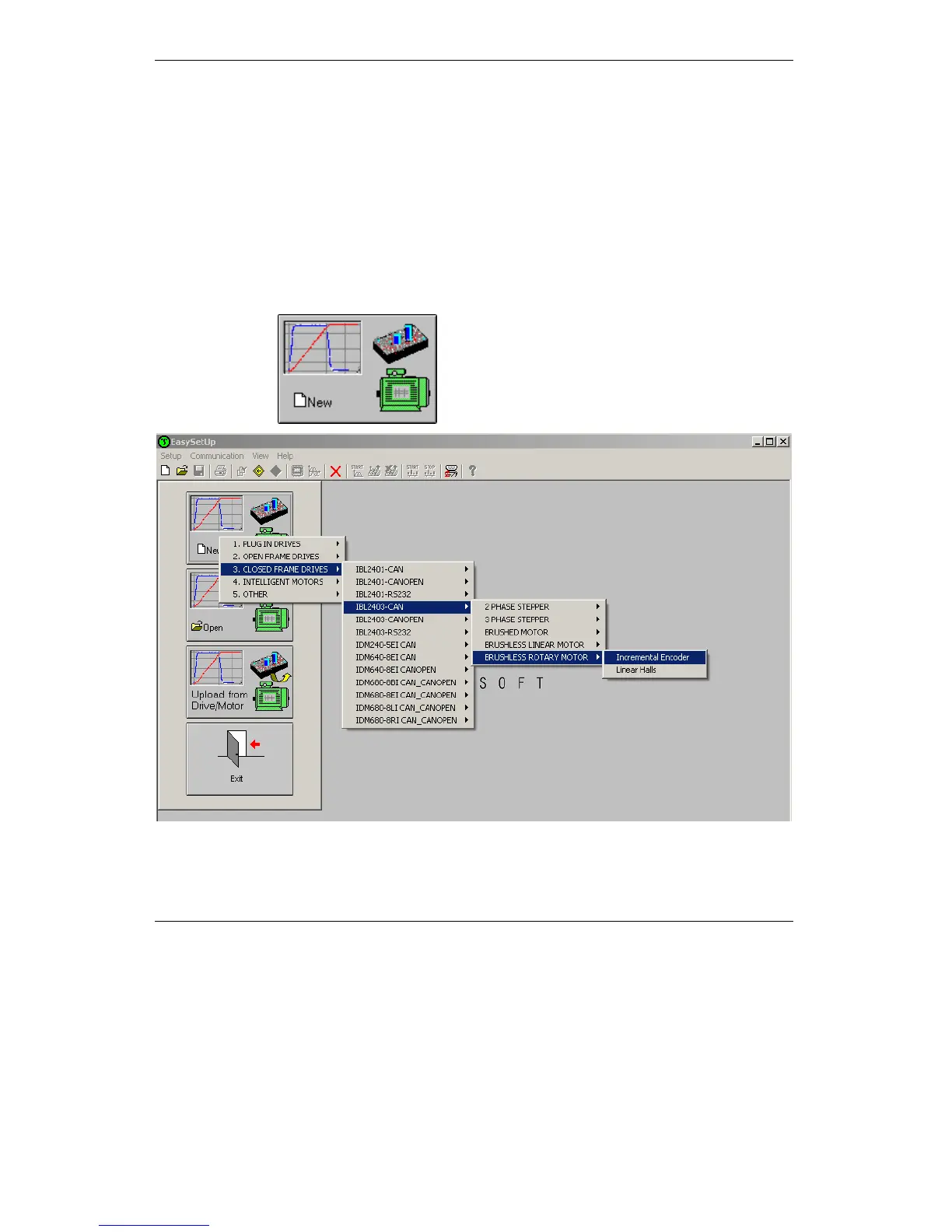
Press New button and select your drive type.
The selection continues with the motor technology (for example: brushless or brushed) and type
of feedback device (for example: Incremental encoder, Linear Halls).



 To Next Page