© Technosoft 2007 47 IBL2403 Technical Reference
The axis ID of an IBL2403 drive can be set software – any value between 1 and 255, stored in the
setup table.
The axis ID is initialized at power on, using the following algorithm:
a) If a valid setup table exists, with the value read from it. This value can be an axis number 1
to 255
b) If the setup table is invalid, with the last value set with a valid setup table. This value can
be an axis number 1 to 255
Remark: If a drive axis ID was previously set by software and its value is not anymore known,
you can find it by selecting in the Communication | Setup dialogue at “Axis ID of drive/motor
connected to PC” the option Autodetected. Apply this solution only if this drive is connected
directly with your PC via an RS-232 link. If this drive is part of a CANbus network and the PC is
serially connected with another drive, use the menu command Communication | Scan Network
4.4. Setting CANbus rate
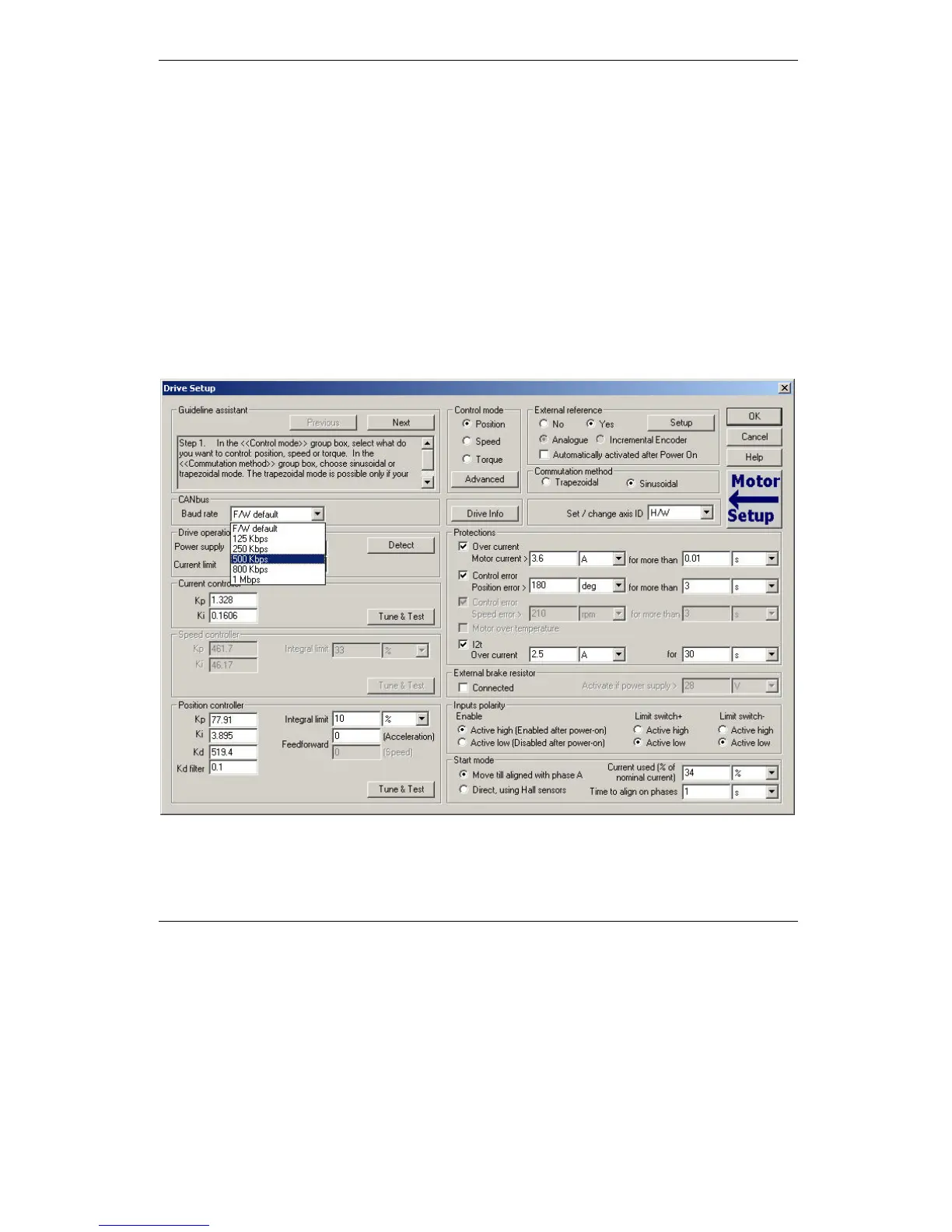
The IBL2403 drives can work with the following rates on the CAN: 125kHz, 250kHz, 500KHz,
1MHz. In the Drive Setup dialogue you can choose the initial CAN rate after power on. This
information is stored in the setup table. The CAN rate is initialized using the following algorithm:



 To Next Page