TD350 Series VFD Maintenance and hardware fault diagnosis
-262-
Cooling fan replacement
Read chapter 1 "Safety precautions" carefully and follow the instructions to
perform operations. Otherwise, physical injuries or damage to the device may
be caused.
1. Stop the device, disconnect the AC power supply, and wait for a time no shorter than the waiting
time designated on the VFD.
2. Open the cable clamp to loose the fan cable (for VFDs of 460 V, 1.5 to 30 kW, the middle casing
needs to be removed).
3. Remove the fan cable.
4. Remove the fan with a screwdriver.
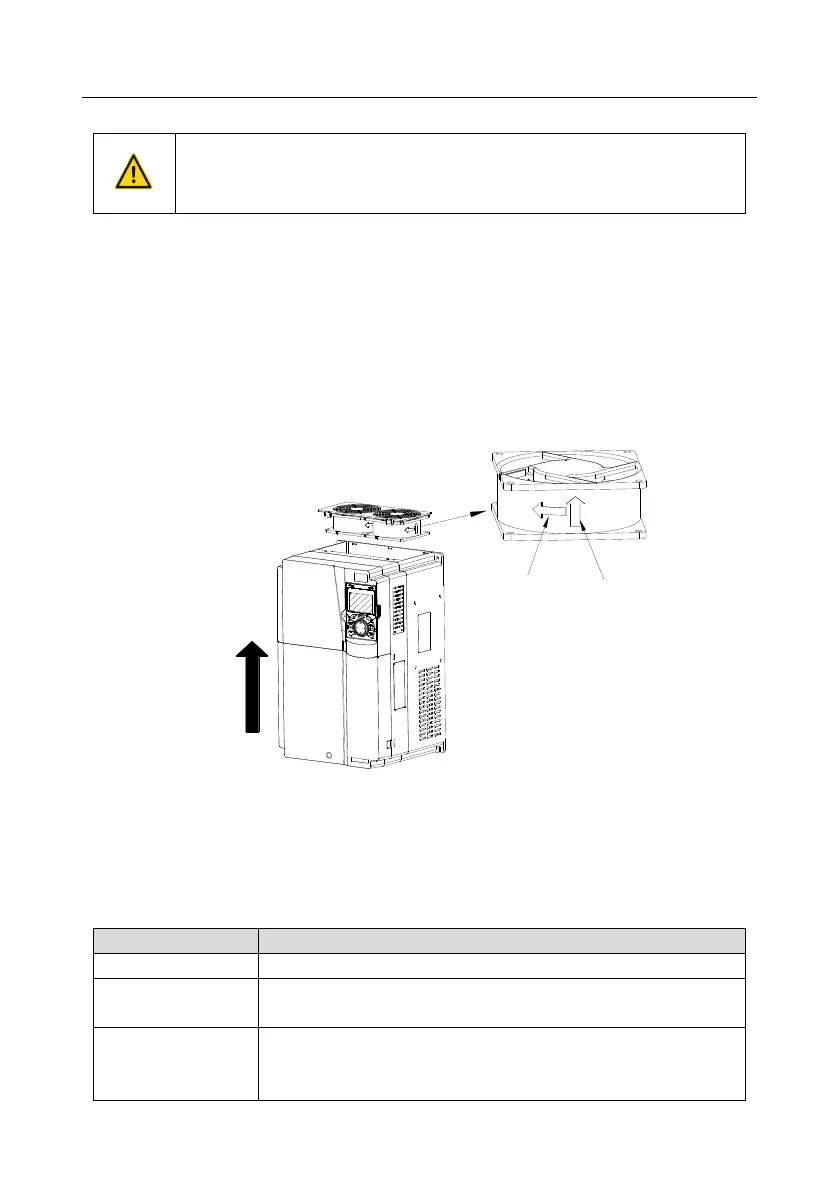
5. Install a new fan in the VFD in the reverse steps. Assemble the VFD. Ensure that the air direction
of the fan is consistent with that of the VFD, as shown in the following figure.
Rotating direction
Air direction
Air
direction
Fig 8.1 Fan maintenance for VFDs of 7.5 kW or higher
6. Power on the VFD.
8.4 Capacitor
8.4.1 Capacitor reforming
If the VFD has been left unused for a long time, you need to follow the instructions to reform the DC
bus capacitor before using it. The storage time is calculated from the date the VFD is delivered.
No charging operation is required.
The VFD needs to be powered on for 1 hour before the first running
command.
Use a voltage controlled power supply to charge the VFD:
Charge the VFD at 25% of the rated voltage for 30 minutes, and then
charge it at 50% of the rated voltage for 30 minutes, at 75% for



 To Next Page