WORKING WITH STATION MEMORIES
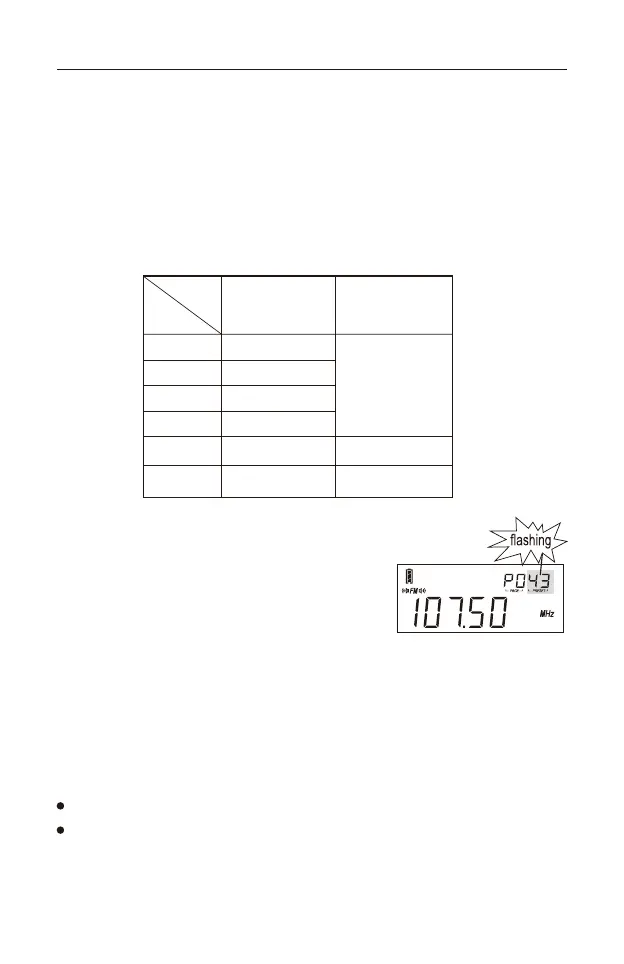
This device can store 3150 stations (presets), separated over 25 memory
pages (P0 - P24).
1) Page 0, indicated as “P0” on the display, can store 750 stations: 100 stations
each for FM, MW, LW, SSB and SYNC, and 250 stations for SW.
2) Pages 1-24 (“P1”, “P2”, etc.) can store 100 stations each for FM, MW, LW
and SW.
Storing Stations Manually
1) Tune into a radio station.
2) Quick press the memory [ M ] button, “PRESET”
flashes and indicates the first available storage
location in the selected memory page.
If desired, change the page and/or preset location by using the [ PAGE - ]
or [ PAGE + ] button and/or the [ TUNING ] knob.
3) Quick press the [ M ] button again to confirm or wait for about 3 seconds to
automatically store the station into memory.
Notes:
SSB and SYNC stations are only available for storage in Page 0.
Stored SSB and SYNC station details include USB/LSB and frequency
information, but no frequency details smaller than 1 kHz.
12
FM
MW
LW
SW
SSB
Page 0 ( P0 )
100 stations
100 stations
100 stations
250 stations
100 stations
Each memory
page can store
100 stations.
Page 1-24
SYNC
100 stations
X
X



 To Next Page