EasyManua.ls Logo

Tektronix Keithley 2260B Series - Page 91

Tektronix Keithley 2260B Series
207 pages
Print Icon
To Next Page IconTo Next Page
To Previous Page IconTo Previous Page
Loading...
OPERATION
87
2
12
17
20
21
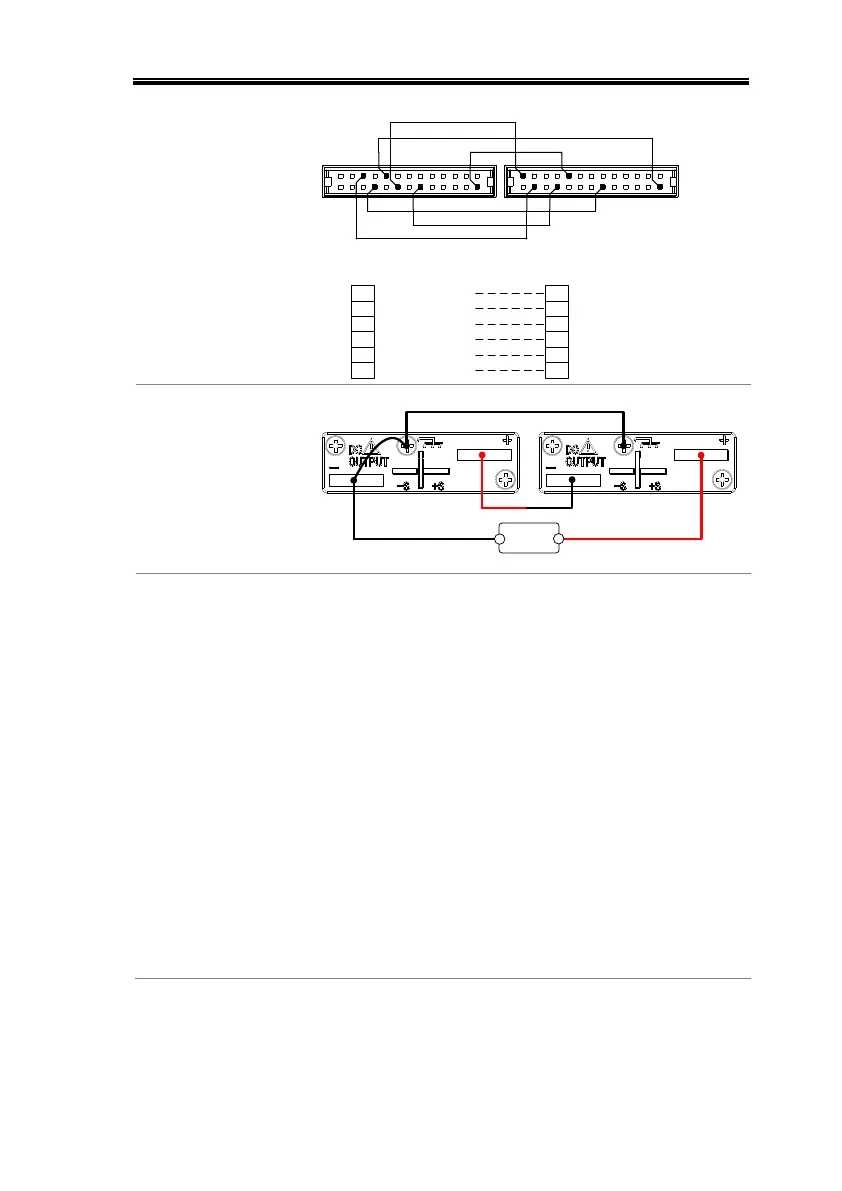
Master unit
A COM16
OUTPUT ON STATUS21
ALM STATUS20
STATUS COM17
SHUTDOWN12
Slave Unit 1
25 SER SLV IN
20 ALM STATUS
12 SHUTDOWN
2 D COM
24 OUT OFF/ON CONT
2 D COM
24 20 12
17
25
2
16
17 STATUS COM
Series Output
Connection
Master unit
Load
+
-
Slave unit
Steps
1. Ensure the power is off on both power supplies.
2. Choose a master and slave unit.
3. Connect the analog connectors for the master
and slave unit as shown above.
4. Remove the output terminal cover
and the protection dummy plug
from the analog control connector.
Page 47
5. Connect the master and slave unit in series as
shown above.
6. Reattach the terminal cover.
Page 47

Table of Contents

Other manuals for Tektronix Keithley 2260B Series

Related product manuals