The available fields are:
TV format (i.e. TV screen size ratio, 4/3 or 16/9).
Colour mode standard at receiver output (PAL, SECAM, NTSC, RGB).
Audio mode (STEREO or MONO)
Screen type (i.e. how received image size is to be managed with the set TV screen
size).
Display time (i.e. show the time on the frontal display when receiver is placed in
stand-by.
UHF mode (i.e. definition of the modulation standard used by the TV modulator)
UHF service (i.e. service used by the modulator).
Select an item using the and number keys and confirm your choice by pressing the
OK key. To leave the menu press the EXIT key.
Set time
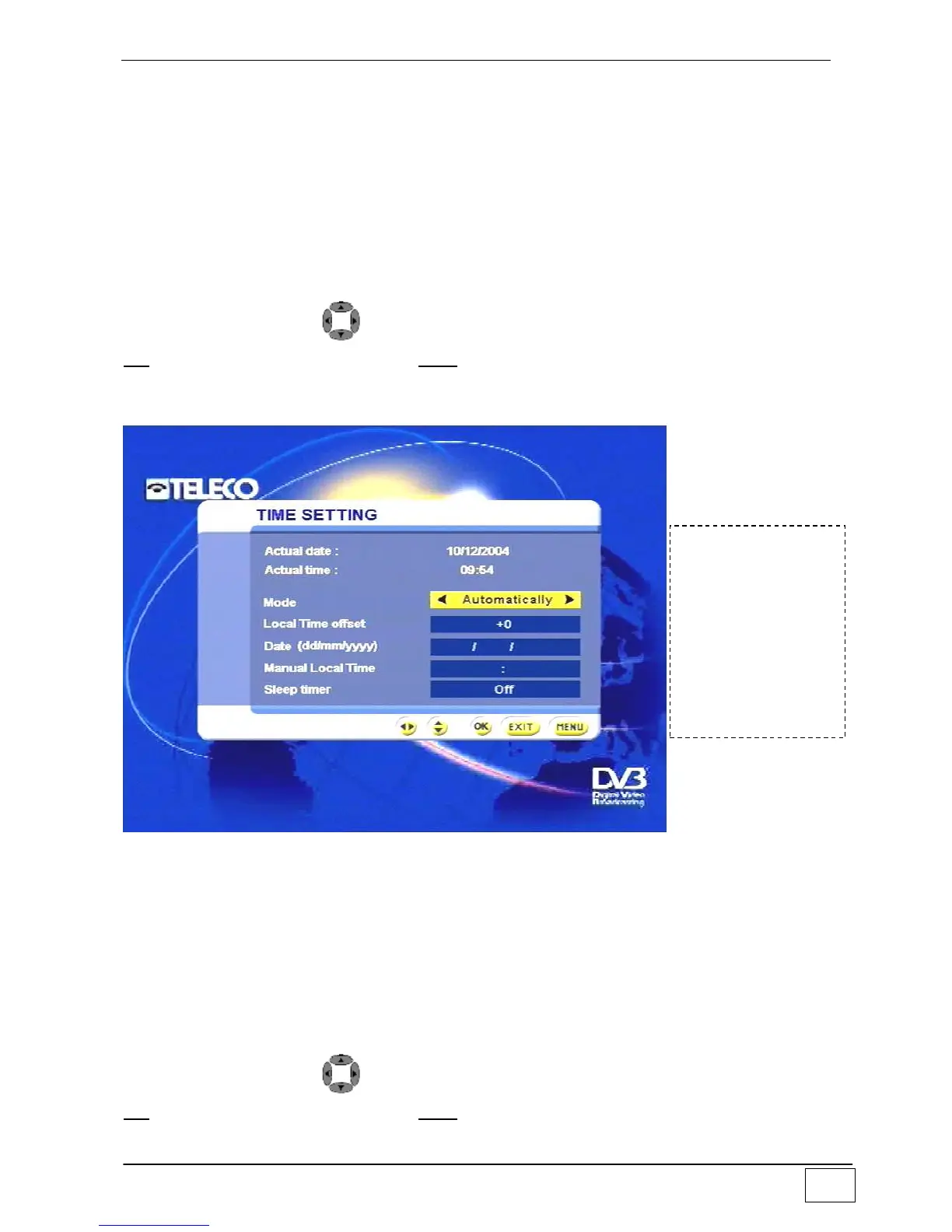
Use this sub-menu to set the clock on your receiver:
Figure 31 - Setting the clock
The available fields are:
Mode (i.e. whether the time is controlled via the received service or “locally” by the
mini-computer on the receiver).
Local time difference (i.e. time difference with respect to GMT).
Date (the date is set when the clock is used in “local” mode).
Local time (i.e. clock time when used in “local” mode).
Delayed switch-off (i.e. causes the receiver to be switched off when it has not been
used for a set time as established by the user).
Select an item using the
and number keys and confirm your choice by pressing the
OK key. To leave the menu press the EXIT key.
To reach this
screen page select
the following in
sequence:
- Main Menu
- Installing
- Setting the
clock



 To Next Page