Installation and User Manual
Televic Conference Systems
Assigning multiple IP Addresses (IP – Aliasing)
To use multiple tcp_ip addresses on your PC, set a
fixed IP address first as explained above and add the
appropriate Subnet Mask, Default Gateway and the
DNS server addresses.
The Default Gateway and DNS servers can be
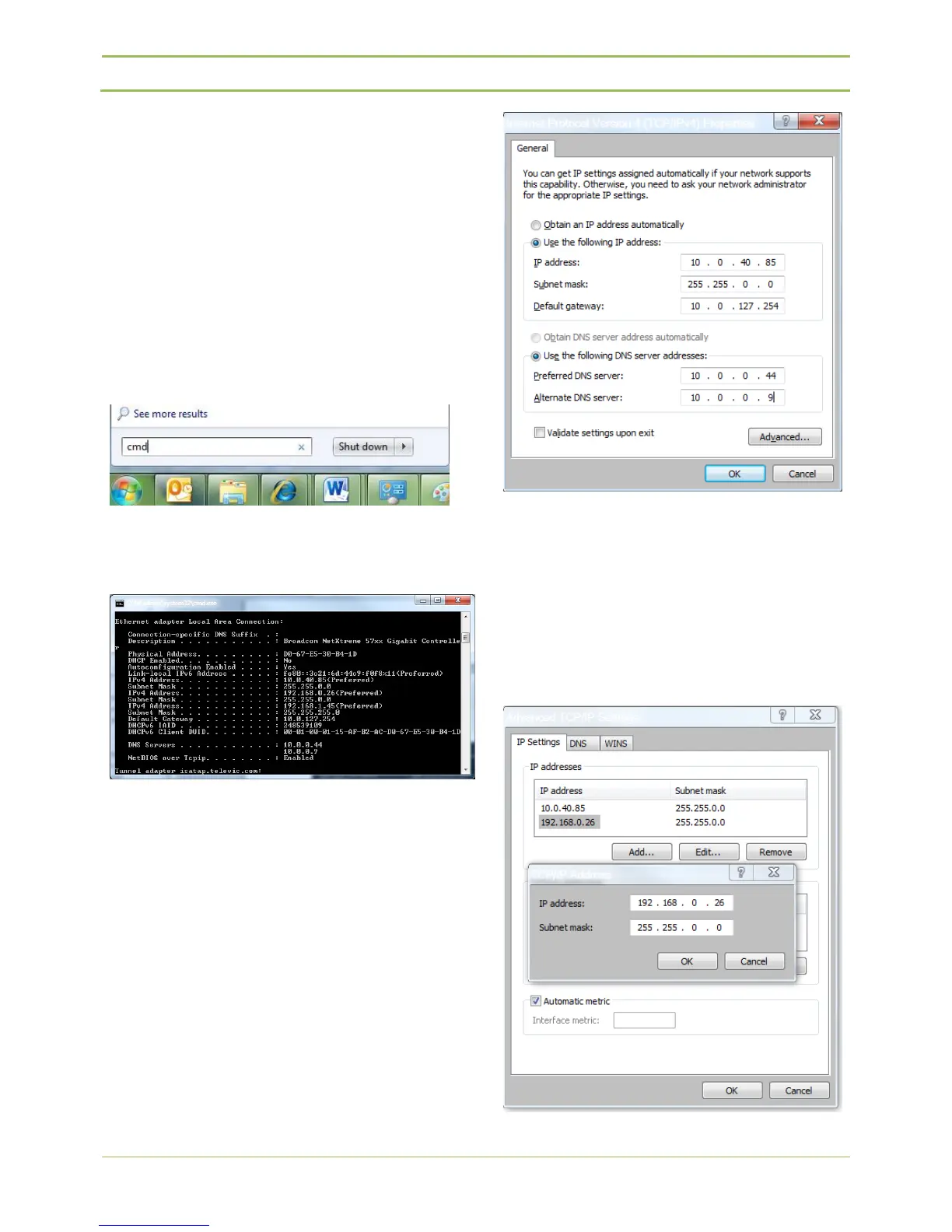
determined by executing the command “ipconfig
/al”l in a “cmd” screen
Windows 7: Click on start -> enter “cmd” in the
search bar and press enter
Figure 13.6: Command Prompt
In this example the PC has normally “10.0.40.85” as
IP address. Now IP Address “192.168.0.26” (e.g.) has
to be added to be able to access the webserver of
the central unit.
(Refer to Figure 13.7).
Figure 13.7: DNS and gateway settings
Next click on “Advanced” and “Add”… to add IP
Address(es) and click 2x OK. (Refer to Figure 13.9).
To assign multiple IP addresses on a MAC we kindly
refer to an external document on the Televic partner
domain.
Figure 13.8: Adding IP-address



 To Next Page