31
Sidekick
®
Plus Test Set
3-Lead
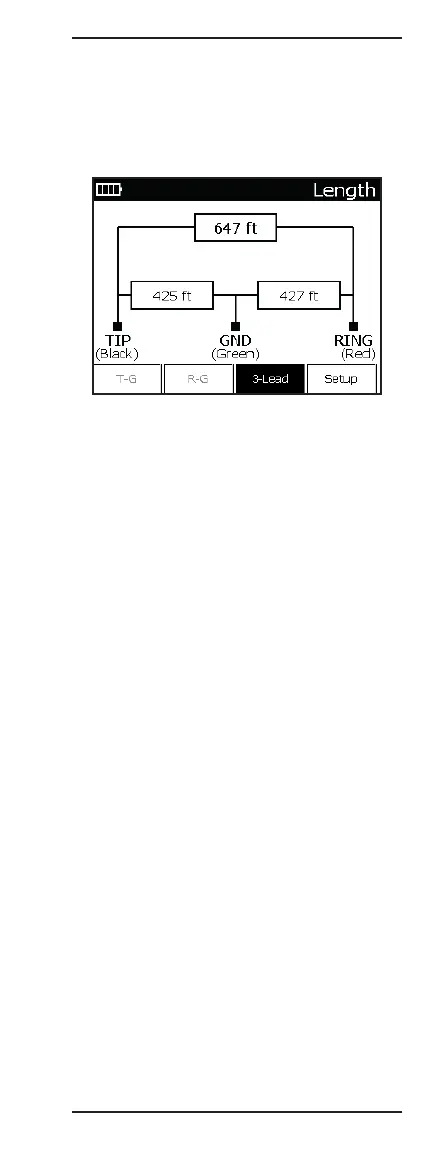
To obtain a 3-lead measurement, press F3 3-Lead
while on the Length menu. The length or capacitance
measurement is displayed from the ring-to-tip, tip-to-
ground, and ring-to-ground in sequence, with the active
measurement in bold.
Return to the Single Pair screen by pressing the
F33-Lead key.
Specifications for this measurement are the following:
Range: 0 to 30 km (0 to 100,000 ft)
0 to 30 m (0 to 99 ft)
• Resolution: 0.3 m (1 foot)
• Accuracy: 5%/0.6 m (5%/2 ft)
30 to 6095 m (100 to 19,999 ft)
• Resolution: 4 digits
• Accuracy: 4%
6096+ m (20,000+ ft)
• Resolution: 4 digits
• Accuracy: 10%
Changing Distance Units
The distance measurement may be toggled between
feet and meters through the F4 Setup screen.
1. Press F4 Setup.
2. If necessary, use the up (2) or down (8) arrow keys
on the keypad to highlight “Unit.”
3. Use the right (6) arrow key to toggle between
“Feet”, “Metres”, and “Capacitance”.
To exit back to the LENGTH function, press the
O(Back) key.



 To Next Page