66
Sidekick
®
Plus Test Set
2 Cable Config
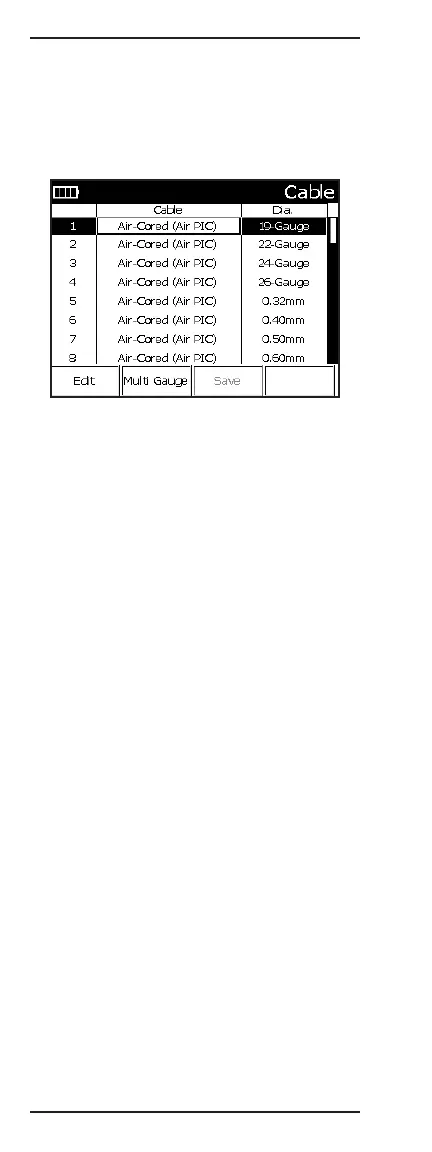
Pressing 2 while on the MAIN MENU screen accesses
the Cable Configuration screen. This screen allows the
user to make any one of a number of changes or addi-
tions to the cables configured for use in TDR, RFL, and
the R-D calculator.
This table is configured in a spreadsheet format, where
additional fields can be accessed by using the left (4)
and right (6) buttons. To view additional cables, use the
up (2) and down (4) buttons. To edit the selected field,
press F1 Edit. Once all the cable changes have been
made, press # (Enter).
• Cable: This field contains a description of the type of
cable used, such as air-cored, filled poly, etc.
• Dia.: This field contains the description of the cable
size, either in metric or AWG.
• Mat.: This field contains the cable material. Available
choices include “Cu” (copper) and “Al” (aluminum),
“Ag” (gold), or “Au” (silver).
• Resistivity: This field contains the cable resistivity.
• Temp.: This field contains the base temperature
used for the cable’s temperature coefficient (i.e., the
temperature in which the coefficient is zero).
• Temp. Coeff.: This field contains the temperature
coefficient for the cable per each degree. The use
of Celcius or Fahrenheit is set in the configuration
menu.
• VP: This field contains the cable’s velocity of
propagation.



 To Next Page