54
Sidekick
®
Plus Test Set
Automatic Test
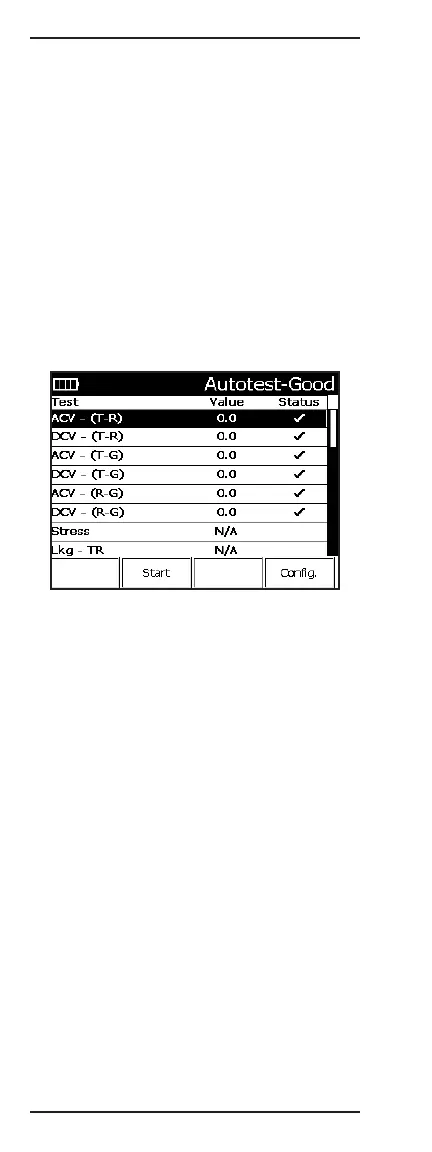
The AUTOTEST selection checks most of the tool’s tests
and measurements by comparing them to tolerances
set by the Autotest configuration selected. It is a quick
check to qualify a line against specific standards.
The AUTOTEST runs through all the tool’s tests except
the TDR, impulse noise, ground resistance, and RFL.
To run the AUTOTEST:
1. Connect the black lead to tip, the red lead to ring,
and the green lead to ground.
2. Move the rotary knob to the AUTOTEST position.
3. The first time AUTOTEST is selected, the unit will
prompt you to choose an AUTOTEST to perform.
Use the arrow keys to select the proper test, and
then press F4 Select.
The following selections are available on the Autotest
menu:
• F2 Start begins the test.
• F4 Config allows the user to select/edit the Autotest
configuration that the unit will test against. (Refer to
the next section, “Main Menu,” for more information
on the CONFIG section.)
Press 9 (Save) to enter the Save/Recall menu. The
current Autotest result can be saved, and previously
saved results can be viewed.
Autotest XML
The Sidekick
®
Plus can export xDSL test results in
XML format to a USB flash drive. After the test result is
saved to internal memory using the instructions above,
follow these steps:
1. In the Save function, press F2 Recall.
2. Use the up (2) and down (8) keys to select the
saved test result to export.



 To Next Page