55
Sidekick
®
Plus Test Set
3. Insert a USB flash drive into the larger USB port
at the top of the test set. The USB symbol should
appear in the top of the Sidekick
®
Plus display
4. Press F2 USB Save to save the test result in XML
format to the USB flash drive.
To exit the Autotest menu, move the rotary knob to
another position.
AUTOTEST with FED
With a Far End Device (FED) connected to the far end
of the pair, the following additional measurements can
be made on a vacant pair: Loss and Noise (G-Filter),
Resistive Balance, Loop Resistance, and Wideband
Slope. Note: The Wideband tests are only available on
Wideband enabled units.
Using the blue pair of the FED, connect the red lead of
the FED to the Ring(B) of the telephone pair, the black
lead of the FED to the Tip(A) of the telephone pair, and
the green lead of the FED to the cable ground.
1. Select the FED script in the Select Configuration
screen.
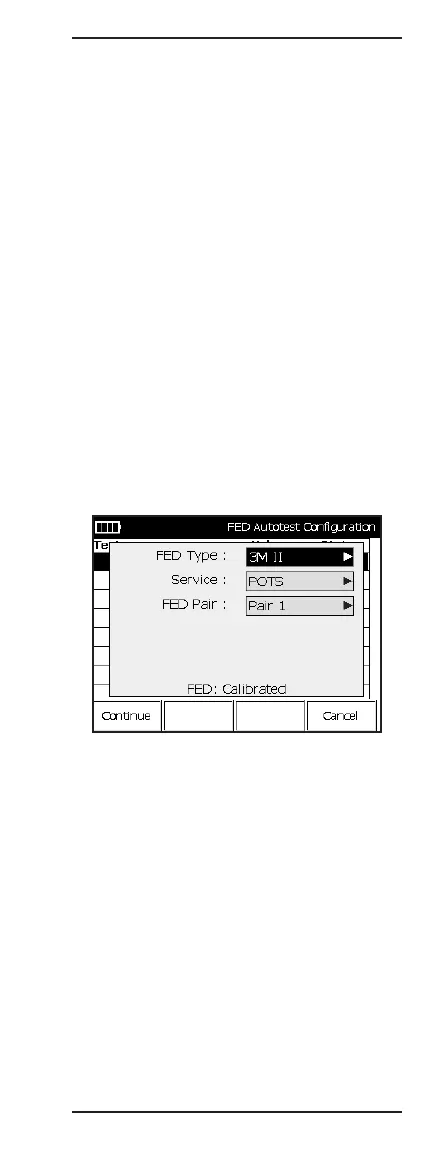
2. Press F1 Start to access the FED Autotest
Configuration screen.
• FED Type: Select the type of FED.
• Service: Select the xDSL service.
• FED Pair: Select test pair.
• Calibration: To eliminate impedance mismatches,
the FED and test set cables should be calibrated.
Calibration Status:
• Not Calibrated – To calibrate, go to FED Cal under
Cord Calibration in the TOOLS MENU.
• Calibrated – No further calibration needed.
Press F1 Continue to start the test.



 To Next Page