30
Sidekick
®
Plus Test Set
Measuring Cable Length
The LENGTH selection measures the distance to an
open, mutual capacitance as well as the conductor to
ground capacitance of the pair.
Note: This Sidekick
®
Plus test set can subtract the test
lead length from the LENGTH measurement. Refer to
“Cord Calibration’” in the “Tools Menu” section.
To measure cable length, perform the following steps:
1. Connect the test leads: black to tip, red to ring, and
green to ground.
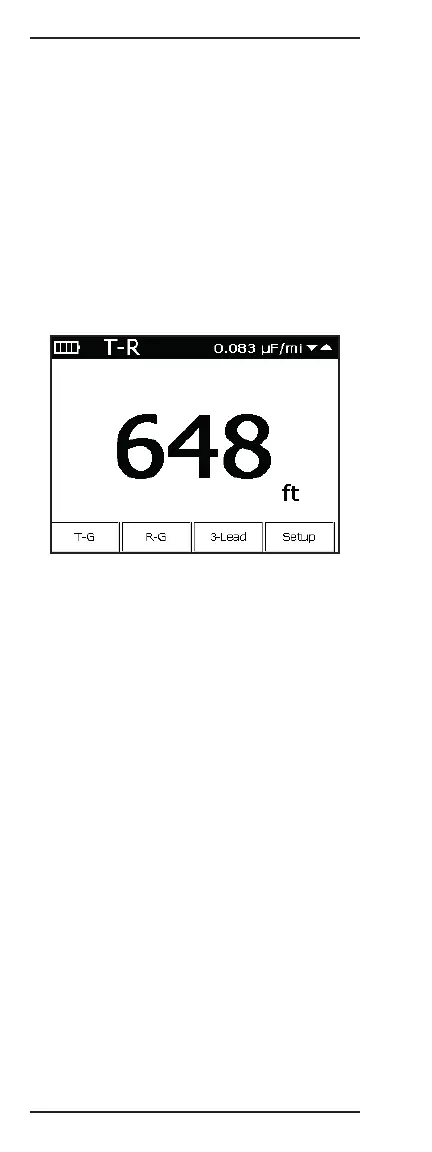
2. Move the rotary knob to the LENGTH position.
A single pair measurement in feet (or meters) appears
on the LCD screen.
To change the single pair measured or make another
choice, use the following function keys:
• F1 T-G displays tip-to-ground; “T-G” now in the
upper left corner and “T-G” button is highlighted.
To return to tip-to-ring, press F1 again.
• F2 R-G displays ring-to-ground; “R-G” now in the
upper left corner and “R-G” button is highlighted.
To return to tip-to-ring, press F2 again.
• F3 3-Lead accesses the 3-lead screen.
• F4 Setup shows the measurement configuration. The
measurement unit, mutual capacitance, and ground
capacitance is set on this page. Press the O (Back)
key to return to the measurement.
To exit the LENGTH function, move the rotary knob to
any other position.
Changing Capacitance per Distance
Use the up (2) and down (8) keys to adjust capacitance
per unit length displayed in the upper right of the
screen. Adjust the capacitance per distance value to
match a known length of cable or a known capacitance
per distance for a given cable.
Note that there are two capacitance per distance
values. One is for the T-G and R-G capacitance, while
the other is for T-R.



 To Next Page