33
Sidekick
®
Plus Test Set
Cable Type
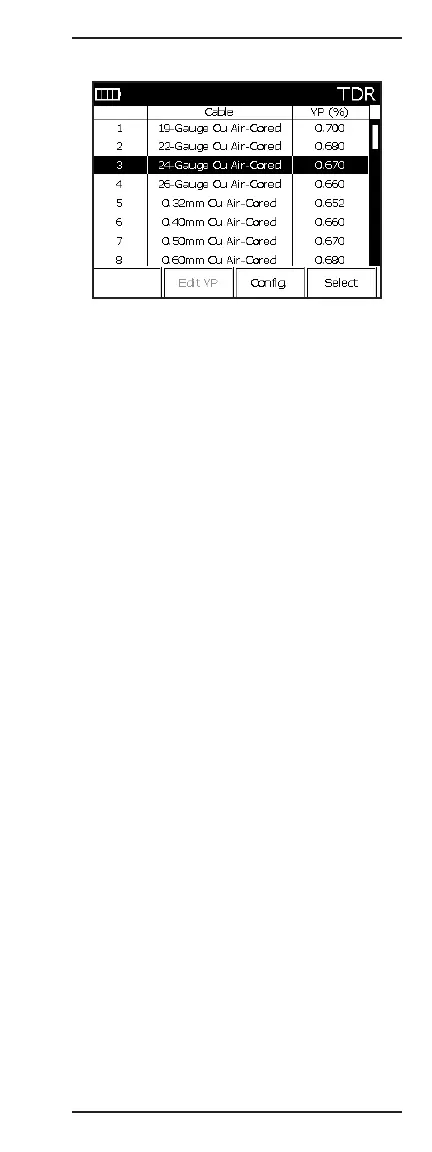
Use the keypad arrow keys (2 and 8) to scroll through
the cable types. Once the correct one has been high-
lighted, press the F4 key to exit.
If the cable type is not listed, the user may create a
new cable type by accessing the MAIN MENU (Fn-F4)
and selecting 2 Cable Config.
To use a simple custom cable, move to the bottom of
the list and select “Custom Cable”. Use the keypad
arrow keys (2 and 8) until the “VP(%)” column is high-
lighted. Press F1 Edit, and then use the keypad to enter
the velocity of propagation.
Press the O(Back) key when the cable is selected or
“Custom Cable” is defined.
Measuring and Reading Traces
The TDR main display contains the following controls:
• Up (2) or down (8) arrows change the value of the
parameter selected by the F2 Adjust key.
• F1 Less Cable shortens the amount of cable
examined.
• F2 Adjust selects the parameter for adjustment:
Gain/Offset/Averages/VP/PW. Use the up (2) and
down (8) arrows to make changes to the selected
parameter.
• F3 Config function allows the user to adjust all
parameters of the TDR. Press the O(Back) key to
return to the TDR display.
• F4 More Cable increases the amount of cable
examined.



 To Next Page