63
Sidekick
®
Plus Test Set
To move to the next options menu, select F3 Next. If no
more changes are required, press the O(Back) key.
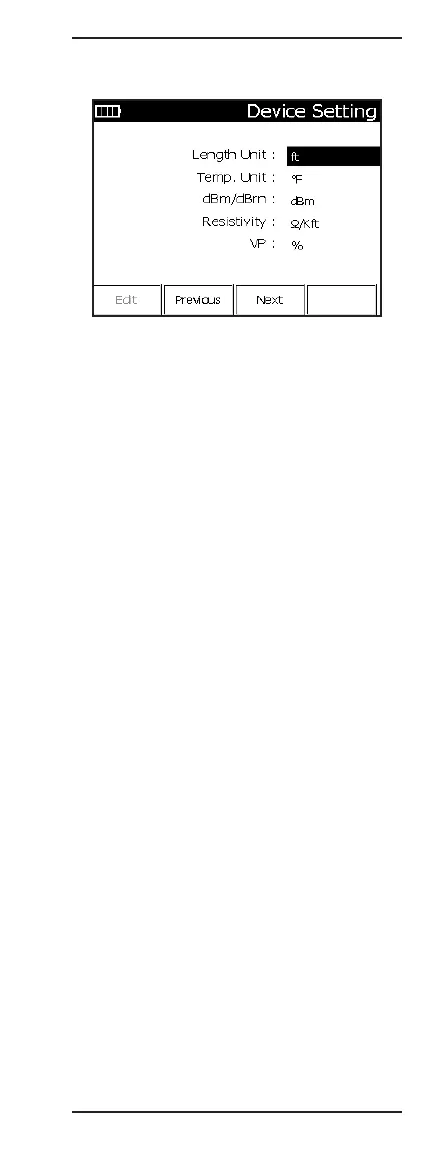
The second Device Setting screen provides the follow-
ing options to the user. Each option can be reached by
using the up (2) or down (8) buttons:
• Length Unit: This option allows the user to select
which distance unit is used for displays. Select “ft”
for feet or “Meters” for meters by using the left (4)
and right (6) buttons. The default setting is selected
by the user when the unit is first used.
• Temp. Unit: This option allows the user to select
which temperature unit is used for displays. Select
“°F” for Fahrenheit or “°C” for Celsius by using the
left (4) and right (6) buttons. The default setting is
selected by the user when the unit is first used.
• dBm/dBrn: This option allows the user to select the
unit used to display spectral noise and power influ-
ence data. Select “dBm” or “dBrn” by using the left
(4) and right (6) buttons. The default setting is “dBm”.
• Resistivity: This setting allows the user to change
the units used in displaying and changing the cable
resistivity in the cable configuration table. Select “Ω/
Kft”, “Ω/Km”, “ft/Ω”, or “m/Ω” by using the left (4)
and right (6) buttons. The default setting is “Ω/Kft”.
• VP: This setting allows the user to change the units
used in displaying and changing the cable velocity of
propagation in the cable configuration table. Select
“%”, “m/mS”, “ft/mS”, “Km/mS”, or “Kft/mS” by
using the left (4) and right (6) buttons. The default
setting is “%”.
To move to the previous options menu, select
F2Previous. To move to the next options menu,
select F3 Next. If no more changes are required, press
the O(Back) key.



 To Next Page