82
Chapter-5
There is a system installation DVD in the package. This DVD does not only include all the
drivers you need but also some other free application programs and utility programs.
In addition, this DVD also includes an auto detect software telling you which hardware is
installed and which driver is needed so that your system can function properly. We call this
auto detect software SYSTEM INSTALL.
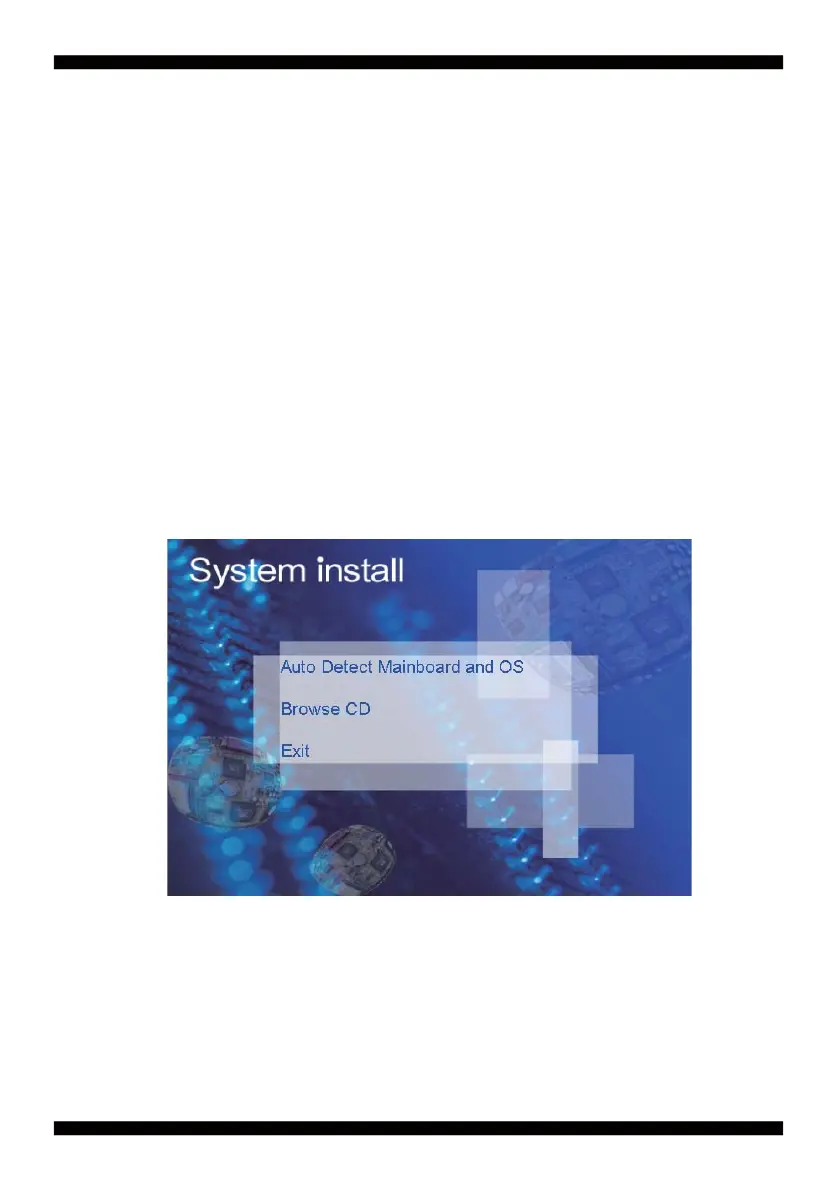
1. Auto Detect Main board and OS to AUTOMATIC DRIVER INSTALLATION menu
2. Browse DVD to view the contents of the DVD
3. Exit to exit SYSTEM INSTALL menu
DRIVER INSTALLATION
Make your selection from SYSTEM INSTALL menu:
Insert the DVD into your DVD-ROM drive and the SYSTEM INSTALL menu should appear
as below. If the menu does not appear, double-click MY COMPUTER and double-click
DVD-ROM drive or click START, click RUN, and type X:\SETUP.EXE
(assuming your DVD-ROM drive is X).
SYSTEM INSTALL Supports Windows 7(32bit/64bit) / Windows
8/8.1(32bit/64bit)


 To Next Page