Chapter 4 – Temperature Controller
Page 4-2 TestEquity 1007C Temperature Chamber
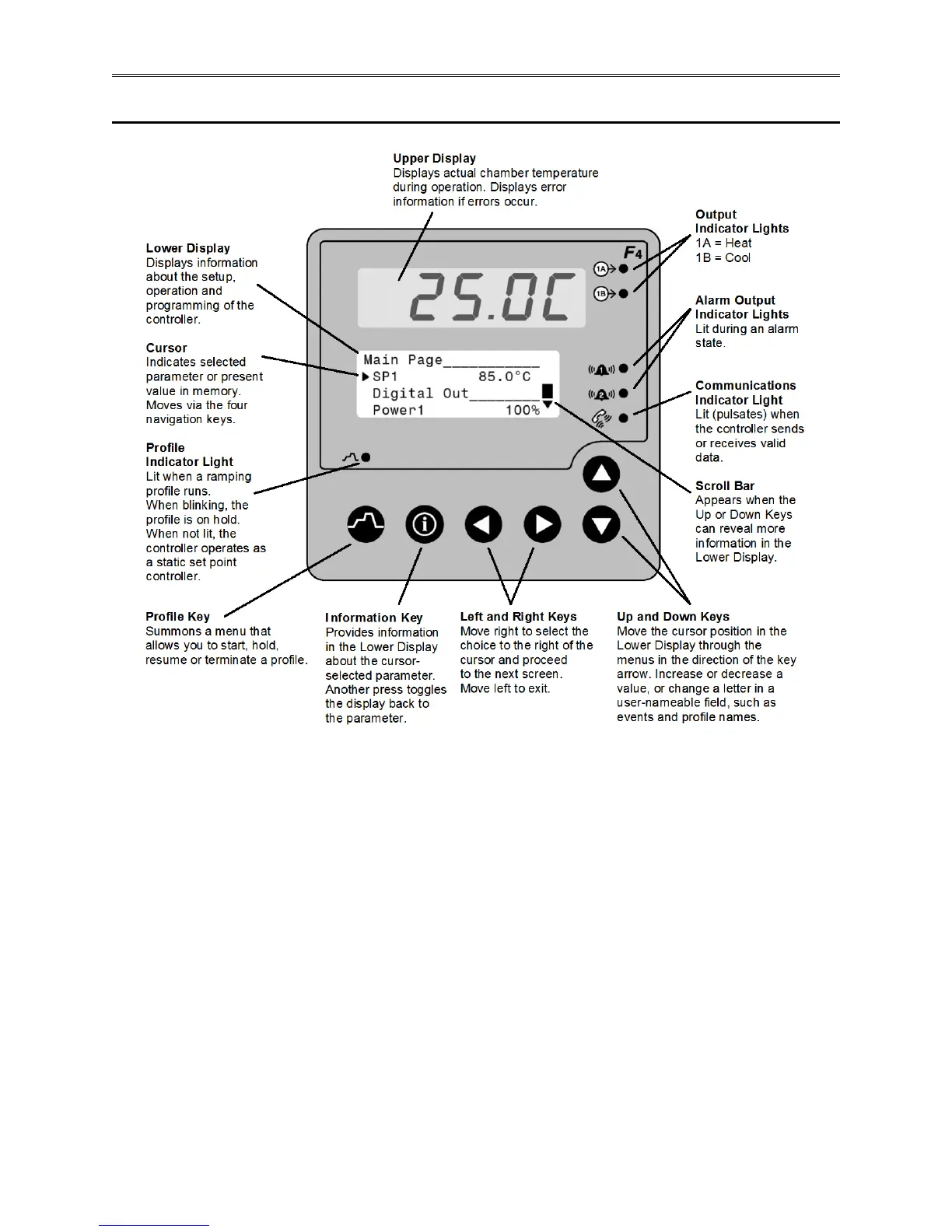
Temperature Controller Keys and Displays
Figure 4.1 – Temperature Controller Keys and Displays
To navigate through the menus:
1. Use the ▲ or ▼ key to move the cursor to line up with the item to be selected in a menu on
the lower display.
2. Press the ► key to select the item.
3. Enter or change the value, or make a choice with the ▲ or ▼ key.
4. Press the ► key to enter the value or choice.
5. Repeat until you return to the original list.
The ► key again saves the value and proceeds to the next parameter in the series.
The ◄ key saves the value and backs out of the series, and returns to the Main Page.
To edit a parameter, proceed through the series using the ► key without changing values until
you find the parameter you want to change. After making the change with the with the ▲ or ▼
key, you may back using the ◄ key out or proceed using the ► key to the end of the series.



 To Next Page