Chapter 5 – Limit Controller
Page 5-2 TestEquity 1007C Temperature Chamber
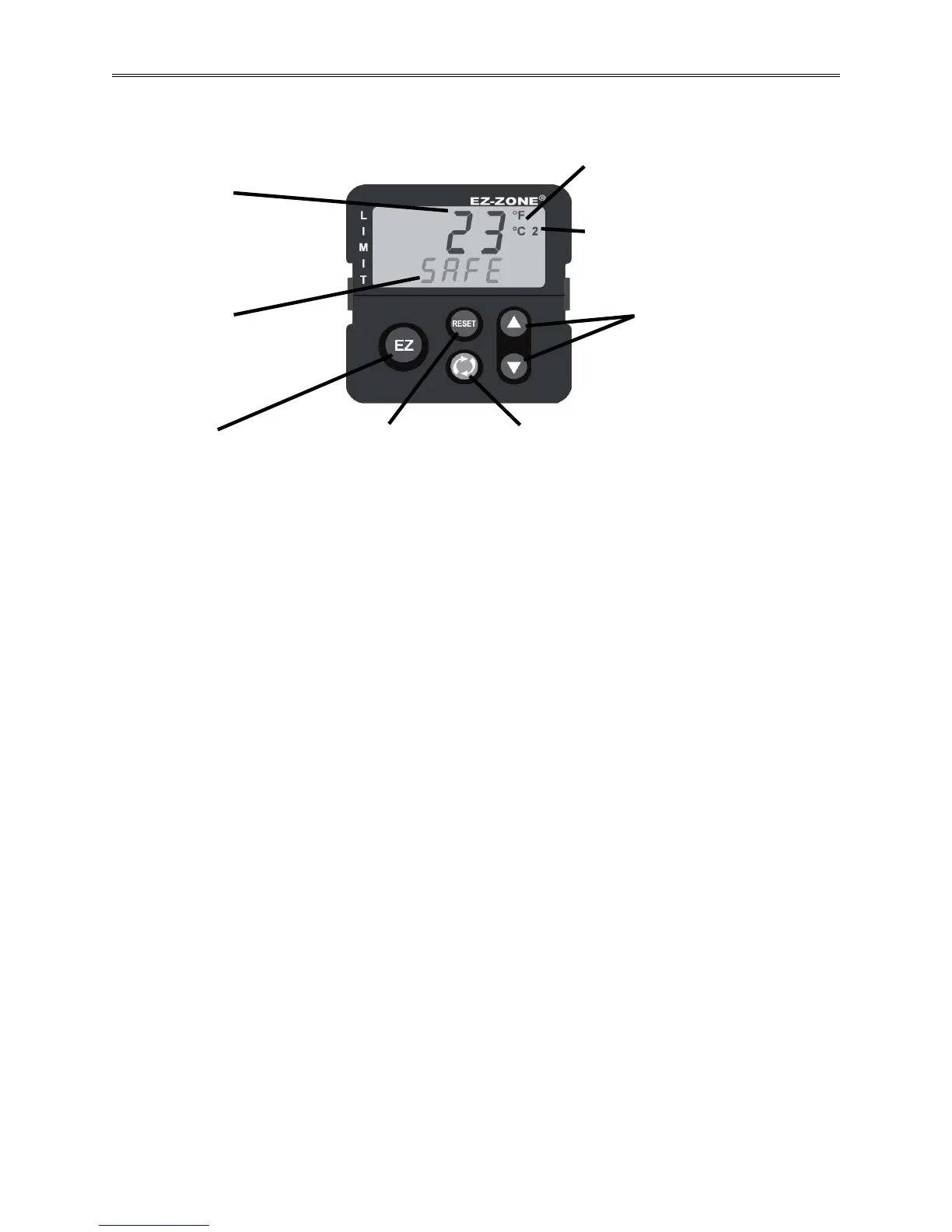
Limit Controller Keys and Displays
Advance Key ‰
Advances through the
parameter prompts
Output Indicator
Lit when the limit setting is exceeded.
Only light 2 is applicable for this
configuration.
Up/Down K
eys ¿ ¯
When in a menu, scrolls
through available options for
any given prompt. In other
menus can change set points
and modify the upper display
to a higher or lower value.
Upper Display
Indicates the actual chamber
temperature, or displays the
value of the parameter in the
lower display.
RESET Key
Returns to the Home Page.or
Resets the limit after a trip
condition has cleared.
Lower Display
Indicates [SAFE] during normal
operation or [FAiL] in an out of
limit condition, or the parameter
whose value appears in the
upper display.
Temperature Units Indicato
r
Indicates whether the temperature is
displayed in Fahrenheit or Celsius.
EZ Key
Resets the limit after a
trip condition has cleared.
Figure 5.1 – Limit Controller Keys and Displays
How to Set the High and Low Temperature Safety Limits
1. Press the ‰ key once to get the [`LL;s] prompt in the lower display. This is the Low Limit
Set Point prompt.
2. Press the ▲or ▼ key to enter the desired Low Limit Set Point in the upper display. Make
sure it is lower than your actual chamber temperature set point, and at least below room
temperature to prevent nuisance tripping.
3. Press the ‰ key once again to get the [`lh;s] prompt in the lower display. This is the High
Limit Set Point prompt.
4. Press the ▲or ▼ key to enter the desired High Limit Set Point in the upper display. Make
sure it is higher than your actual chamber temperature set point to prevent nuisance tripping.
5. Press the RESET Key to return to the Home Page.
6. The upper display will show the actual chamber temperature while the lower display will
show [SAFE] as long as the limits are not exceeded.
Resetting an Out of Limit Condition
If the limit is exceeded, the Limit Controller will flash [Li;h1] (high limit) or [Li;L1] (low
limit) in the upper display and [Attn] in the lower display, alternating with the actual chamber
temperature in the upper display and [FAiL] in the lower display. It will also shut down all
chamber functions. The Limit Controller cannot be reset until the temperature returns to within
the limit set points. Then, you must press the RESET or EZ Key to resume normal operation.
Silencing the Audible Alarm
Turning off the MASTER switch on the chamber front panel lets you temporarily turn off the
Audible Alarm, even though the High or Low Limit condition may still exist.



 To Next Page