6 Using the product
53
Selection of the displayed measurement parameters is based on
the display sequence in measuring mode.
• First measurement parameter displayed: red
• Second measurement parameter displayed: green
• Third measurement parameter displayed: blue
• Fourth measurement parameter displayed: violet
1. Select the required tab.
> If necessary change the order of the measurement parameters,
as only the first four measurement parameters are displayed.
2. [ ] → Graphic mode.
- Graphic mode is activated .
> Exit graphic mode: [ ] → Graphic mode or [ESC].
The values are deleted when switching tabs, however
graphic mode is not terminated. On returning to the tab,
the measurement starts again in graphic mode.
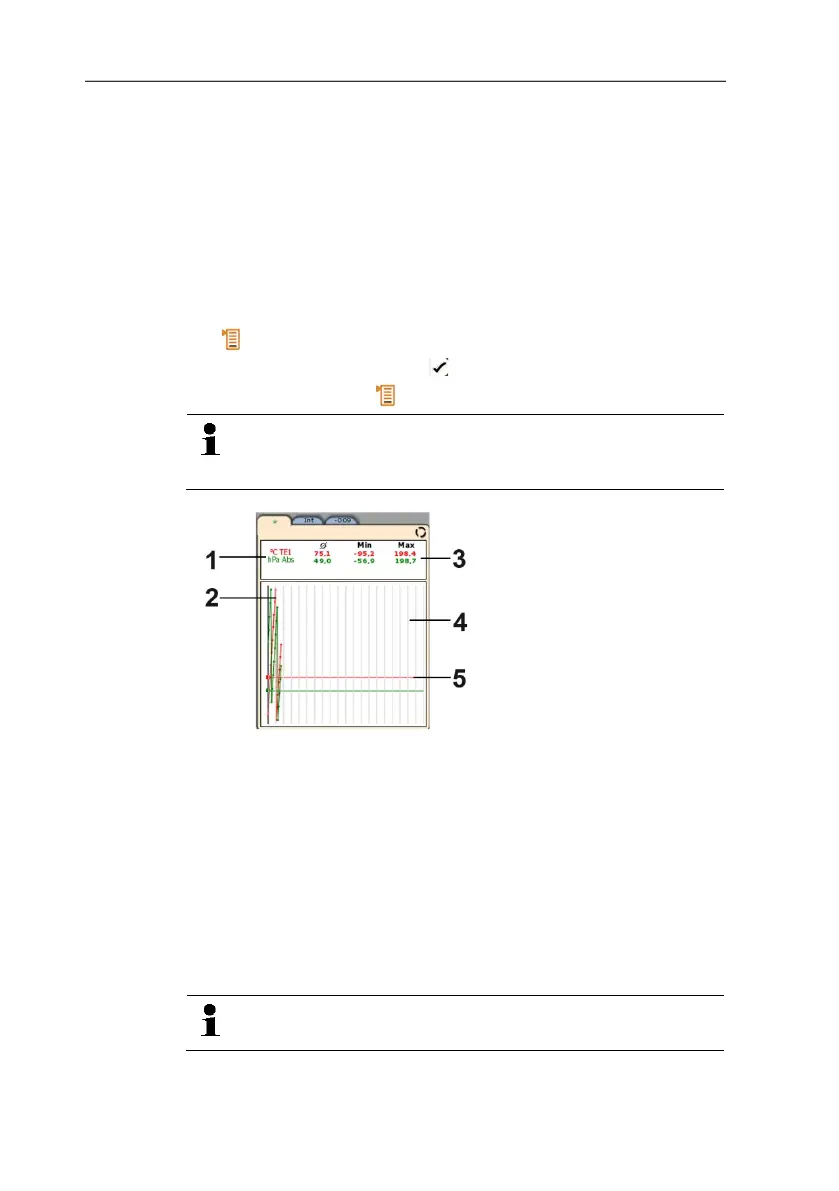
1 Displayed measuring values
2 Graphically displayed measuring value
3 Average, minimum and maximum values since graphic mode
selection
4 Vertical scaling marking (5 seconds)
5 Specific x-axis of the respective measurement parameter in the
same colour as the graphically displayed measuring value
6.6.5. Transferring measurement values
To view and evaluate the measurement results on the PC,
you need the testo EasyClimate software.
1. Switch on the testo 480.



 To Next Page