27
6. Regulation
6.1 Temperature Regulation
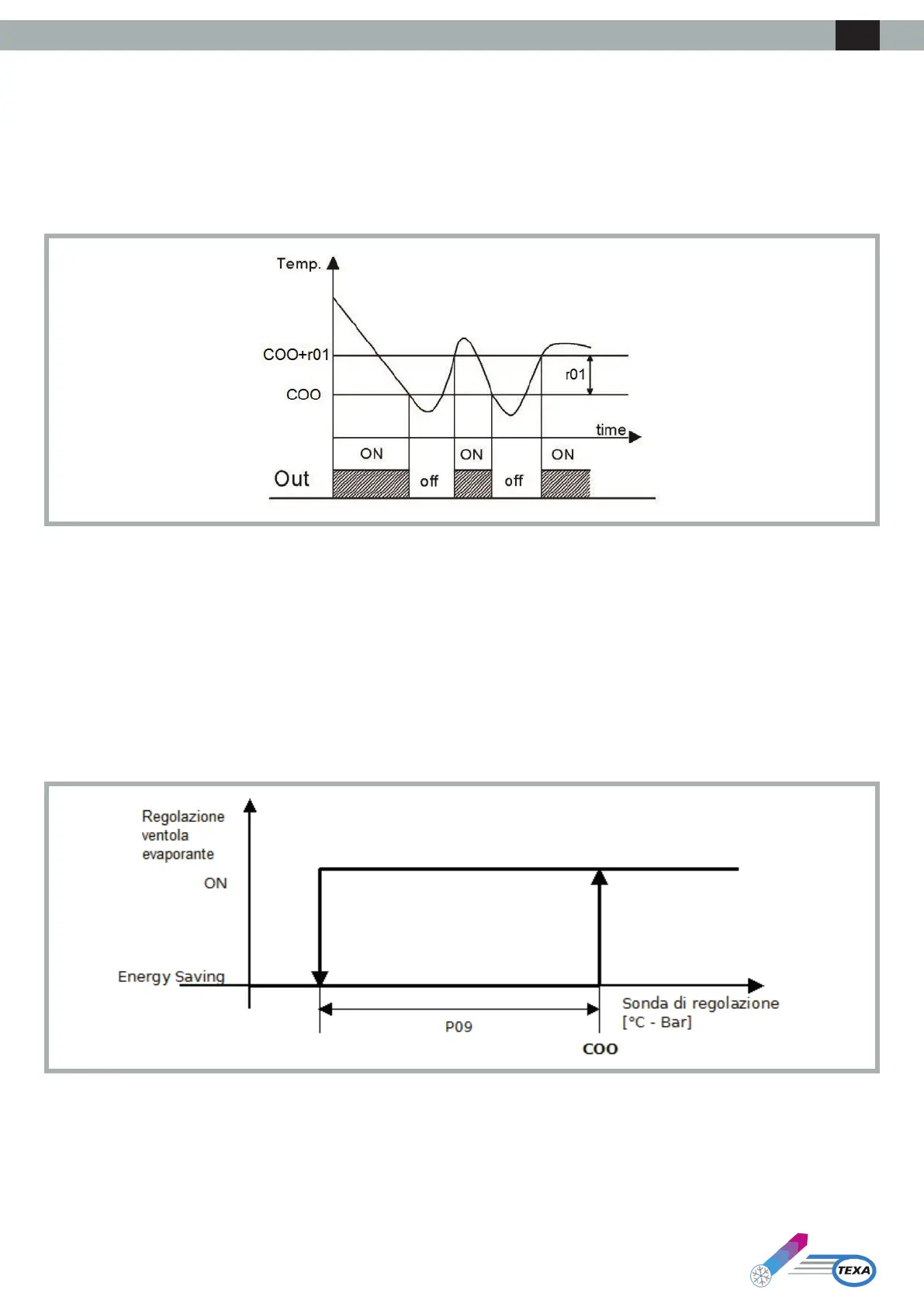
The compressor relay is activated to maintain a given temperature set by the Set Point. The hysteresis (r01) is automatically added to the Set Point (COO).
IfthetemperatureincreasesandreachestheSetPointplusthehysteresis,thecompressorisactivated,beforebeingshutowhenthetemperaturereturns
totheSetPointvalue(seegure).
In the event of a fault with the thermostat sensor, the duration of the compressor duty cycles is calculated as the weighted average of the duration of the
cycles preceding the sensor fault.
The value of the Set Point (COO) and hysteresis (r01) parameters can be set from the “SEt” and “PAr” menus, respectively.
6.2 Evaporator Fan Management
Parameter P01denestheoperatingmodeoftheevaporatorfan:
• -1: on regulation request
• 0: evaporator fan always active
• >0: OFF time (in minutes) in “Energy Saving” mode
Ifthemachineisinstandbyortheevaporatorfanoperatesontemperatureregulationrequest,theevaporatorfanisshutowithadelay.
“Energy Saving” regulation is active only if:
o The energy saving operating mode is selected (Parameter P01>0)
o The regulation sensor is not in alarm status
o The machine is working in cooling mode
In all other cases, the evaporator fan is on.
6.2.1 Energy Saving Regulation
When energy saving mode is set (P01>0), when the regulation temperature falls below the value COO-P09, the fan alternates 15 seconds of operation
with P01 minutes of inactivity. With each cycle, a check is made that the regulation temperature is below the Set Point (COO).
Energy saving mode is exited when the regulation temperature reaches the Set Point value (COO).
ENG



 To Next Page