Testing the EVM Data Capture with LVDS Interface
www.ti.com
12
SLOU489–August 2017
Submit Documentation Feedback
Copyright © 2017, Texas Instruments Incorporated
AFE5832 32-Channel Analog Front-End Evaluation Module (EVM Rev. A)
4.2.2 AFE5832 GUI Actions
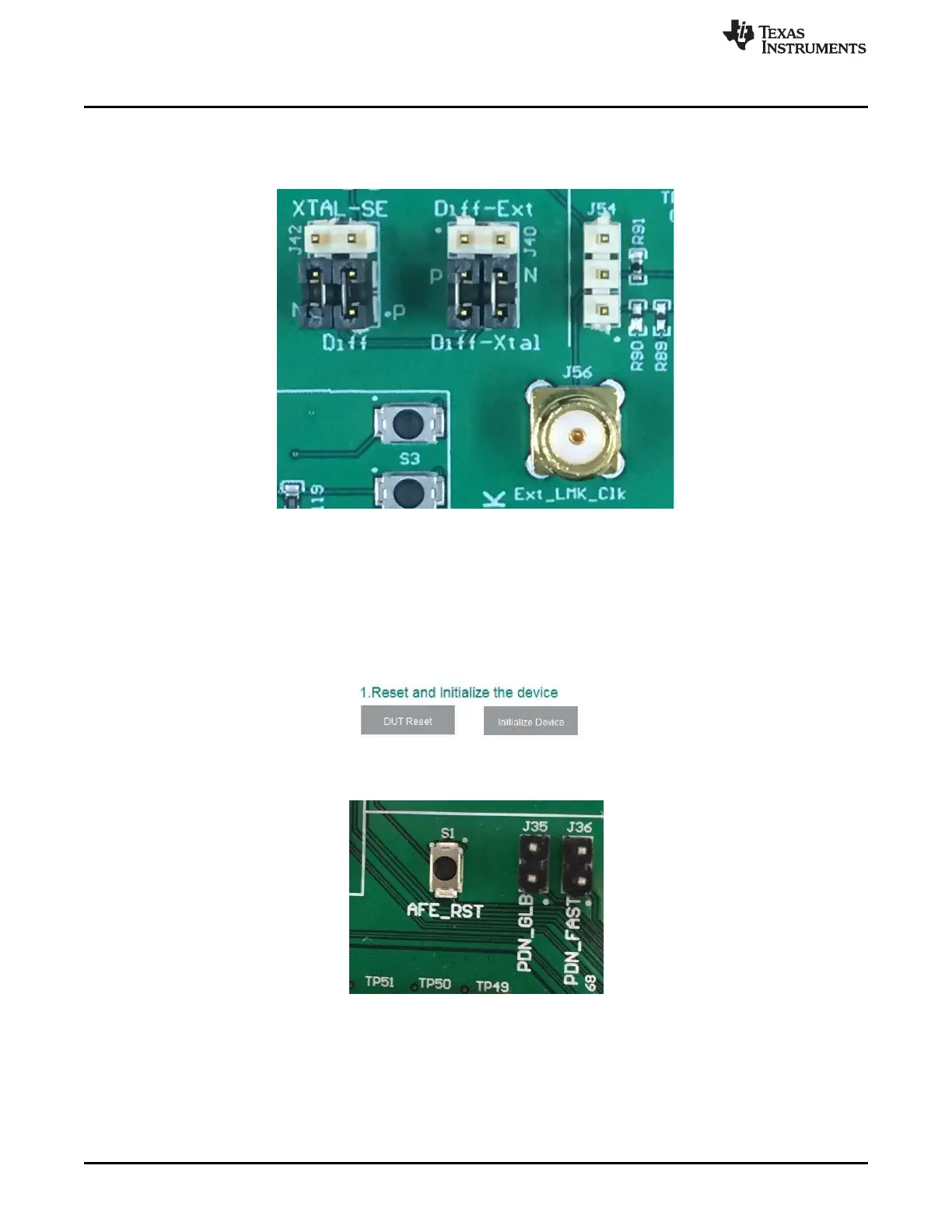
1. Verify the clock configuration by matching J42, J40, and J54 to Figure 9. Provide a 160-MHz, +13-dBm
clock to J56.
Figure 9. Clock Configuration on AFE EVM for LVDS Capture
2. Press the DUT RESET button on the AFE5832 GUI.
3. Press the Initialize Device button on the AFE5832 EVM GUI (Figure 10). These buttons are located
close to the upper left-hand corner of the GUI window.
• Alternatively, there is an option to use the hardware reset. Press the AFE_RST button on the AFE
EVM, located above the AFE device (S1), as shown in Figure 11. Hold for 1 second. Then, press
the Initialize Device button on the AFE5832 EVM GUI.
Figure 10. Software Reset and Initialize Buttons on AFE5832 EVM GUI
Figure 11. AFE_RST Hardware Reset Button







 To Next Page