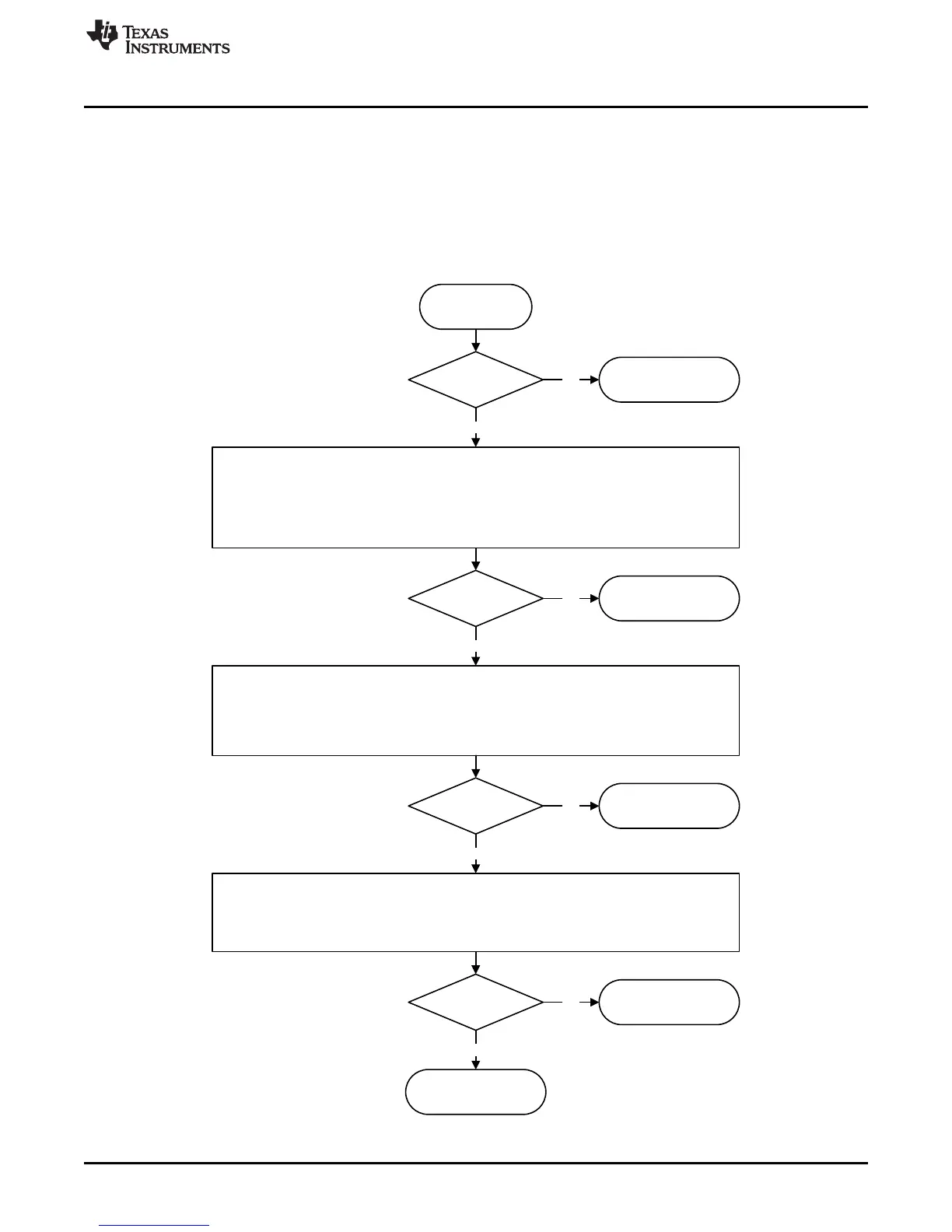
Device locked
Congratulation!
Start
Yes
Verify hardware setup:
x Validate power supply is connected, turned on, and current limit is appropriate for the device.
x Validate OSCin signal is supplied and turned on, if required.
x Ensure programming cable is hooked up to the board.
x Ensure spectrum analyzer center frequency matches target frequency. Choose wide span so that the carrier can
be seen if it is off frequency.
x Ensure device is not powered down by the CE pin.
x Load all registers (Ctrl+L).
Device locked
Congratulation!
No
Yes
Verify software setup:
x 5HYHUWWRGHIDXOWPRGHLQWKHVRIWZDUHXQGHU³'HIDXOW&RQILJXUDWLRQ´.
x Validate that no boxes are red. If so, mouse over and read the tool tips.
x Ensure that all the frequency boxes values are correct. Also understand that the VCO frequency could be
different than the output frequency as there are often dividers after the boxes.
x Load all registers (Ctrl+L).
x Try Readback at this point, if necessary.
Device locked
Congratulation!
No
Yes
Verify communications:
x *RWR³86%&RPPXQLFDWLRQV´, ³,QWHUIDFH´, ensure that the USB2ANY button is turned green. &OLFN³,GHQWLI\´WR
have the program blink the green LED.
x Send simple one way communication to the device such as: POWERDOWN, RESET, or change the status of a
pin. Realize that if a RESET is done, do a Ctrl+L to refresh the registers afterwards. For POWERDOWN, you can
validate this looking at the current on the power supply.
Device locked
Congratulation!
No
Yes
No
Contact TI support
www.ti.com/support











 To Next Page