Programming 10-3
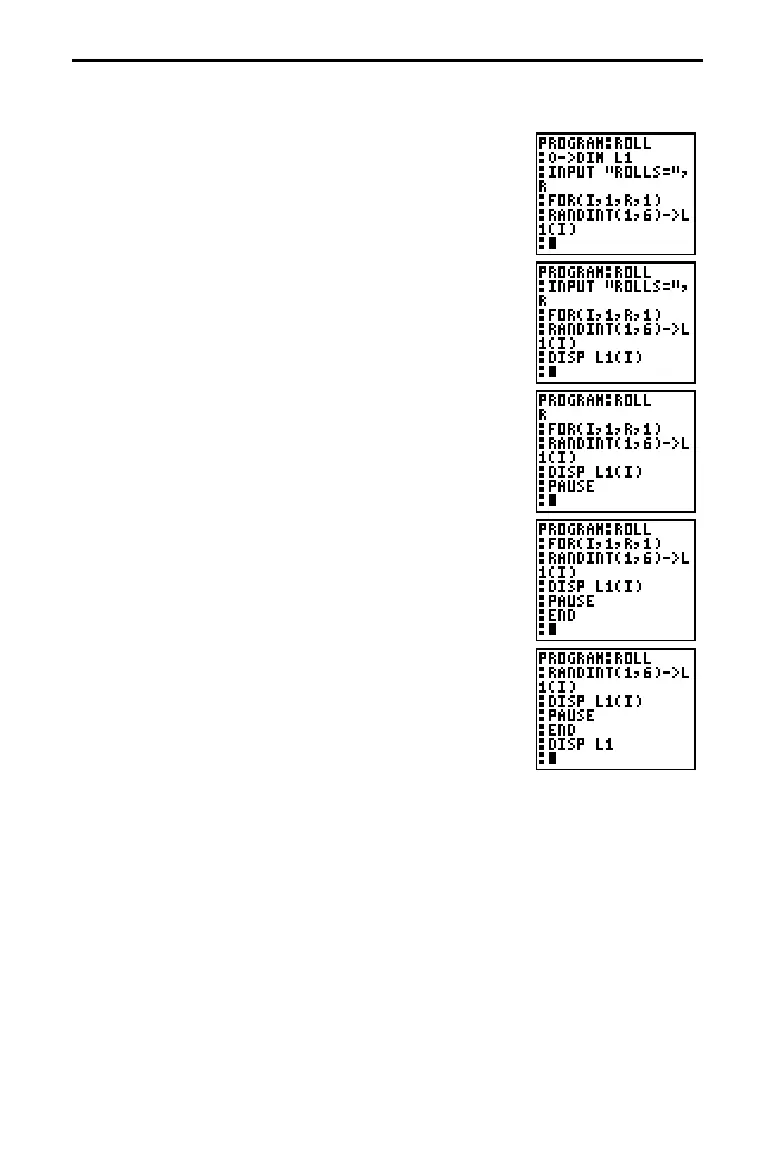
7. Press
I
6
to access the
MATH PRB
menu. Press
5
(to copy
RANDINT(
to the cursor location)
1
b
6
d
§
2
¢
c
?
I
d
to generate random
integers from 1 to 6 and store them into element
I
of
L1
. Press
¸
to complete the instruction.
8. Press
K
9
2
to select
DISP
(display), which is
copied to the cursor location. Press
2
¢
c
?
I
d
. This instruction displays the value of element
I
(the result of the last roll) in
L1
. Press
¸
to
complete the instruction.
9. Press
K
6
to select
PAUSE
, which is copied to the
cursor location. This pauses the program after
displaying the result of the last roll. Press
¸
to
complete the instruction.
10. Press
K
5
to select
END
, which is copied to the
cursor location.
END
identifies the end of the group
of commands in the
FOR(
loop. Press
¸
to
complete the instruction.
11. Press
K
9
2
2
¢
to display the list of all the
roll results. Press
¸
to complete the instruction.
12. Press
2
.
M
K
. Move the cursor to the
program name
ROLL
. Press
¸
. Press
¸
again
from the Home screen to execute
PRGM_ROLL
.














 To Next Page