Operating the TI-80 1-17
To leave the keyboard uncluttered, the TI
.
80 uses full
.
screen menus to give you
access to many additional operations. The use of specific menus is described in
the appropriate chapters.
Some menu keys, such as
I
, display more than one menu.
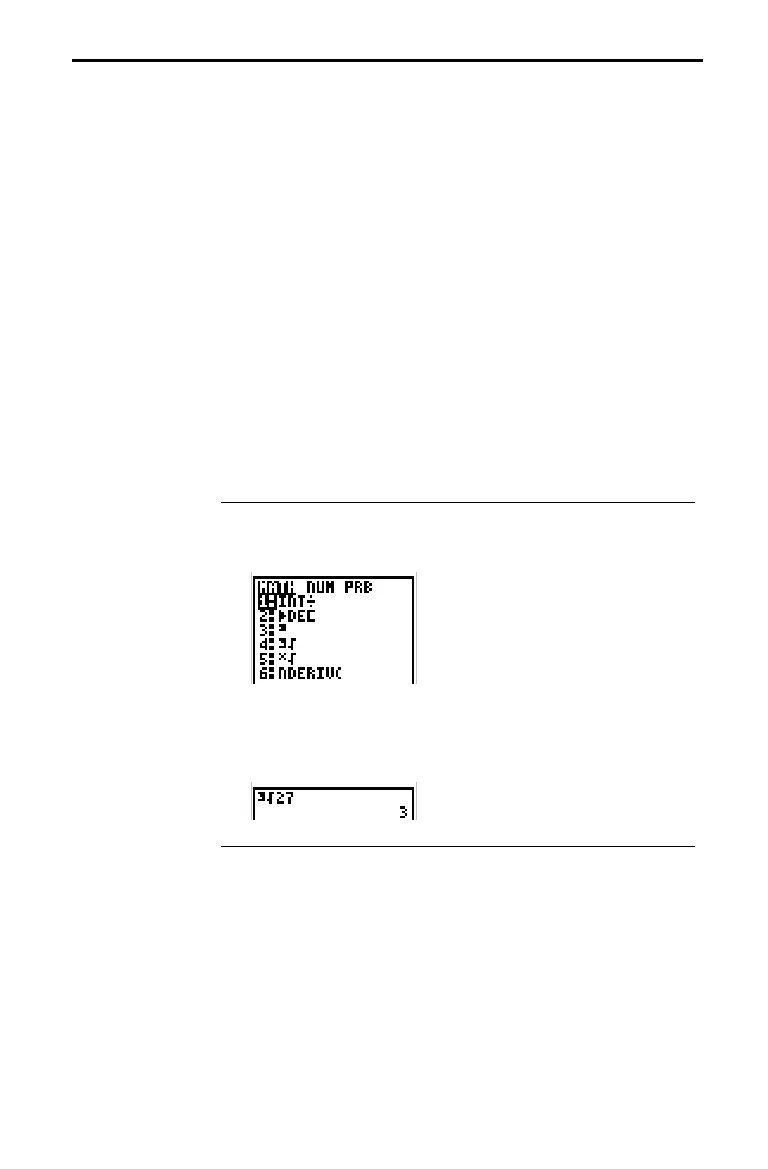
The names of the menus appear on the top line. The current
menu is highlighted and the items in that menu are displayed.
Press
9
or
6
to move the cursor to a different menu.
The number of the current item is highlighted. If there are
more than seven items on the menu, a
$
appears on the last
line in place of the
:
(colon) between the menu number and
name. Menu items, such as
VARS WINDOW
, that end in ...
(ellipsis marks) display another menu.
There are two methods of selecting from a menu.
¦
Press the number of the item you want to select.
¦
Press
8
and
7
to move the cursor to the item you want to
select, and then press
¸
.
Calculate
ò
‡
27 .
1. Press
I
to display the
MATH
menu.
2. To select
ò
‡
, you may either press
4
or press
8
8
8
¸
.
3. Enter
27
,
and then press
¸
to evaluate the expression.
TI-80 Menus
Moving from One
Menu to Another
Selecting an Item
from a Menu














 To Next Page