43
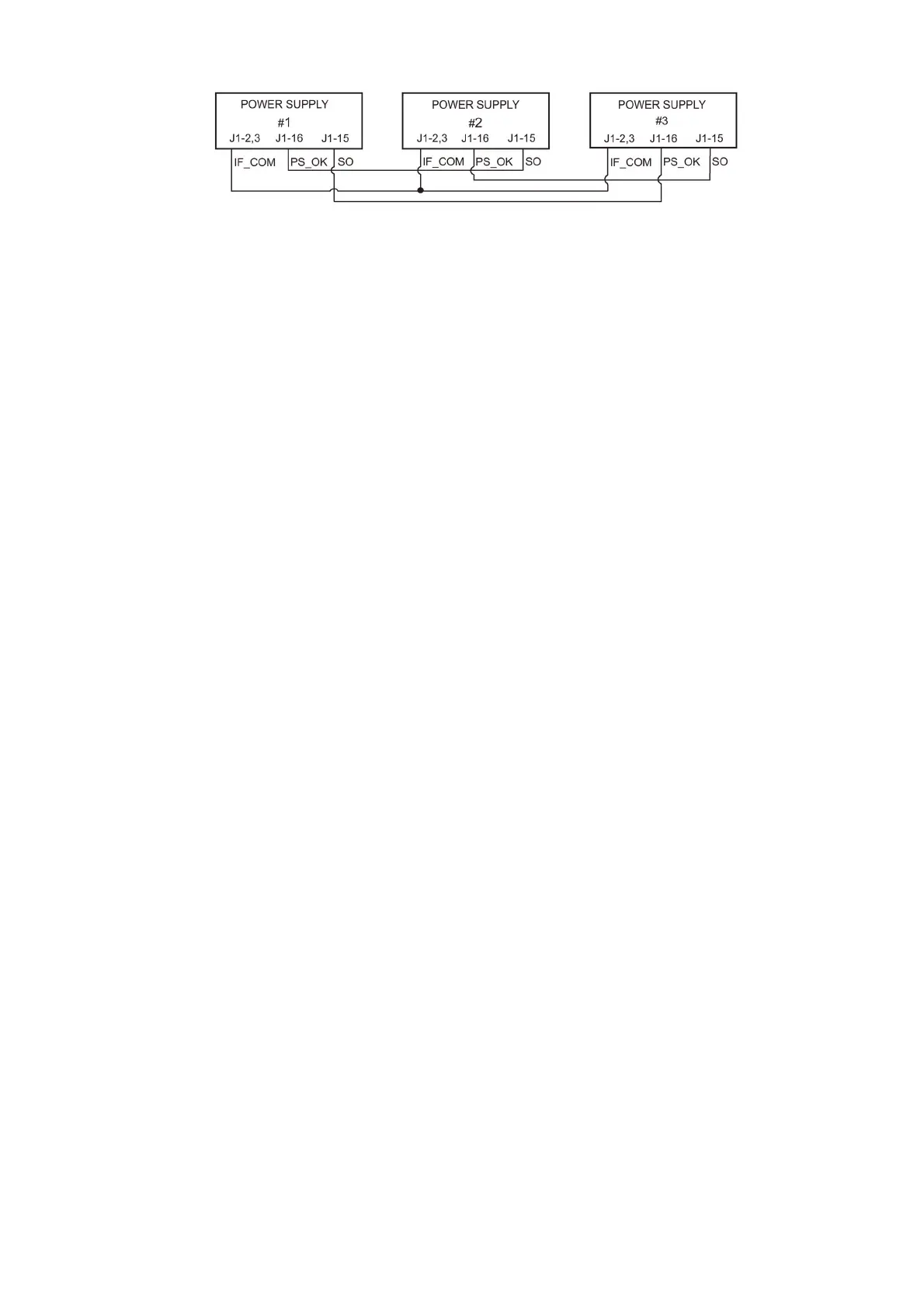
Fig.5-6: Daisy-chain connection
4.17. FRONT PANEL LOCKING
The front panel controls can be locked to protect from accidental power supply parameter change.
Press and hold V/I CHK button to toggle between “Locked front panel” and “Unlocked front panel”.
The display will cycle between “LFP” and “UFP”. Releasing the V/I CHK button while one of the
modes is displayed, selects that mode.
5.17.1 Unlocked front panel
In this mode, the front panel controls are enabled to program and monitor the power supply
parameters.
5.17.2 Locked front panel
In this mode the following front panel controls are disabled:
- VOLTAGE and CURRENT encoders.
- FOLD button.
- OUTPUT button.
The power supply will not respond to attempts to use these controls. The VOLT display will show
“LFP” to indicate that the front panel is locked.
OVP/UVL button is active to preview the OVP and UVL setting.
Use V/I CHK button to preview the output voltage and current setting or to unlock the front panel.


 To Next Page