51
6.3. REAR PANEL RS232/485 CONNECTOR
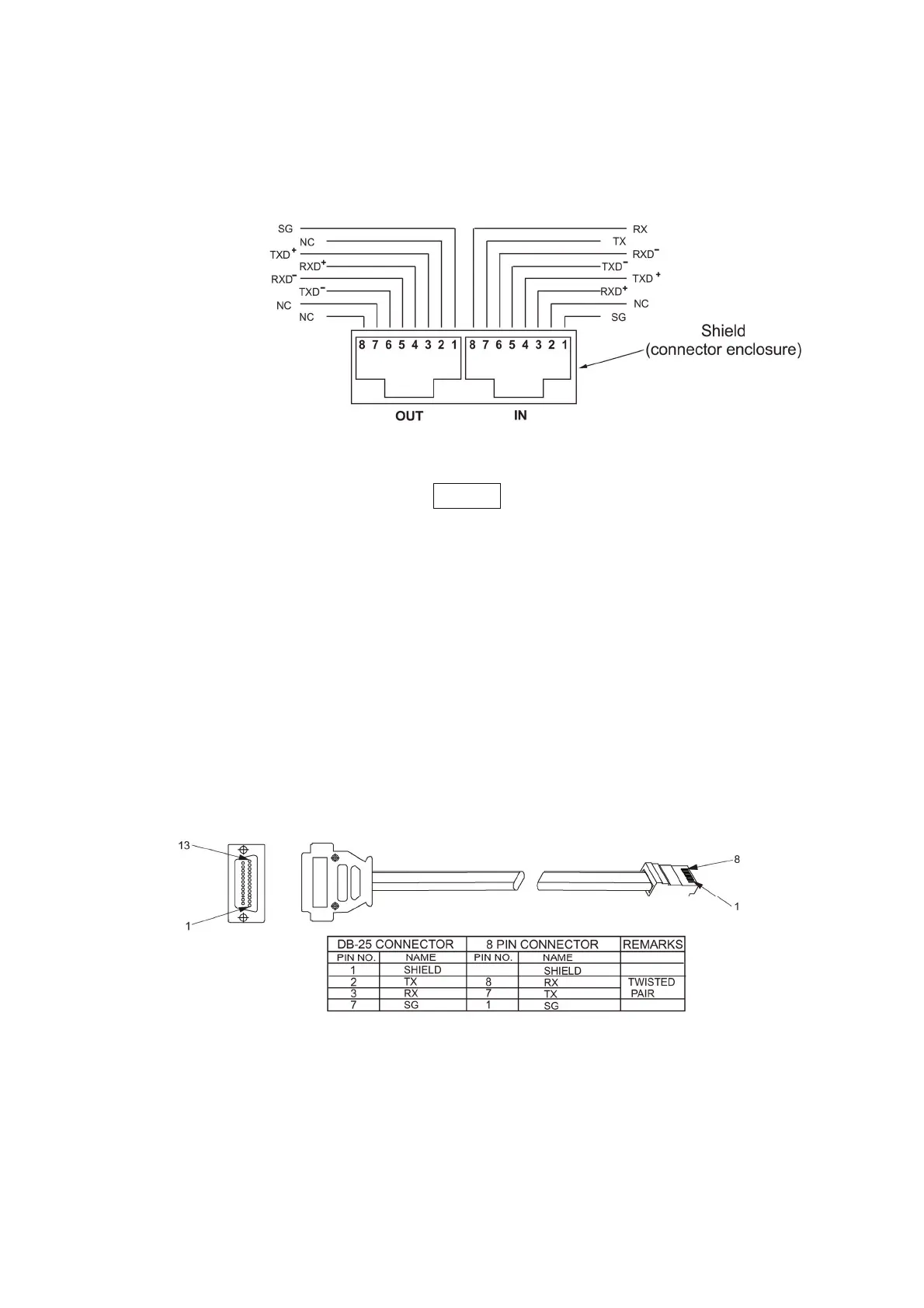
The RS232/485 interface is accessible through the rear panel RS232/485 IN and RS485 OUT
connectors. The connectors are 8 contact RJ-45. The IN and OUT connectors are used to connect
power supplies in a RS232 or RS485 chain to a controller. Refer to Fig.7-1 for IN/OUT connectors
Fig.7-1: J3 rear panel IN/OUT connectors pinout
NOTE
Tx and Rx are used for RS232 communication. Txd +/- and Rxd +/- are used for RS485
communication. Refer to RS232 and RS485 cables description for connection details.
6.4. CONNECTING POWER SUPPLIES TO RS232 OR RS485 BUS
7.4.1 Single power supply
1. Select the desired interface RS232 or RS485 using rear panel setup switch SW1-6 (section 4-4).
- RS232: Down position
- RS485: Up position
2. Connect rear panel IN connector to the controller RS232 or RS485 port using a suitable shielded
cable.
Refer to Figures 7-2, 7-3 and 7-4 for available RS232 and RS485 cables.
Fig.7-2: RS232 cable with DB25 connector



 To Next Page