52
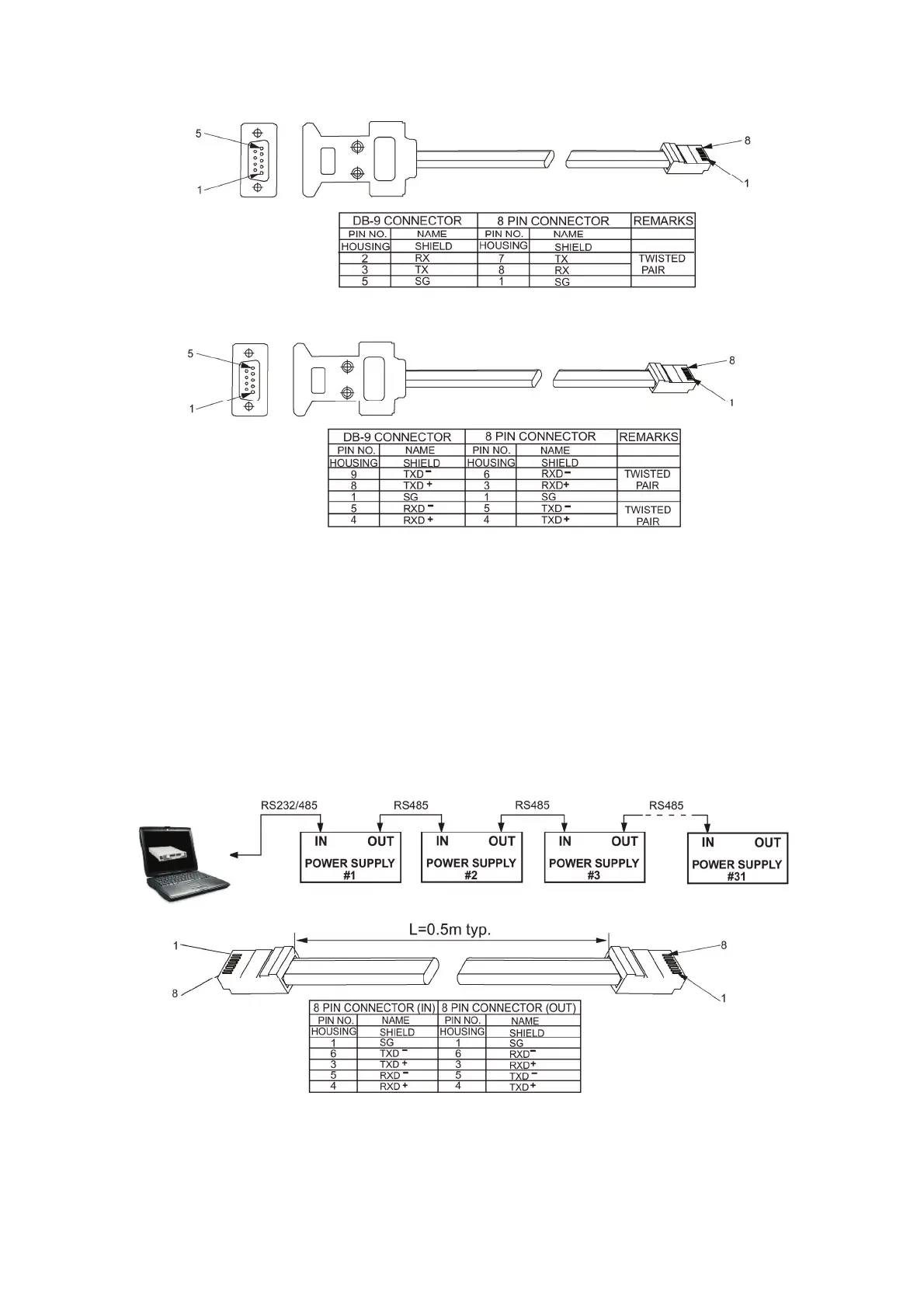
Fig.7-3: RS232 cable with DB9 connector
Fig.7-4: RS485 cable with DB9 connector
7.4.2 Multi power supply connection to RS232 or RS485 bus
Up to 31 units can be connected to RS232 or RS485 bus. The first unit connects to the controller
via RS232 or RS485 and the other units are connected with RS485 bus.
1. First unit connection: Refer to section 7.4.1 for connecting the first unit to the controller.
2. Other units connection: The other units on the bus are connected via their RS485 interface.
Refer to fig.7-5 for typical connection.
- Set rear panel setup switch SW1-6 to it's UP position
- Using the Linking cable supplied with each unit (refer to Fig.7-6), connect each unit OUT
connector to the next unit IN connector.
Fig7-5: Multi power supplies RS232/485 connection
Fig.7-6: Serial link cable with RJ-45 shielded connectors



 To Next Page