AS 680/682
Description, Operation and Maintenance Technical Situation Display
ADS−B
4−33Ed. 10.07
4.4.5.4 Flight Level Panel
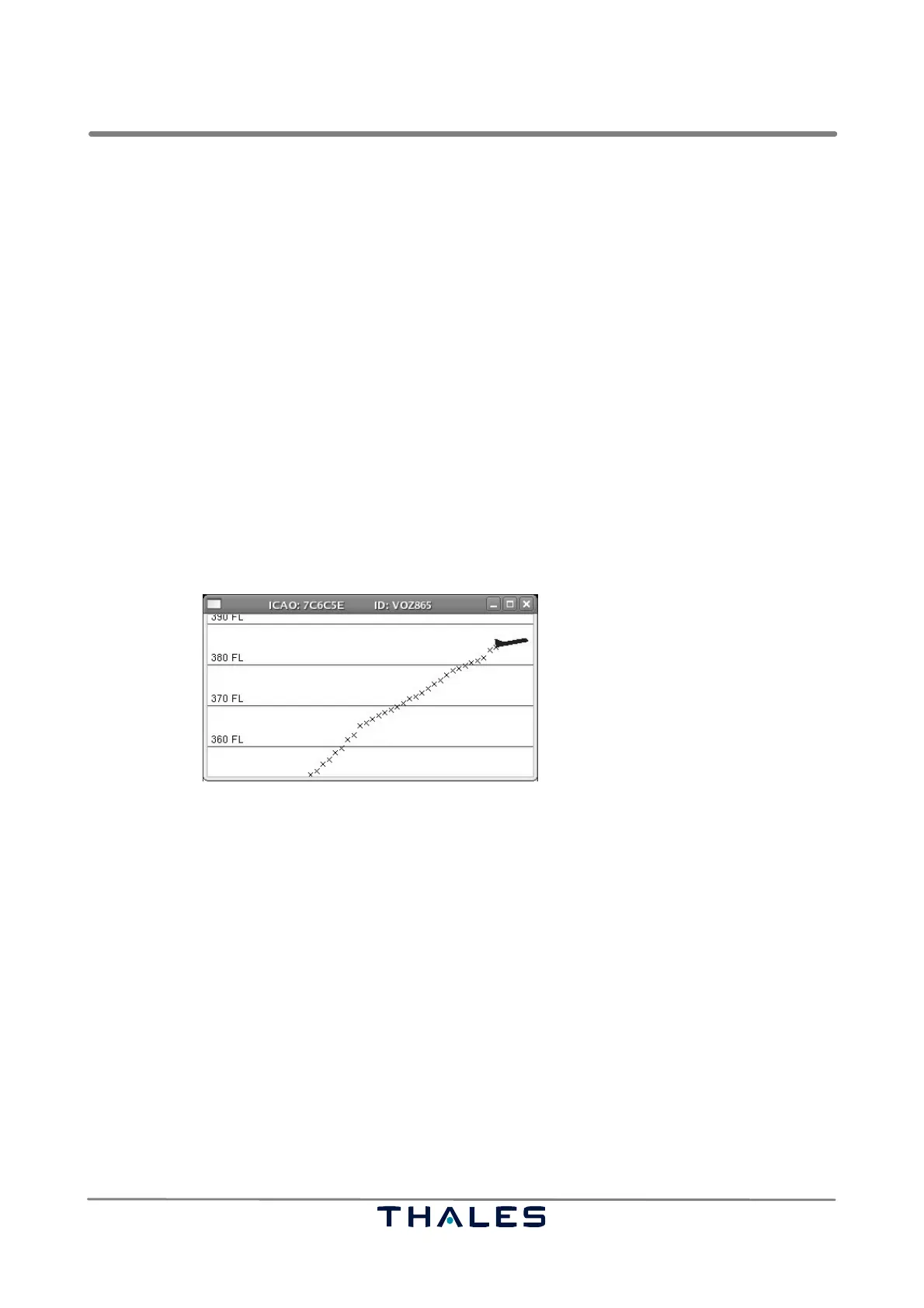
It is possible to show the course of the altitude change and the current vertical rate of a selected target
graphically in the flight level panel. This panel, see Fig. 4−51, is shown or hidden by selecting the entry
’Show FL Panel’ in the menubar item ’Display’, refer to section 4.4.2.4.
If no target is selected or if vertical rate or altitude is not available, then the panel is blank. If the altitude
and the vertical rate of a selected target are given, then
S the inclination of the airplane symbol shows the degree of the target’s vertical rate
S red lines give the altitude level in distances of 10 Flight Level (FL)
S the history of the altitude of the target is marked by x symbols, which are drawn in time distance
of about 1.5 seconds at the corresponding altitude
The titlebar of the flight level panel shows the ICAO address and, if available, the identification of the
selected target.
The flight level panel is closed by the window’s standard possibilities depending on the used window
manager, e.g. by pushing the x on the upper right corner of the panel.
Fig. 4−51 TSD, flight panel (example)


 To Next Page
 Loading...