4-22
User Manual PN 84469 Rev B
Wireless
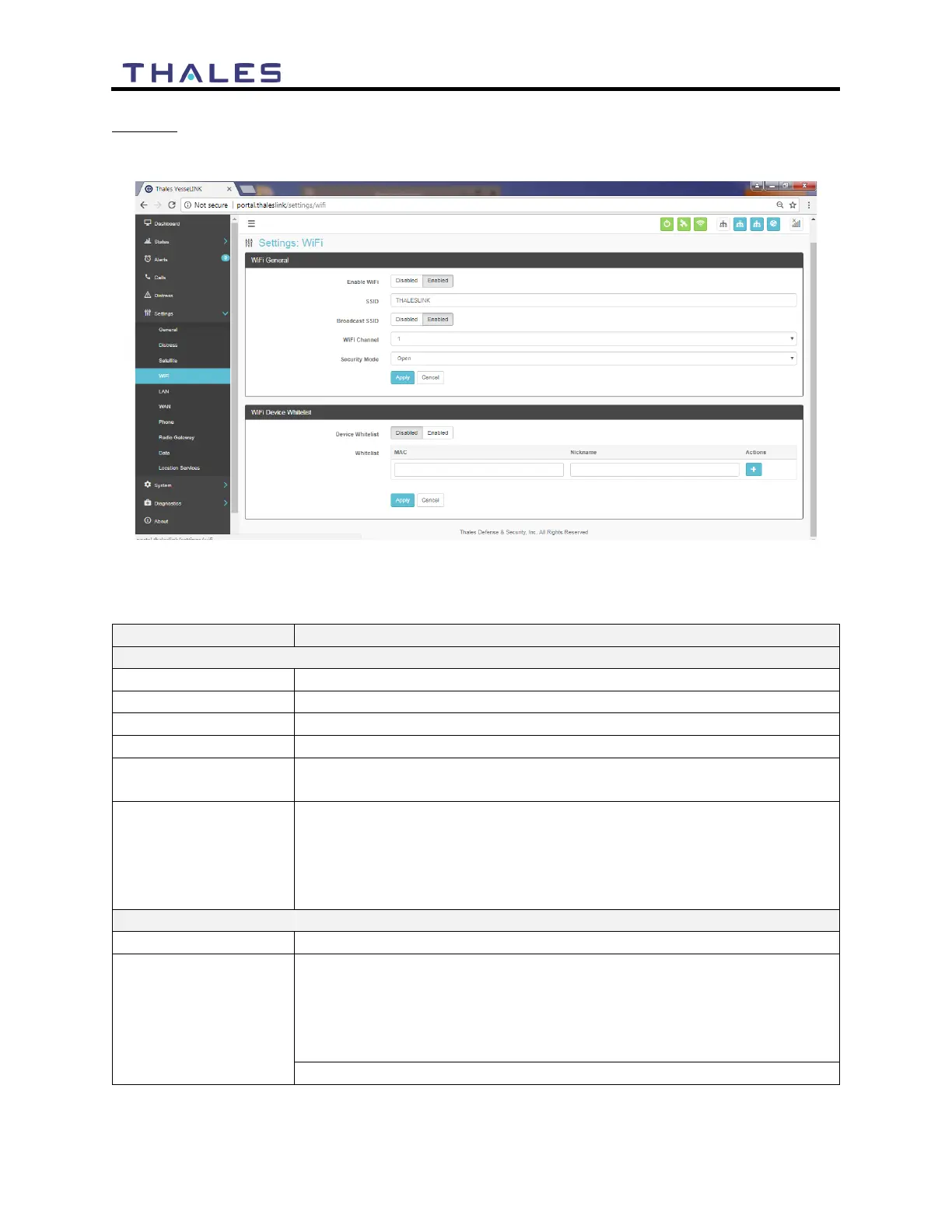
The Wireless page shown in Figure 4-25 allows setup of the Wi-Fi service.
Figure 4-25 Settings
Wi-Fi Screen
Table 4-6 Settings
Wi-Fi
Disabled / Enabled (Enabled is the default setting)
Enter the name of the SSID. ThalesLINK is default.
Disabled / Enabled (Enabled is the default setting)
Set the Wi-Fi Channel 1 – 11
Set the security mode for the channel – OPEN or WPA2. OPEN is
default and does not require a Security Key (password).
When WPA2 is selected as the security mode, a security key must be
entered. The password must be at least 8 characters in length and can
be any combination of characters, numbers, etc. Once enabled, any
device accessing the ThalesLINK (or new SSID name) Wi-Fi will
have to enter the password.
Disabled / Enabled (Disabled is the default setting)
This allows specific devices to access the system’s Wi-Fi. If Enabled,
only the devices entered in the Whitelist are allowed on the Wi-Fi
network. This is done by entering the MAC address of the device
(example: 01:23:45:67:89:ab). All others are prevented from accessing
it. See below note for finding a device’s MAC address
Assign a Nickname to the MAC Address


 To Next Page