Chapter7.Locations
Thischapterintroducesthelocationsofthehardwarecomponentsonyourcomputer.
Locatingcomputercontrols,connectors,andindicators
Thistopicintroducesthelocationsofthecomputercontrols,connectors,andindicators.
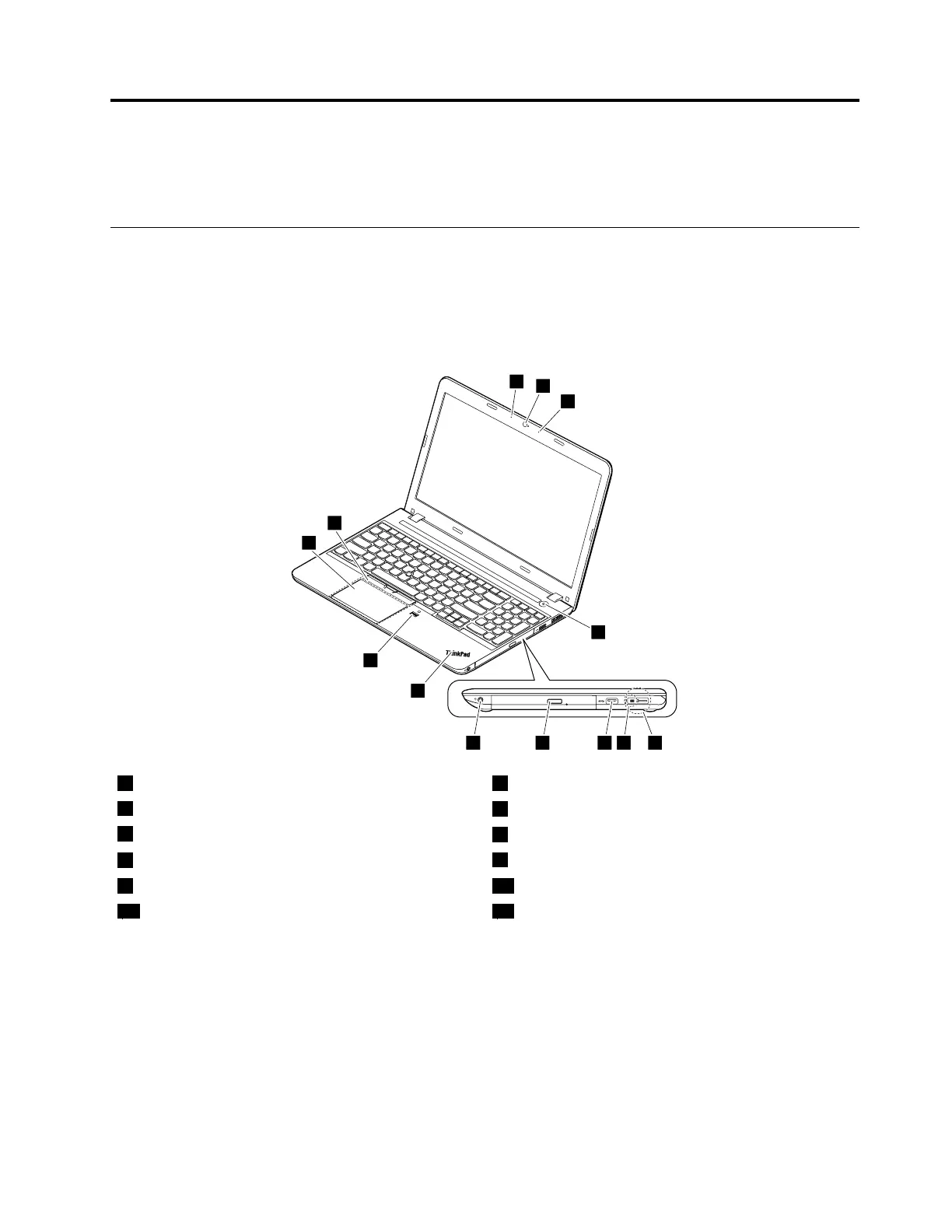
Frontviewformodelswitha2Dcamera
Note:Dependingonthemodel,yourcomputermightlookdifferentfromthefollowingillustration.
1Microphones22Dcamera
3Powerbutton
4LenovoOneLinkconnector
5acpowerconnector
6UniversalSerialBus(USB)3.0connector
7Opticaldriveoroptical-drivebaybezel
8Audioconnector
9System-statusindicator
1
10Fingerprintreader(availableonsomemodels)
11Trackpad12TrackPoint
®
buttons
1
:Forthedescriptionofthesystem-statusindicator,seeChapter5“Statusindicators”onpage53
.
©CopyrightLenovo2015
57



 To Next Page