8.8
Songs for practising
The digital piano offers 60 songs for practising in total, where you mute the right
hand voice and play this part yourself.
1. Playing and ending practising songs
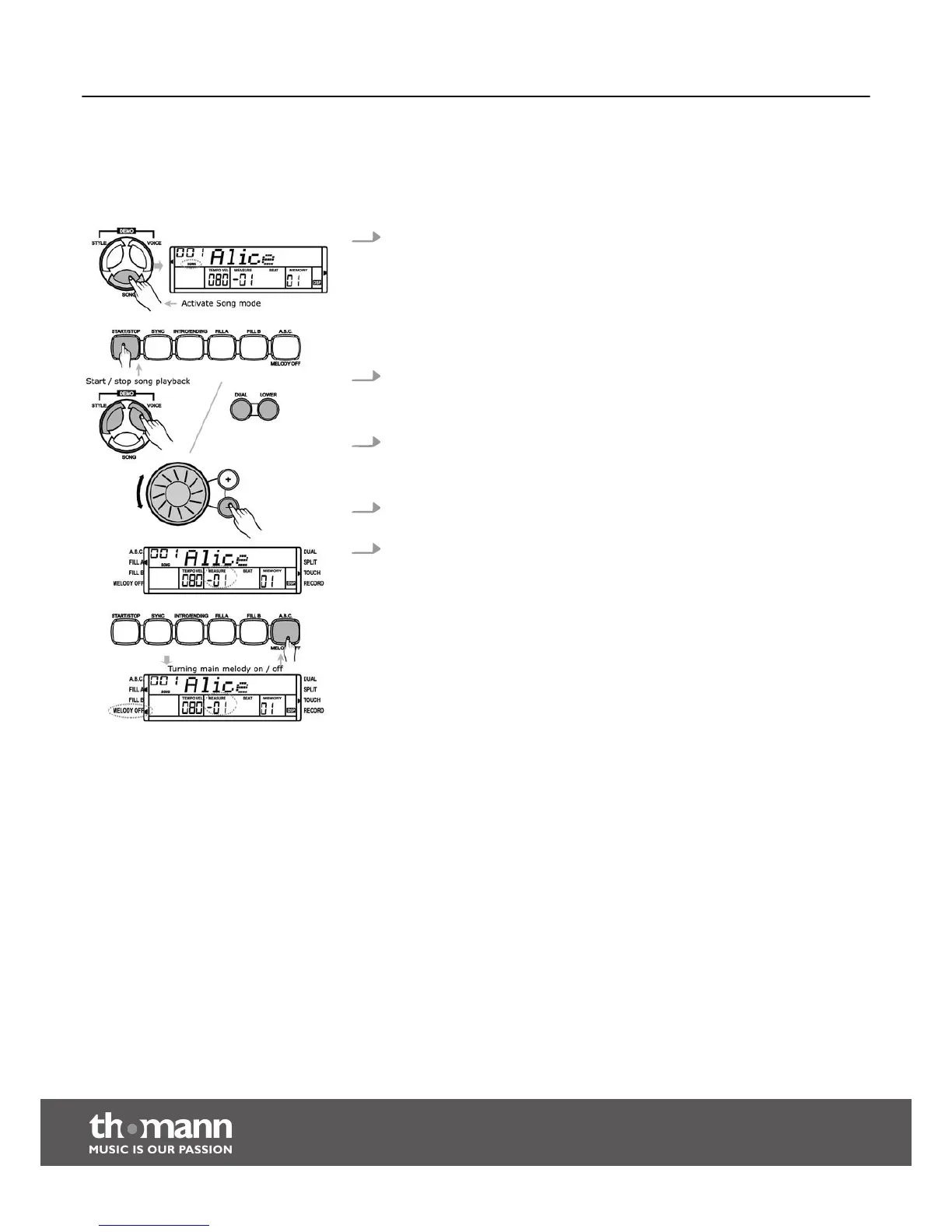
Press the [SONG] button to enter the playback mode for practising songs.
‘SONG’ appears in the display. If you press the [SONG] button again all prac‐
tising songs are played in an endless loop. If you press the [START/STOP] button
the currently displayed practising song is played in an endless loop.
Press the [START/STOP] button again to end the currently played practising
song. This will not quit the mode for practising song playback ‘SONG’.
2. Selecting practising song
Use the jog wheel or the [+] / [–] buttons to select the desired practising song.
When choosing a new practising song, the display shows the title.
3. Playback control
Prior to playback start, one beat is pre-counted. The beat display starts with a
negative value. The practising song begins with beat 1.
4. Press the [START/STOP] button followed by one of the [STYLE], [VOICE], [DUAL]
or [LOWER] buttons to stop playback and quit the mode for practising songs.
5. Press the [MELODY OFF] button to mute the right hand voice. ‘MELODY OFF’
lights up in the display and you only hear the left hand voice. Press the
[MELODY OFF] button again to unmute the track.
Functions
digital piano
36



 To Next Page