Chapter 4
Bridged PPPoE
E-DOC-CTC-20051017-0167 v1.0
36
4.2.2 Using the Mac OS X Dial-In Client
Configuring a Dial-In
connection on a Mac OS X
platform
Proceed as follows to create a Dial-In connection:
1 On the Apple menu, click System Preferences.
2 In the System Preferences window, click the Network icon.
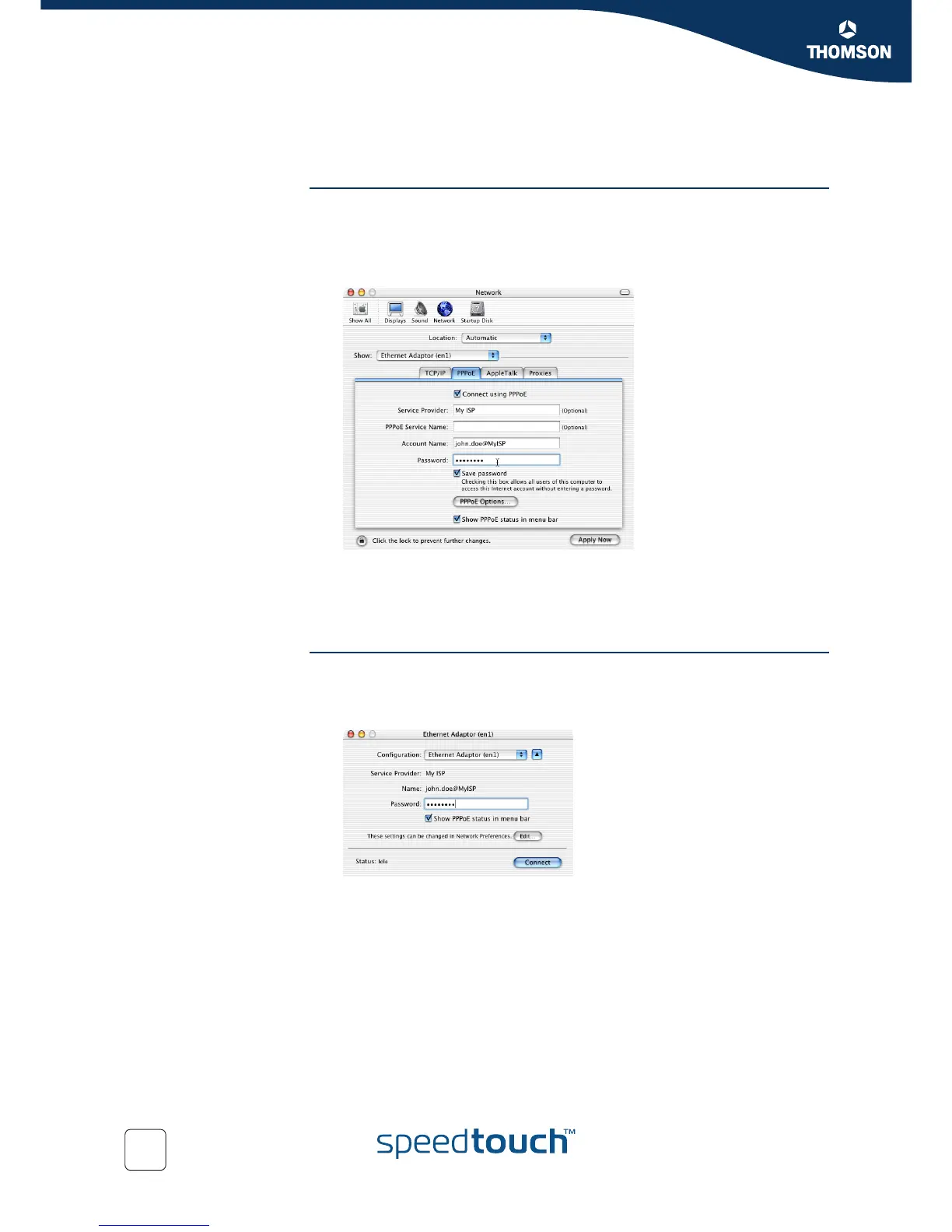
3 The Network window appears:
In the Show list, select Ethernet Adaptor (enx) and click the PPPoE tab.
4 Type your Account Name and Password as provided by your Service Provider.
5 Click Apply Now.
Starting a Dial-In
connection on a Mac OS X
platform
Proceed as follows to connect to the Internet:
1 Click the Internet Connect icon in the dock.
2 The following window appears:
Make sure Ethernet Adaptor (enx) is selected in the Configuration drop-down
list.
3 Type your password.
4 Click Connect.
Your Macintosh connects to the Internet.















 To Next Page