Chapter 9
Routed IPoA
E-DOC-CTC-20051017-0167 v1.0
77
9.1 SpeedTouch™ Routed IP over ATM
Configuration
Preparatory steps for
using Routed IPoA
To be able to configure the SpeedTouch™ successfully for the Routed IPoA Packet
Service, the following information must be available:
The VPI/VCI value of the Virtual Channel on which the IPoA connection service
is enabled
The encapsulation method (in most, if not all cases LLC/SNAP)
The Routed IPoA local and remote interfaces’ IP configuration
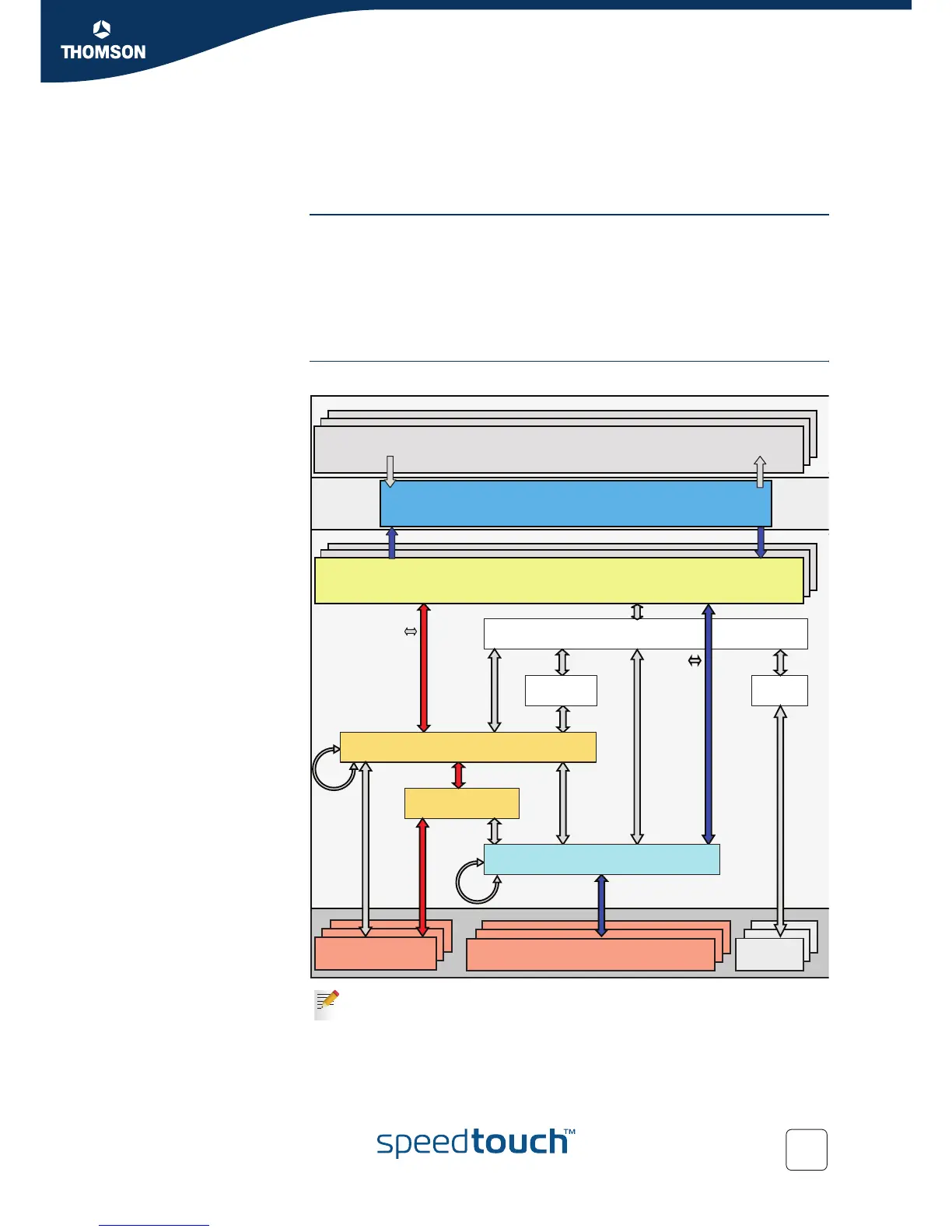
Interface road map The figure below shows the interfaces which have to be configured for Routed IPoA.
Interfaces connected with red arrows are by default created and connected.
Interfaces connected with blue arrows need to be created and connected.
The colours used correspond with the colours used in the “ Protocol stack”.
PPP
PPPoA
IPoA
iARP
PPPoEIPoE /
IPoEoA
ARP
PPPoE RELAY
Multilink
PPP
EthoA
IP Interface(s)
IP Forwarding
Physical Ports
(Eth, USB, WLAN, BT...)
ATM VP/VC
(Over DSL / ATM-F)
ISDN
LoopBack
Ethernet Interface(s)
Bridge
VLAN
ATM Bundle
ATM Interface(s)















 To Next Page