© 2017 Thorlabs GmbH32
PM400
Instrument Setup
Save / Recall
- save / recall remote control specific parameters
Shortcut: [Shift + F9]
- sets the device to local mode between the measurement inter-
vals
Shortcut: [Shift + F10]
4.2 Using the Instrument Drivers
Instrument Driver Installation
The PM400 software package contains a set of instrument drivers that allows conveniently re-
mote controlling the instrument in most common programming languages. The instrument dri-
vers must be installed, please follow the setup dialog instructions.
Note
To successfully complete the install of the PM400 USB driver you must have Administrator pri-
vileges on the PC which you are performing the install.
Prior to connecting the PM400 with a PC, please check if NI-VISA is installed on the PC, other-
wise install NI-VISA that is available for free from the National Instruments website www.ni.com
or from the data carrier that came with the instrument.
After successfully installing the drivers connect the PM400 to a USB port of your PC. The PC
will find a PM400 test and measurement device. Please follow the instructions of the dialog
screens and allow the installing.
Instrument Driver Example
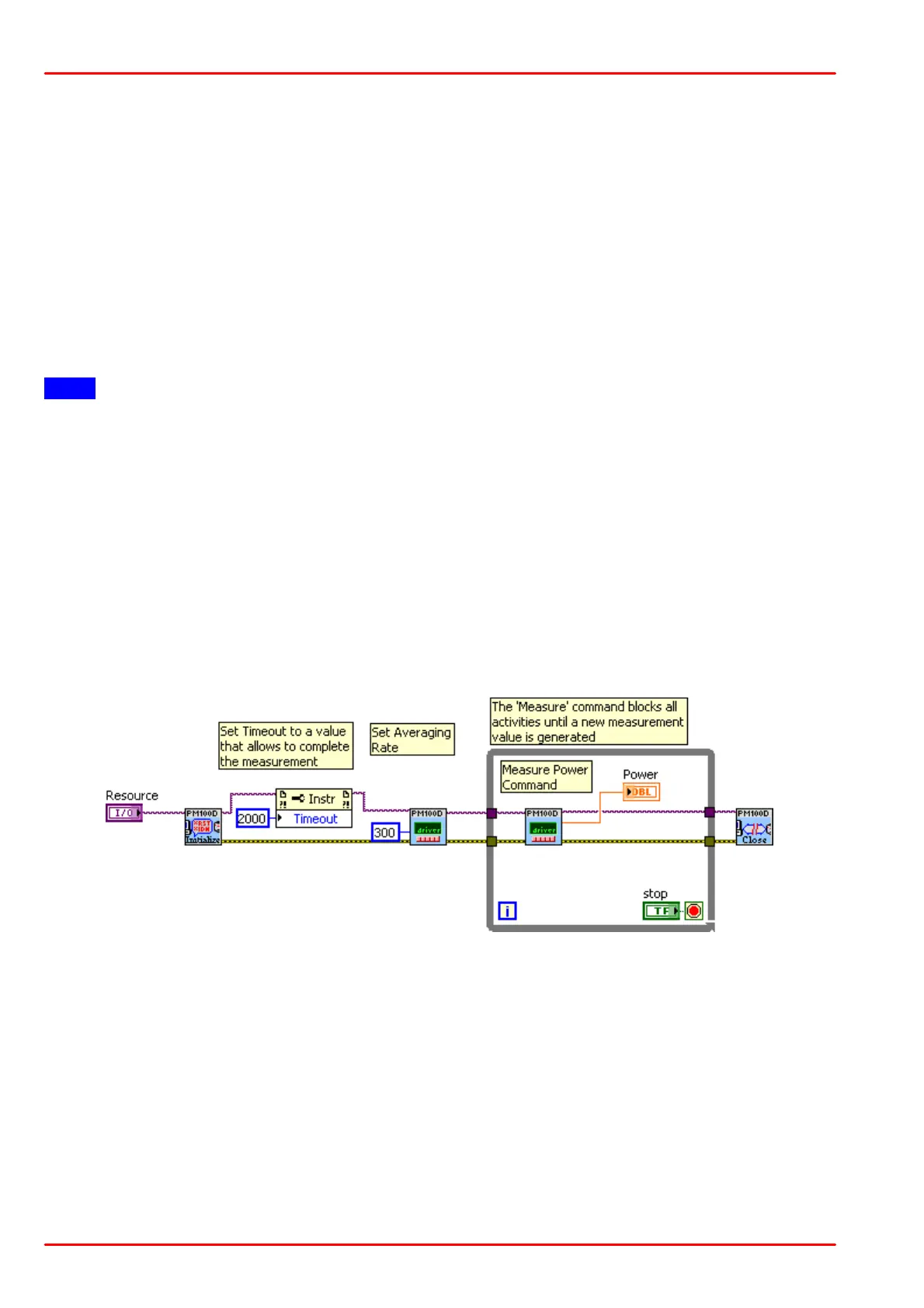
The following LabVIEW example demonstrates how to use the instrument drivers for measure-
ment tasks. The example is included on the data carrier that came with the instrument.



 To Next Page