© 2017 Thorlabs GmbH26
PM400
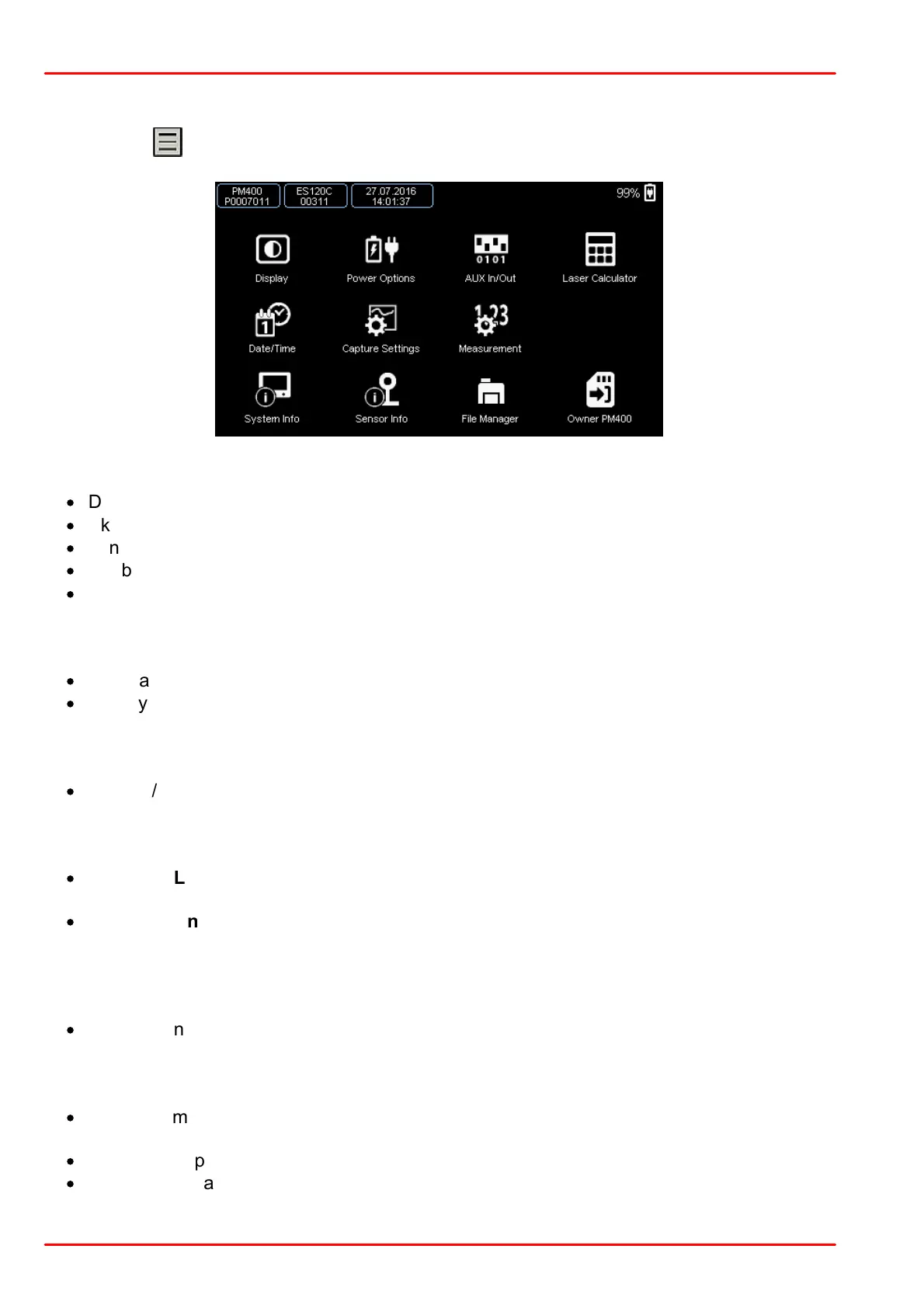
3.9 Main Menu
Pressing the button, opens the PM400 Main Menu.
Submenu Display
·
Display brightness
·
Skin (dark or light)
·
Language (English, German, Chinese or French)
·
Enable / disable button sound
·
Lock / unlock GUI control; in Remote operation: performs GTL (Go To Local) command
Submenu Power Options
·
Dim Backlight and Auto-Shutdown on battery and mains operation
·
Battery state information
Submenu AUX IN / Out
·
Enable / Disable GPIO ports
Submenu Laser Calculator
·
Submenu Laser Calculator: Allows entering beam parameters for correct calculation of
the additional parameters
·
Submenu Unit Converter: Allows optical power conversion between W and dBm, wave-
length conversion between wavelength, frequency, wave numbers and photon energy.
Submenu Date / Time
·
Set date and time
Submenu Capture Settings
·
Set long-time capture parameters: capture control (manual, time, number of samples) and
capture interval (10 ms to 60 s)
·
Optional temperature logging
·
Returns estimated output file size



 To Next Page