SLEEP
XXX
SUBTITLE SUBTITLE
7
Remote control
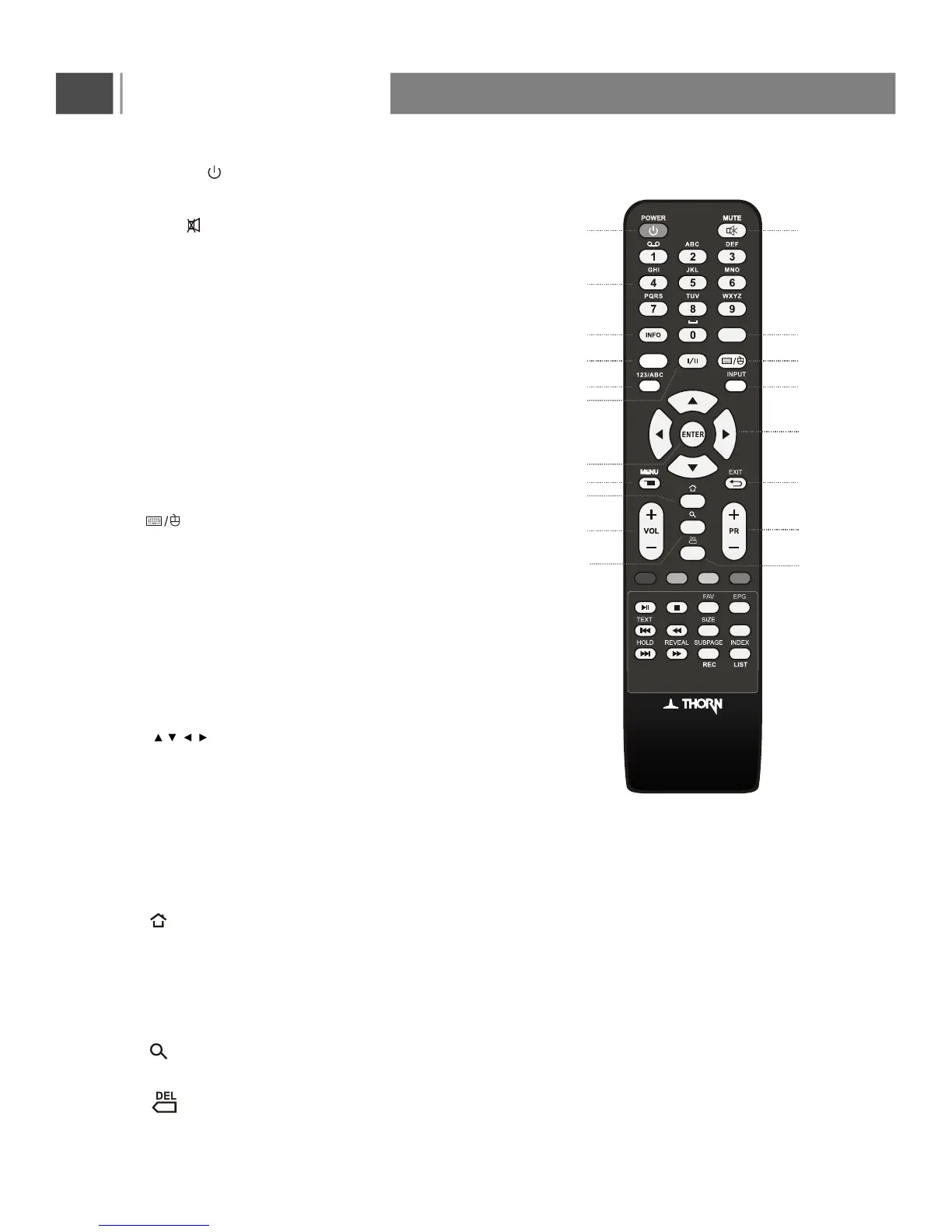
1.POWER( ): Switches the TV on from standby or back
to standby.
2.Mute( ): Switches the sound on or off.
3.0~9 Number Buttons: Press 0~9 to select a channel,
or input the password.
4.INFO: Press to display the channel information;
this information disappears after 10 seconds.
5.RECALL: Press to return to previously-viewwed channel
(only for TV)
12.ENTER: Press to enter or confirm an entry.
13.Menu: Press to enter into the on-screen setup
Menu, press again to return.
14.EXIT: press this button to exit the menu.
16.VOL+/-: Press to adjust the volume output levels.
17.PR+/- : Switches to the next or previous channel.
6
.SLEEP: Press repeatedly to set a time delay
(10,20,30,60,90,120,180,240 minutes and Off)
after which the TV switches to standby. To cancel
sleep time,press Sleep button repeatedly until sleep off
appears.
.INPUT: Press to display the input source menu, then
using Direction buttons to select input signal source,
such as DTV,ATV,AV,PC,YPbPr,SMART TV,HDMI1,
HDMI2, HDMI3, and Media.
10
8
.I/II: Selects the sound output in TV mode.
11. , , , : Press Direction buttons to navigate the
on-screen menus and adjust the system settings to
your preference.
1 2
3
4 5
15
16
6 7
8 9
10
12
13 14
17
18. : Call out the search bar for search or input new web
address.
.123/ABC: Press to switched digital key and the letter key
under smart TV source.
15. : Press to back to home interface under smart TV
source.
19. :
XX
Press to backspace enter text.
7. : Press to switch the mouse arrow and select the
box under smart TV source.
9
18
19
RECALL
11
3D
3D: 2D/3D mode switch.



 To Next Page