D4008 – EN EZ 2810 Operators Manual 24
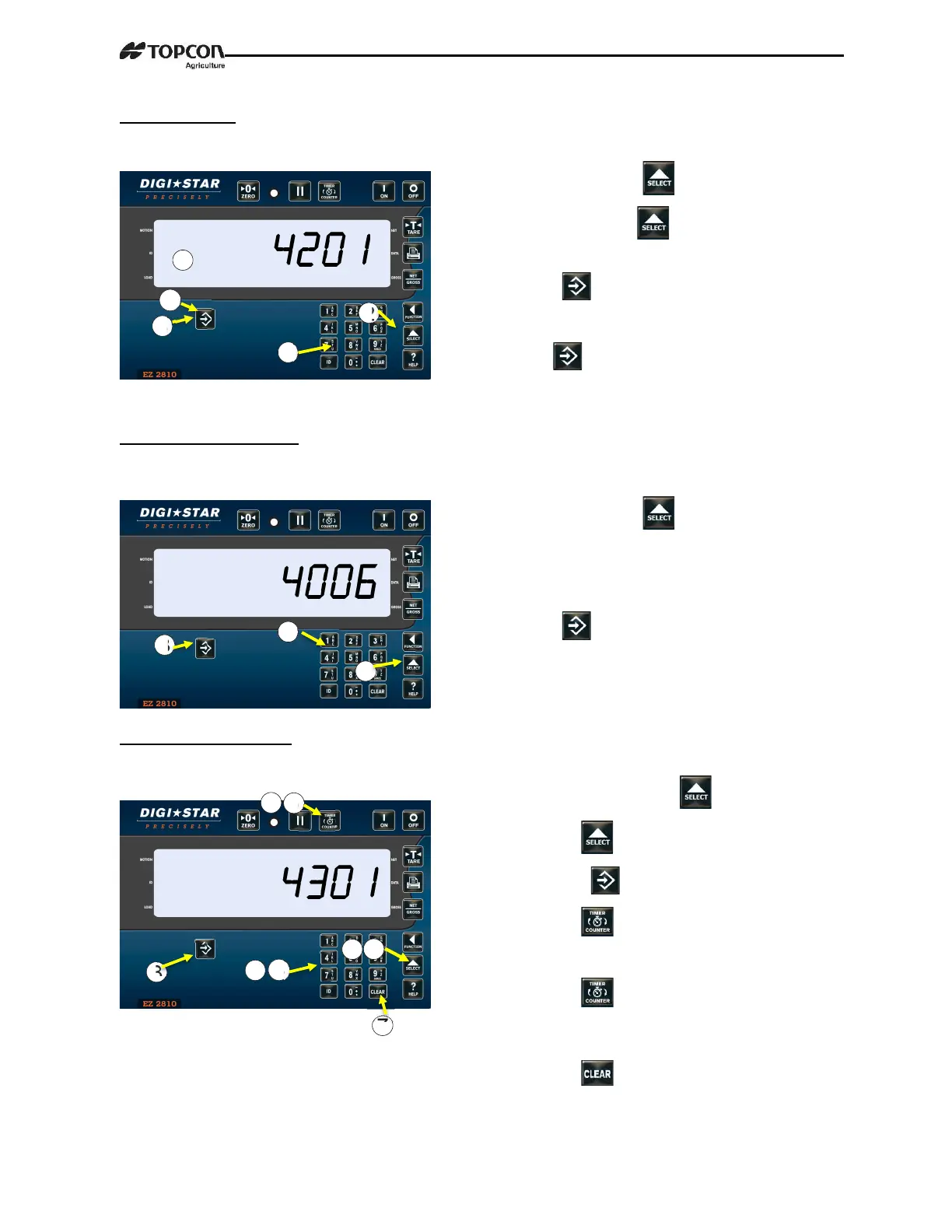
2.9.0 Tolerance
% ingredient can be under/over-loaded and still automatically advance.
2.9.1 Preset Delay Time
Time indicator waits before automatically
advancing/printing entered preset weight.
2.9.2 Rotation Counter
Indicator counts mixer auger rotations. Allows user to know how long feed has mixed. NOTE:
Feature requires optional Rotation Sensor kit.
1.
Enter 4201 press .
2. Repeatedly press displays tolerance
amount by percentage
3. Press stores setting.
4. Enter number for tolerance setting
5. Press stores setting.
NOTE: OFF Setting always advances after
ingredient amount reached, if delay timer is
set.
1.
Enter 4006 press .
2. Using keypad, enter number (in seconds)
before automatic advance/printing. (See
note)
3. Press stores setting.
NOTE: 0 Setting prevents auto-advance.
1. Enter 4301 press .
2. Press to pick REV option.
3. Press .
4. Press
5. Enter number of rotations.
6. Press rotation counter counts
down. Counter reaches zero, alarm
light and buzzer on.
7. Press


 To Next Page