Setting the Neutral Lock
1. Squeeze the dri v e lev ers bac k until an increase
in force is felt.
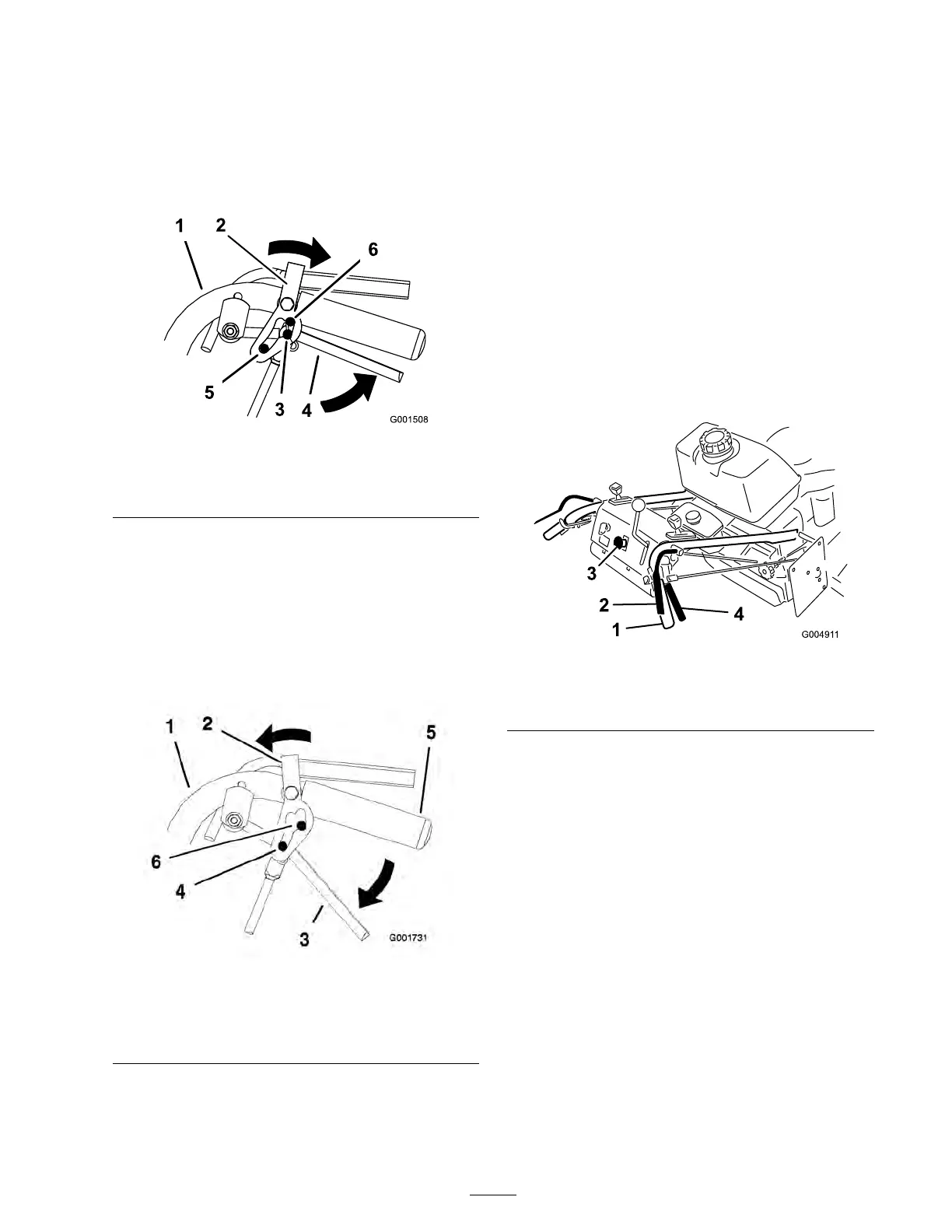
2. Place thumbs on the upper par t of the loc ks
and mo v e them bac k ( Figure 7 ).
Figure 7
1. Handle 4. Drive lever
2. Neutral lock 5. Full speed forward position
3. Neutral position
6. Reverse position
Releasing the Neutral Lock
1. Squeeze the dri v e lev ers bac k until an increase
in force is felt.
2. Place thumbs on the upper par t of loc ks and
mo v e them forw ard until the pins are in the
forw ard slot ( Figure 8 ).
Figure 8
1. Handle 4. Pin in full speed forward
position
2. Neutral lock 5. Handle
3. Drive lever 6. Forward slot
Operating the Mower Blade
Control (PTO)
T he blade control knob (PTO) is used in
conjunction with the Operator Presence Control
(OPC) lev ers to eng ag e and diseng ag e the mo w er
blades .
Engaging the Mower Blades (PTO)
1. T o eng ag e blades , squeeze the Operator
Presence Control (OPC) lev ers ag ainst handle
g rips ( Figure 9 ).
2. Pull the blade switc h (PTO) up and release it
while holding the OPC lev ers ag ainst handle
g rip .
Figure 9
1. Handle
3. Blade control switch (PTO)
2. Operator Presence Control
levers (OPC)
4. Drive Lever
Disengaging the Mower Blades (PTO)
R elease the Operator Presence Control (OPC)
lev ers to stop the blades ( Figure 9 ).
Note: T he engine will kill if the OPC lev ers are
released with the mo w er r unning and the speed
control lev er is not in neutral position.
17



 To Next Page