2. MAJOR UNIT REPLACEMENT
EO18-33032
2.10 Replacing the Peel-Off Roller
2-27
2.10 Replacing the Peel-off Roller
1) Remove the Peel-Off Unit. (Refer to Section 2.8 Replacing the Peel-Off Unit.)
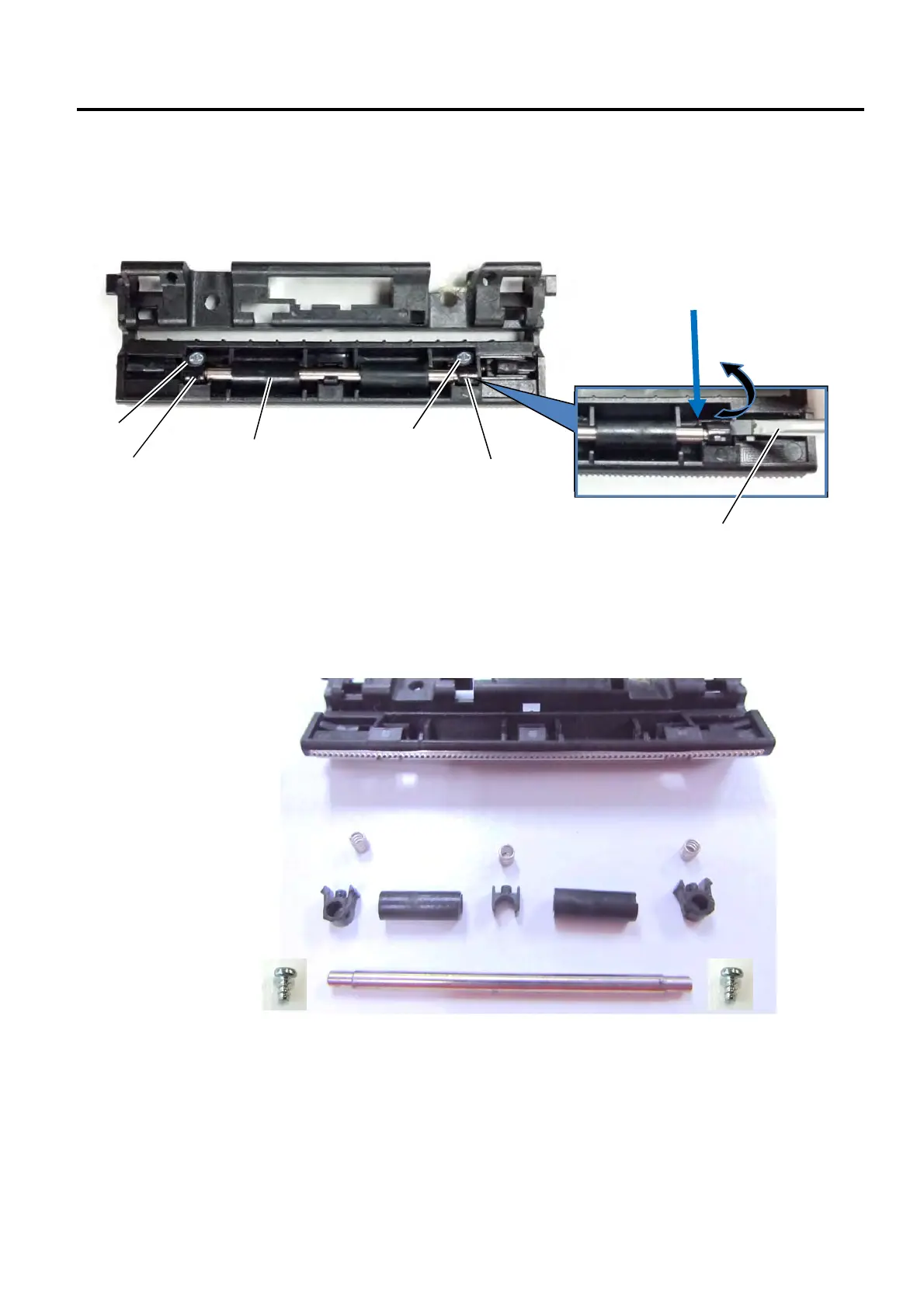
2) Remove the two Screw and two Roller Clips with a Flat screwdriver, then remove the Peel-off Roller Assembly.
3) Remove the two Peel-off Rollers and the 3 Roller Clips from the Roller Shaft.
Roller Clip
Flat-blade
Screwdriver
Peel-off Roller
Roller Clip
Legend:
A - 3 springs
B - 2 Peel-off rollers
C - Roller Clips
D - Roller shaft
E - Middle hook
F - 2 Screws
Release the peel off shaft hook with
a flat-blade screwdriver.
1
2
3
B1 B2
C1
C2
E1
D
F1
F2
Screw
Screw


 To Next Page
 Loading...








