Touch Screen Controller Owner's Manual
50
-EN
8 Administrator menu
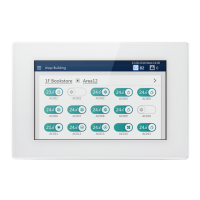
You can restrict the operation range of the Unit by locking it.
This section explains how to lock and release it.
For the restriction range, see "Set the operation lock level (Operation lock)" (P.62).
• You can change the password. (P.62) If you do not know the password, please contact your administrator.
• If you enter the wrong password three times when unlocking, password input is restricted for 30 minutes.
• When automatic lock is set, the Unit will be locked automatically after 5 minutes have passed after an operation has
completed.
• When the lock is set, if you tap a function that cannot be operated, the message "operation function is locked" is displayed.
Also, appears in the menu.
Restrict Operation of the Touch Screen Controller (Operation Lock)
1 Tap
[1-(1)] appears.
2 Tap [2-(1)]
Below, the screen for release is explained.
3 Tap [3-(1)]
To change the auto lock settings, tap [
3-(2)]
4 Tap the number, enter the 4-digit password, then tap
[
4-(1)]
The lock is set or released.
• The initial set password is "1048".
• There are two levels of protection when locking. (P.62)
• Tap to delete one character.

 To Next Page
 Loading...