24
Chapter 6
Network Security
6. 3. Access Control
Access Control is used to block or allow specific client devices to access your network
(via wired or wireless) based on a list of blocked devices (Blacklist) or a list of allowed
devices (Whitelist).
I want to:
Block or allow specific client devices to access my network (via wired or wireless)
How can I do that?
1. Visit http://tplinkmodem.net, and log in with the password or your TP-Link ID.
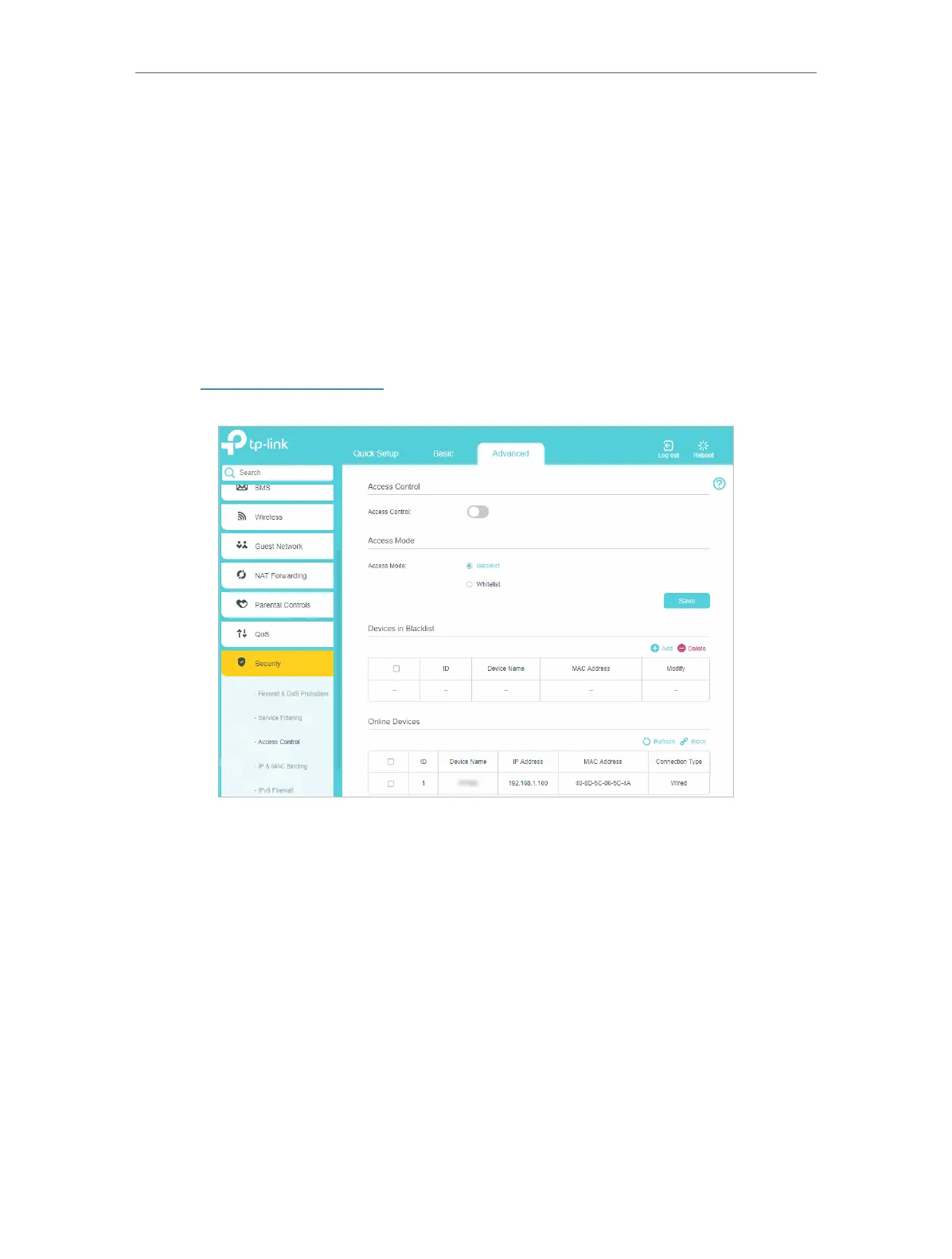
2. Go to Advanced > Security > Access Control and enable Access Control.
3. Select the access mode to either block (recommended) or allow the device(s) in the
list.
To block specific device(s)
1 ) Select Blacklist and click Save.
2 ) Select the device(s) to be blocked in the Online Devices table.
3 ) Click Block above the Online Devices table. The selected devices will be added to
Devices in Blacklist automatically.
To allow specific device(s)
1 ) Select Whitelist and click Save.
2 ) Click Add.















 To Next Page