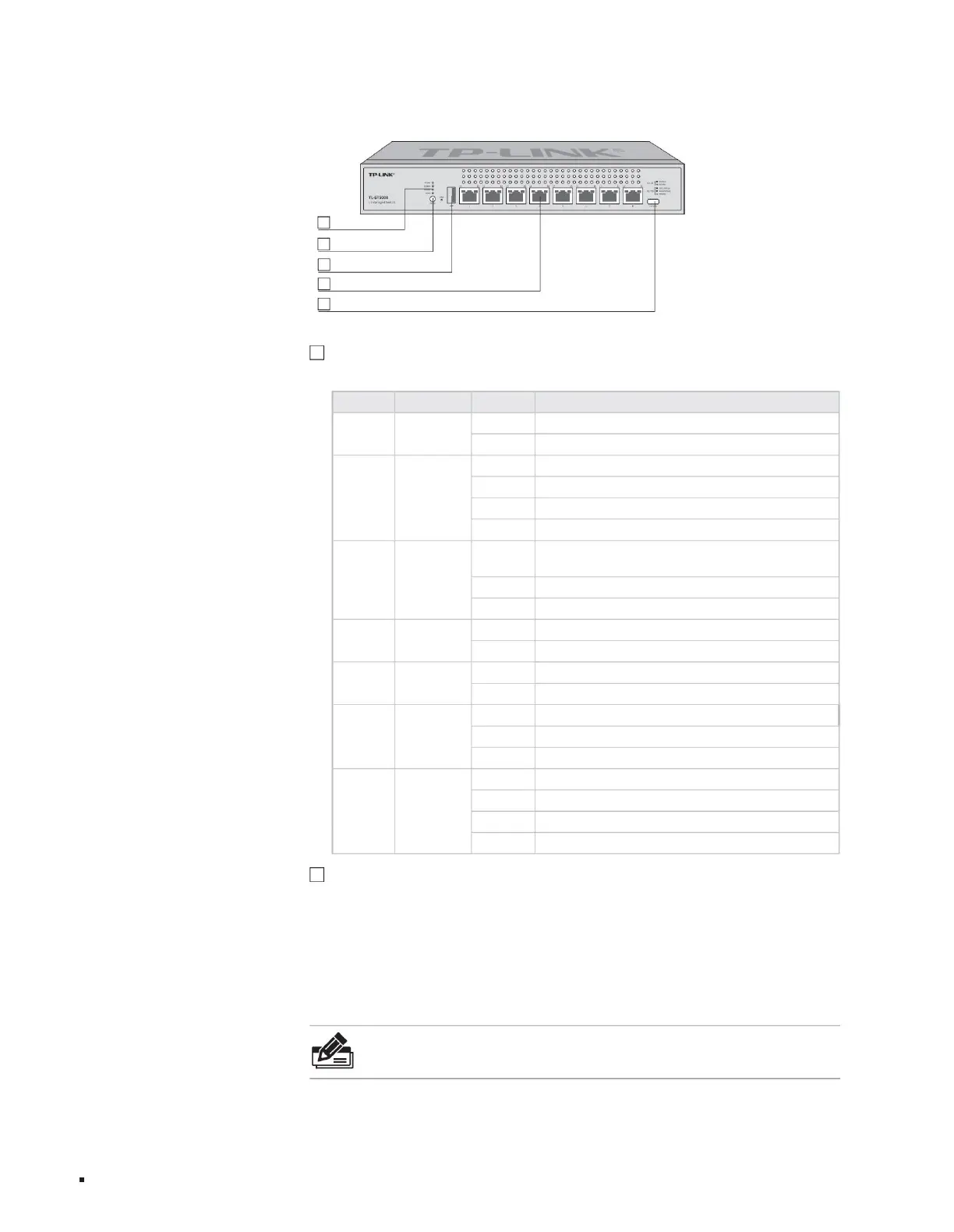
The front panel of TL-ST5008 is shown in the figure below.
2
5 1 Type-C Console port
4
8 10Gbps adaptive RJ45 ports
1 indicator light
product description
3
1 USB ports
Turn off the port indicator to work in other modes
The green port works at 5Gbps/2.5Gbps. The yellow port works
at 1Gbps/100Mbps. The flashing port is transmitting data.
Green flashing system is normal
Solid yellow indicates an error in electing the stack master device, or other types of stack errors occur.
Flashing port is transmitting data
Steady green system abnormality
Turn off this device and it is not the stack master device.
Steady green
The port that is always green is connected to the device normally and works at a rate of 10Gbps.
Off No device is connected to the port
Power power indicator
L1-L8 port indicators
Master stack indicator
Indicator name working status working description
System
The system is not powered or the power supply is abnormal.
Always on USB connection is normal
Always on system power supply is normal
This device is the stack master device, or the stacking function has been enabled but has not been stacked
independently.
Off USB connection abnormality or not connected
R1-R8 port indicator
Off No device is connected to the port
Red always on fan abnormality
Extinguish system abnormality
Steady green port indicator mode works in stacking mode
USB port light
System/fan
indicator
Stack mode indicator
Mode switch
Layer 3 managed switch installation manual
Stacking mode: A certain port indicator (L1-L8) is solid green indicating that the port number is the stacking ID of this device.
Note:
ÿThe mode switching function software is supported by subsequent upgrades, please refer to the actual software functions.
2. Mode conversion switch The
mode conversion switch is used to switch the indication status of the indicator light and supports switching between port mode and stacking
mode. If it is currently in port mode, press the button to switch to stack mode; if it is currently in stack mode, press the button to switch to port mode. If the button
is not pressed for more than 45 seconds in any mode, it will automatically return to port mode.
05
Figure 1-4TL-ST5008 front panel diagram
Port mode: The port indicator light identifies normal connection and speed status;
1 Indicator light
You can monitor the working status of the switch through the indicator light, please see the table below.
Machine Translated by Google



 To Next Page