Slideshow Maker
Slideshow Maker Slideshow Maker
If you want to use the Slideshow feature on your MP840 you must first, convert your Photo files to the
‘.sls’ file format using the Slideshow Maker, then transfer the Slideshow files to the player.
The MP840 will only display a Slideshow of your Photos if they are converted to the “.sls” file format.
You must use the Slideshow Maker software to transfer your “.JPG,” “.BMP,” or “.GIF” photo files
to the “.sls” format.
Slideshow Maker
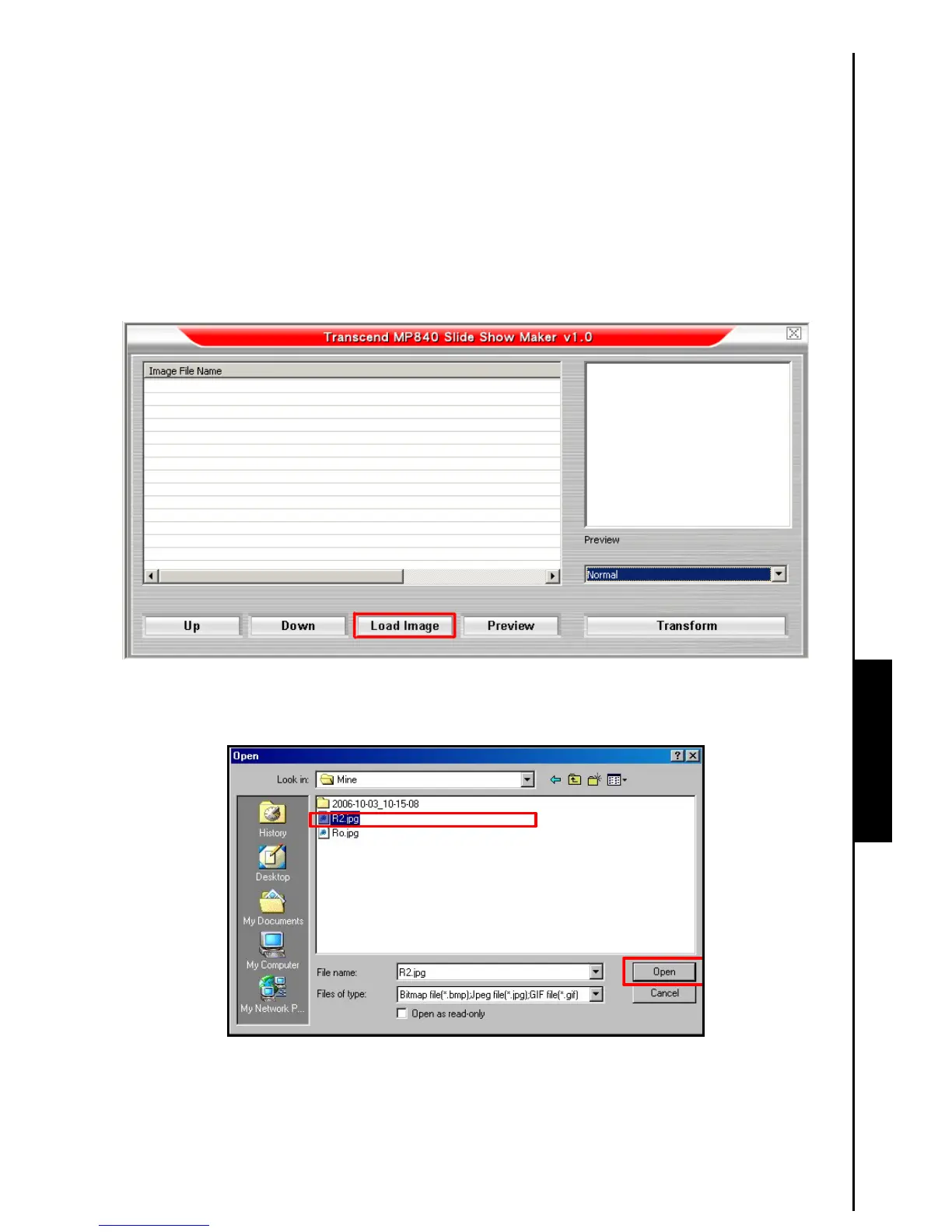
1. Start the Slideshow Maker program and the Slideshow Maker main window will appear. Click on the
“Load Image” button to continue.
Figure 16. Slideshow Maker Main Menu
2. The Open window will appear. Select the “.JPG,” “.BMP,” or “.GIF” photo files that you want to
convert to the “.sls” format and click on the “Open” button to continue.
Figure 17. Select Photo files for conversion



 To Next Page