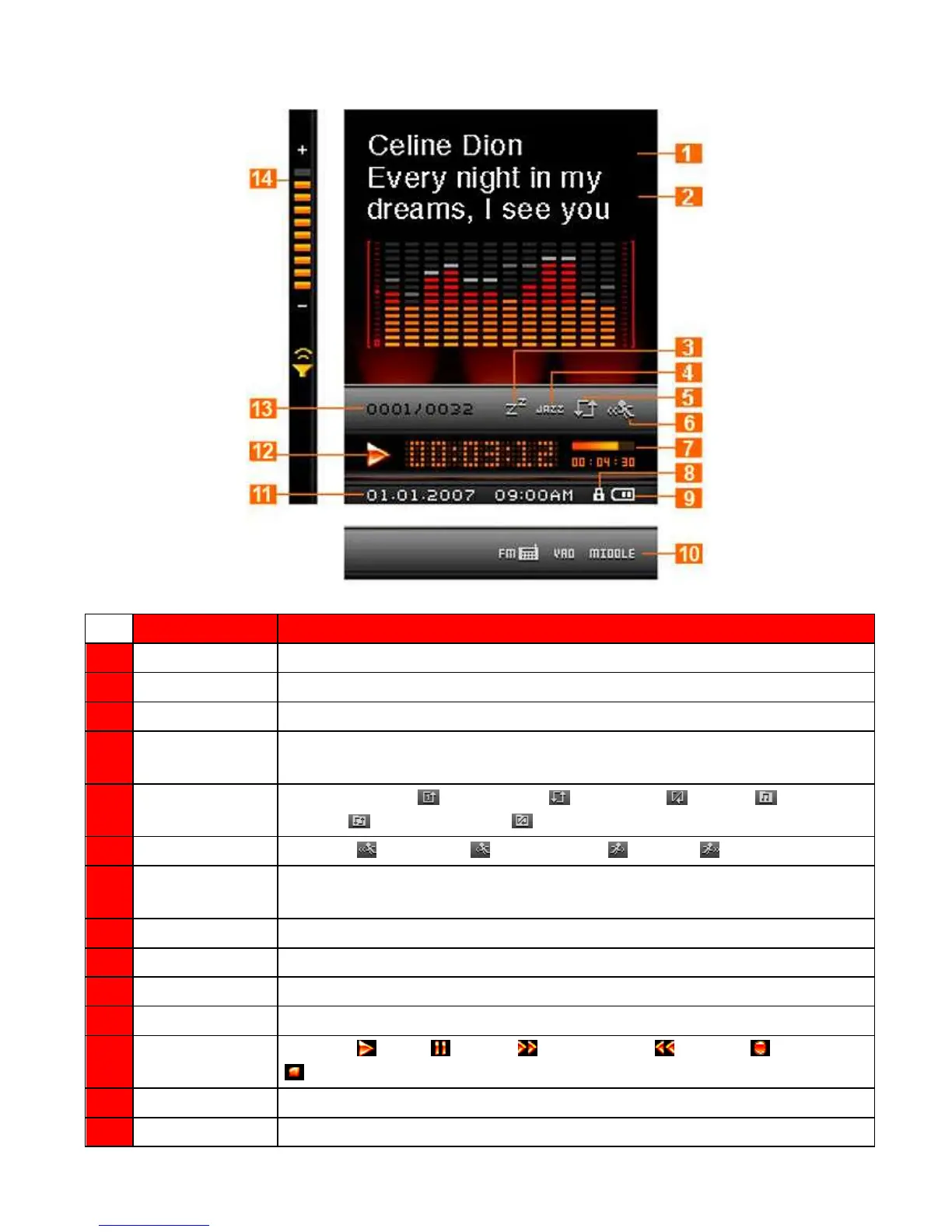
Music Playback Screen︱
Figure 1: Music Mode Interface
Indicates the song/album title and artist name
Displays synchronized lyrics (if available)
Indicates the Sleep Timer is enabled
Indicates the Equalizer (EQ) mode: Normal (Blank), POP, Rock, Classical, Jazz,
Bass or USER EQ
Indicates Normal, (Repeat One), (Repeat All), (Shuffle) (Normal in
Folder), (Repeat in Folder), (Shuffle in Folder), or A-B
Indicates (Very Slow), (Slow), Normal, (Fast), or (Very Fast)
Track Time &
Progress bar
Indicates the track length and current position
Indicates the Hold switch is enabled (controls are locked)
Indicates the battery power level
Indicates current record quality and VAD (Voice Activity Detection) status
Displays current time and date (RTC)
Indicates (Play), (Pause), (Fast Forward), (Rewind), (Record), or
(Stop) status
Indicates the current track number and total tracks available
Indicates the current volume level



 To Next Page